

logo
RunComfy
  • ComfyUI
  • TrainerNew
  • Models
  • API
  • Pricing
discord logo
ComfyUI>Workflows>ComfyUI PhotoMakerV2 | Create Realistic Photos

ComfyUI PhotoMakerV2 | Create Realistic Photos

Workflow Name: RunComfy/PhotoMakerV2
Workflow ID: 0000...1109
ComfyUI PhotoMakerV2 is a powerful text-to-image generation tool that enables users to create realistic personalized photos efficiently. By inputting identity images and a text prompt, PhotoMakerV2 preserves the likeness of the individuals while allowing flexible control over context, style, and attributes. This latest version offers improved identity fidelity compared to its predecessor. Discover the creative possibilities of generating photorealistic images in different settings, stylizing appearances, and even merging identities.

What is PhotoMakerV2#

PhotoMakerV2, an upgrade from PhotoMaker, offers an efficient method for personalized text-to-image generation. It synthesizes realistic photos of individuals using a few input identity images and a text prompt.

Some key features of PhotoMakerV2 include:#

  • High efficiency: Quickly generates personalized photos.
  • Excellent identity preservation: Maintains the likeness of input identities.
  • Flexible text control: Allows specifying context, style, attributes, etc., in the prompt.
  • Improved identity fidelity: Enhanced compared to PhotoMaker V1.

PhotoMakerV2 generates photorealistic images of a person in various contexts, stylizes appearances, changes attributes like age and gender, merges identities, and modernizes people from old photos or artwork. It unlocks numerous creative possibilities.

How PhotoMakerV2 Works#

PhotoMakerV2 encodes one or more input identity images into a "stacked ID embedding," serving as a unified representation encapsulating identity information.

This embedding, combined with a text prompt, feeds into a text-to-image diffusion model. The model then produces an image depicting the embedded identity in the context described by the prompt.

Some key aspects of how it works under the hood:

  • Uses an identity encoder to extract identity information from input face images
  • Improves identity preservation by leveraging an external face recognition model (InsightFace)
  • Encodes multiple identity images into a stacked embedding to capture identity comprehensively
  • Feeds the stacked ID embedding into the diffusion model's cross-attention layers
  • Guides generation with the text prompt while adaptively merging the identity information
  • Trained with an identity-oriented dataset to improve identification capabilities

How to Use ComfyUI PhotoMakerV2#

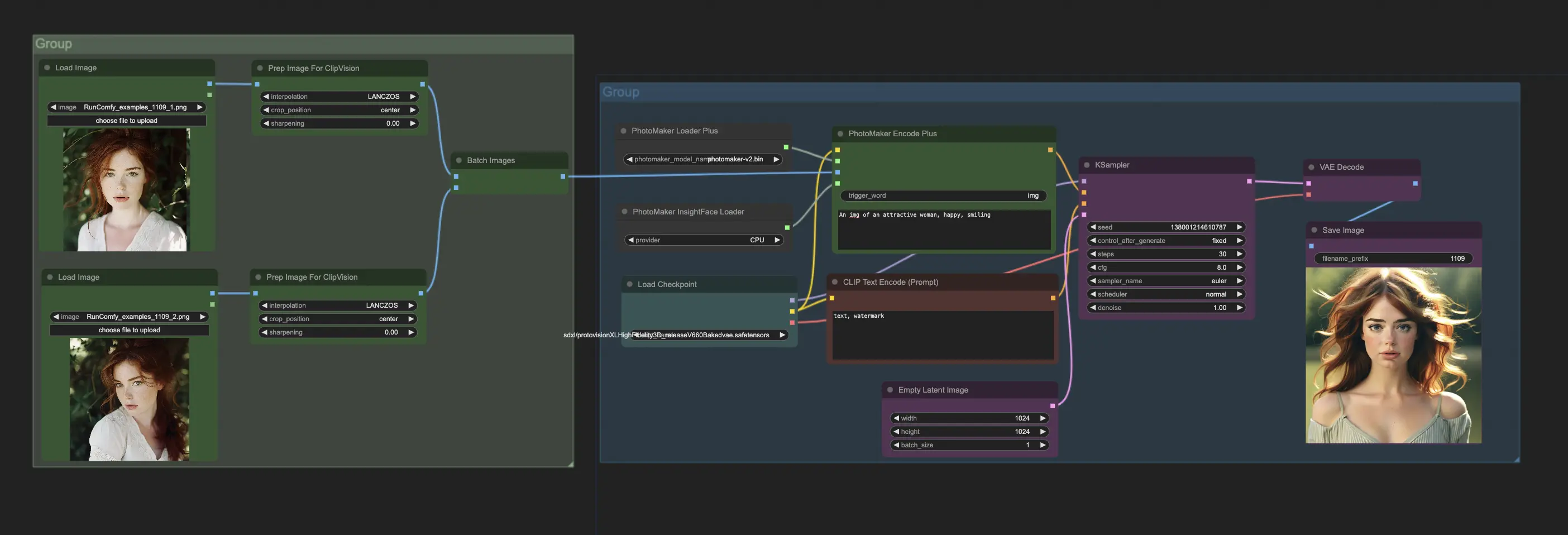
To use PhotoMakerV2 in ComfyUI, primarily interact with the PhotoMakerEncodePlus node. A typical workflow involves:

  1. Load PhotoMakerV2 model using "PhotoMaker Loader Plus" node.
  2. Load one or more identity images using "Prepare Images For CLIP Vision" node.
  3. Load InsightFace model required by PhotoMakerV2 using "PhotoMaker InsightFace Loader" node.
  4. Connect outputs of these nodes to corresponding inputs of "PhotoMaker Encode Plus" node.
  5. In the "PhotoMaker Encode Plus" node, specify the prompt describing the desired image. Use the special trigger word in the prompt where the identity should appear.
  6. Connect output conditioning from "PhotoMaker Encode Plus" to a "KSampler" node to generate the image.

For more information, please visit PhotoMaker Hugging Face and ComfyUI-PhotoMaker-Plus. All credit goes to their contributions.

Want More ComfyUI Workflows?

Create Coherent Scenes | Consistent Story Art Generator

Build seamless storytelling scenes with rich visual consistency.

LivePortrait | Animate Portraits | Vid2Vid

Updated 6/16/2025: ComfyUI version updated to v0.3.39 for improved stability and compatibility. Transfer facial expressions and movements from a driving video onto a source video

SUPIR + Foolhardy Remacri | 8K Image/Video Upscaler

SUPIR + Foolhardy Remacri | 8K Image/Video Upscaler

Upscale images to 8K with SUPIR and 4x Foolhardy Remacri model.

Flex.1 LoRA Inference | AI Toolkit ComfyUI

Run your AI Toolkit-trained Flex.1 LoRA in ComfyUI with training-matched defaults using a single RC custom node.

Hallo2 | Lip-Sync Portrait Animation

Audio-driven lip-sync for portrait animation in 4K.

Qwen Image Edit Plus 2511 LoRA Inference | AI Toolkit ComfyUI

Keep AI Toolkit-trained Qwen Image Edit Plus 2511 LoRA edits in ComfyUI preview-aligned using a single RCQwenImageEditPlus2511 custom node.

Product Relighting | Magnific.AI Relight Alternative

Elevate your product photography effortlessly, a top alternative to Magnific.AI Relight.

FLUX LoRA (RealismLoRA) | Photorealistic Images

FLUX LoRA (RealismLoRA) | Photorealistic Images

Blend FLUX-1 model with FLUX-RealismLoRA for photorealistic AI images

Follow us
  • LinkedIn
  • Facebook
  • Instagram
  • Twitter
Support
  • Discord
  • Email
  • System Status
  • Affiliate
Resources
  • Free ComfyUI Online
  • ComfyUI Guides
  • RunComfy API
  • RunComfy MCP
  • ComfyUI Tutorials
  • ComfyUI Nodes
  • Learn More
Legal
  • Terms of Service
  • Privacy Policy
  • Cookie Policy
RunComfy
Copyright 2026 RunComfy. All Rights Reserved.

RunComfy is the premier ComfyUI platform, offering ComfyUI online environment and services, along with ComfyUI workflows featuring stunning visuals. RunComfy also provides AI Models, enabling artists to harness the latest AI tools to create incredible art.