

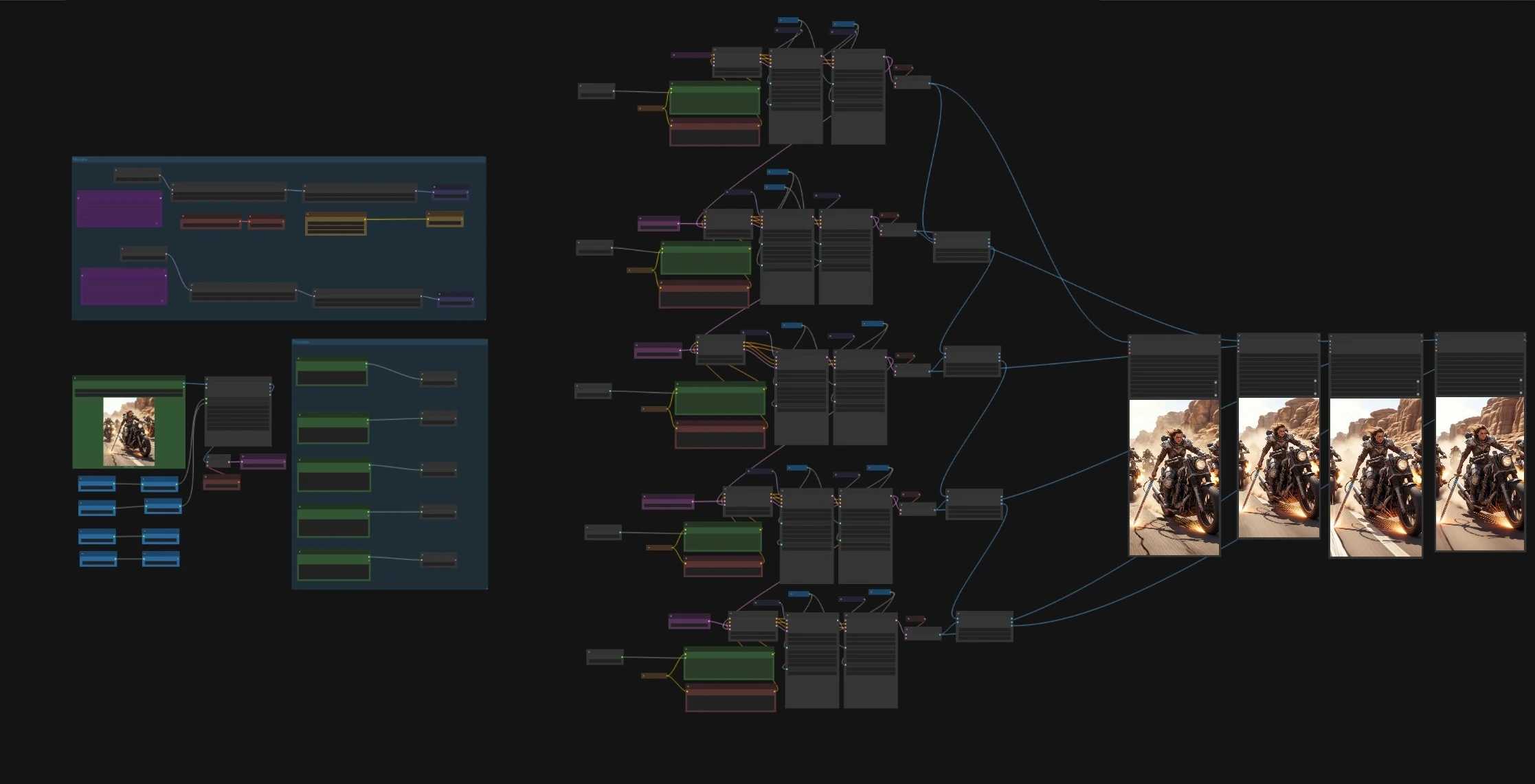
Stable Video Infinity 2.0 ComfyUI workflow for long, coherent image to video on Wan 2.2#
This workflow turns a single image into a long, story driven video while preserving identity, motion flow, and scene consistency. It pairs the Wan 2.2 I2V A14B model with the Stable Video Infinity 2.0 LoRA to extend temporal continuity far beyond short clip limits. The pipeline is organized as five passes that hand off motion latents from one section to the next, with overlap blending to smooth transitions and a final render that stitches everything together.
Creators who need extended animations, narrative beats, or cinematic AI video will find that Stable Video Infinity keeps characters and style stable as the scene evolves. You get intermediate pass videos for quick review and a final master render, all produced directly from the ComfyUI graph.
Key models in Comfyui Stable Video Infinity workflow#
- Wan 2.2 I2V A14B UNet pair (HighNoise and LowNoise), quantized GGUF variants. These generate motion from image latents and are alternated to balance exploration and detail refinement. Source: Comfy-Org/Wan_2.2_ComfyUI_Repackaged.
- Stable Video Infinity 2.0 LoRA for Wan 2.2 I2V A14B, provided in HIGH and LOW variants to match the two UNets. It extends temporal coherence for long sequences. Source: Kijai/WanVideo_comfy – Stable-Video-Infinity v2.0.
- Wan text encoder UMT5 XXL. Encodes per pass prompts into conditioning for the video generator. Source: Comfy-Org/Wan_2.1_ComfyUI_repackaged.
- Wan 2.1 VAE. Encodes the starting image to latent space and decodes frames back to images for each pass. Source: Comfy-Org/Wan_2.2_ComfyUI_Repackaged – VAE.
- Optional Wan 2.2 LightX2V LoRA set (HighNoise and LowNoise). These auxiliary LoRAs complement Stable Video Infinity during sampling. Source: Comfy-Org/Wan_2.2_ComfyUI_Repackaged – loras.
How to use Comfyui Stable Video Infinity workflow#
The workflow takes a single reference image, prepares it at your chosen resolution, then runs five sequential passes. Each pass uses Stable Video Infinity to generate a segment, blends a few frames of overlap with the previous segment, and forwards its motion latent to the next pass. You can preview each pass as an MP4 and also produce a final stitched render.
Group: Models#
This group loads the Wan 2.2 I2V A14B UNet pair, the Wan VAE, and the UMT5 XXL text encoder. It then applies the LightX2V LoRA set and the Stable Video Infinity 2.0 LoRA to both HighNoise and LowNoise branches so that all passes share the same capabilities. If you adjust LoRA strength, keep both HighNoise and LowNoise branches balanced to avoid drifting style or motion behavior.
Group: Prompts#
Prompts are authored per pass to create narrative beats. Positive prompts live in the five CLIPTextEncode nodes such as CLIPTextEncode (#93, #152, #284, #297, #310). Negative prompts are prefilled with common quality filters and can be edited in CLIPTextEncode (#89, #157, #279, #293, #306). Keep consistent subject descriptors across passes and vary only the action verbs or camera cues to maintain identity while evolving the scene.
Input image and resolution#
Load a single reference image with LoadImage (#97), then scale it with Resolution (LayerUtility: ImageScaleByAspectRatio V2 (#398)) to match your target aspect. The image is encoded to latents by VAEEncode (#135), which also establishes the anchor latent used to keep identity stable throughout the run. If you change the input or aspect ratio, re-encode before running the passes.
Pass 1 - Establish the scene#
WanImageToVideoSVIPro (#134) uses your first-pass prompt and the anchor latent to generate motion. Two samplers, KSamplerAdvanced (#277 for HighNoise, #278 for LowNoise), collaborate to explore motion then refine detail. The result is decoded by VAEDecode (#87) and previewed via VHS_VideoCombine (#126) as an MP4. Use this pass to set the subject, lighting, and overall style that Stable Video Infinity will carry forward.
Pass 2 - Continue the action#
WanImageToVideoSVIPro (#160) receives prev_samples from Pass 1 so it can extend motion without a visual jump. The same two stage sampling pattern runs through KSamplerAdvanced (#276 HighNoise, #275 LowNoise), and frames are decoded by VAEDecode (#162). ImageBatchExtendWithOverlap (#168) blends a short overlap with the tail of Pass 1 to hide seams, and VHS_VideoCombine (#167) writes the segment preview.
Pass 3 - Mid sequence expansion#
WanImageToVideoSVIPro (#290) continues from Pass 2 latents and follows the same dual sampler refinement with KSamplerAdvanced (#291, #287). After decoding in VAEDecode (#282), ImageBatchExtendWithOverlap (#292) appends the new frames to the timeline. Update the prompt to evolve the micro action while keeping subject terms identical.
Pass 4 - Build toward the beat#
WanImageToVideoSVIPro (#305) takes the baton from Pass 3 and again uses HighNoise then LowNoise samplers KSamplerAdvanced (#303, #300). VAEDecode (#295) and ImageBatchExtendWithOverlap (#304) yield a continuous sequence you can preview via VHS_VideoCombine (#296). Use this pass to add camera movement or secondary actions, keeping descriptors steady to preserve identity.
Pass 5 - Resolve and render#
WanImageToVideoSVIPro (#318) finishes the story and hands frames to KSamplerAdvanced (#316, #313) for refinement. After decoding with VAEDecode (#308), the frames are added with ImageBatchExtendWithOverlap (#317). VHS_VideoCombine (#319) produces the final stitched MP4; adjust its frame_rate and filename_prefix to suit delivery.
Key nodes in Comfyui Stable Video Infinity workflow#
WanImageToVideoSVIPro (#134)#
This node converts the anchor latent and your prompt into motion latents and can accept prev_samples to continue from an earlier pass. Use length to define how many frames a pass generates and motion_latent_count to control how much new motion energy is introduced. Chaining passes by feeding prev_samples is what lets Stable Video Infinity build long sequences without popping.
KSamplerAdvanced (#276)#
Each pass pairs a HighNoise sampler with a LowNoise sampler to first explore and then consolidate detail. The workflow exposes steps and a secondary split control so you can decide how the pass budget is divided between the two. Keep the split consistent across passes to avoid flicker at handoffs.
ImageBatchExtendWithOverlap (#168)#
This utility blends a small number of tail frames from the previous pass with the head of the new one. Adjust overlap and keep the mode on a smooth blend to hide seams while preserving motion direction. It is the key to making Stable Video Infinity segments feel like one continuous take.
VHS_VideoCombine (#319)#
Assembles decoded frames into MP4 for both previews and the final render. Tune frame_rate, format, and crf for your delivery target and file size. Use distinct filename_prefix values to keep previews separate from the final output.
LoraLoaderModelOnly (#141, #142)#
Applies the Stable Video Infinity 2.0 LoRA variants to the Wan 2.2 UNet pair. The strength_model control allows you to fine tune how strongly the LoRA steers motion and coherence. Keep HIGH and LOW branches aligned so both samplers interpret prompts similarly.
Optional extras#
- Keep subject descriptors constant across all five prompts and vary only verbs or camera cues to preserve identity.
- If motion feels too timid, raise
motion_latent_countslightly on the next pass rather than rewriting prompts drastically. - If detail wobbles between passes, reduce the HighNoise share of
stepsor lower LoRA strength uniformly on both branches. - Use a short overlap for fast action and a longer overlap for slow, subtle scenes to balance seam hiding and runtime.
- For a quick cutdown, render only Pass 1 and Pass 3 previews to validate identity and motion before committing to the full run.
Acknowledgements#
This workflow implements and builds upon the following works and resources. We gratefully acknowledge Kijai for Stable-Video-Infinity v2.0 (SVI 2.0) for their contributions and maintenance. For authoritative details, please refer to the original documentation and repositories linked below.
Resources#
- Kijai/Stable-Video-Infinity v2.0 (SVI 2.0)
- Hugging Face: SVI 2.0 Source
Note: Use of the referenced models, datasets, and code is subject to the respective licenses and terms provided by their authors and maintainers.