

YuE2 Music Cover for ComfyUI: Reimagine songs from any reference#
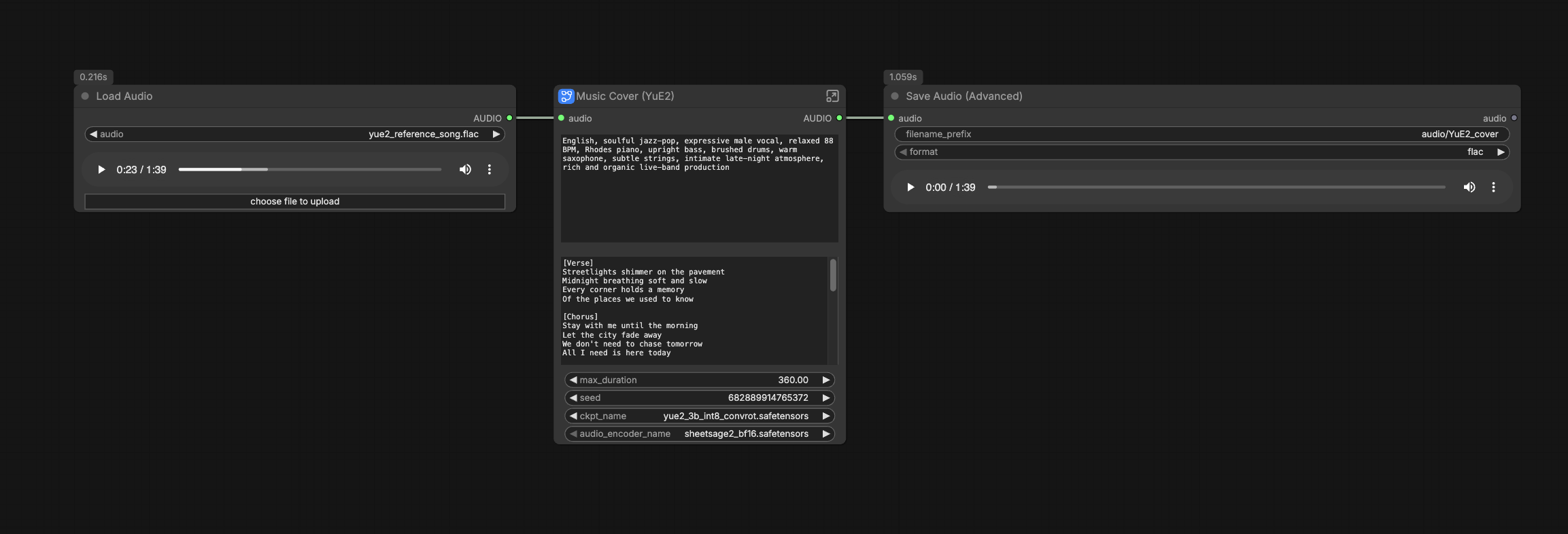
YuE2 Music Cover turns a reference recording into a fresh vocal performance and arrangement inside ComfyUI. The workflow transcribes the source melody to an editable ABC score with SheetSage2, then guides YuE2 with your chosen musical style and lyrics to render a full song. It is ideal for producers, arrangers, and creators who want faithful melody retention with a new vibe, voice, and instrumentation.
The result is a clean FLAC file saved from the canvas. For best melody matching, keep lyric phrasing close to the reference and choose a clear, single‑lead recording when possible. YuE2 Music Cover supports anything from intimate acoustic folk to jazz or synth‑pop styles.
Key models in Comfyui YuE2 Music Cover workflow#
- YuE2‑3B. The main open model that plans a symbolic score and synthesizes the final audio from text, lyrics, and ABC guidance. It supports melody‑only planning for covers and decodes to high‑fidelity stereo with a YuE2 VAE. See the official model card for details and cover examples: m-a-p/YuE2-3B and the paper YuE2: Unifying Symbolic and Audio Music Generation at Frontier Quality.
- SheetSage2. The audio‑to‑lead‑sheet model that turns your reference track into ABC notation suitable for guiding covers. It focuses on coherent melody, chords, beats, and structure, and is well suited to melody‑only ABC for cover work: m-a-p/SheetSage2 and the technical report SheetSage2: Coherent Lead‑Sheet Transcription with Synthetic Supervision.
- YuE2 VAE. The decoder that turns YuE2’s acoustic latents into 48 kHz stereo audio. It is the default listener‑grade decoder used with YuE2‑3B: m-a-p/YuE2-Vae.
How to use Comfyui YuE2 Music Cover workflow#
This YuE2 Music Cover graph flows from reference audio to ABC transcription, then through YuE2 planning and synthesis into a final decoded track. Groups are named on the canvas; each one contributes a distinct step toward the song.
- Reference audio (
LoadAudio(#45))- Load a clean reference file such as a single‑lead mix or instrumental with clear melody. The node feeds the audio into the cover subgraph automatically.
- Short, well‑produced clips transcribe more reliably than noisy or dense mixes. If you hear heavy reverb or strong counter‑melodies, try a different section.
- You can swap the reference file at any time and re‑queue to explore different sources with the same YuE2 Music Cover settings.
- Model (group “Model”)
- The workflow loads a YuE2 checkpoint via
CheckpointLoaderSimple(#15). The included configuration points to a 3B YuE2 checkpoint; you can switch to another official pack from Comfy-Org/YuE2 if desired. - The loader provides the
MODEL,CLIP, andVAEobjects required downstream, so no extra wiring is needed. - If you change checkpoints, keep the rest of the graph intact and re‑queue to compare how each model renders the same cover.
- The workflow loads a YuE2 checkpoint via
- ABC (group “ABC”)
AudioEncoderLoader(#43) initializes the SheetSage2 encoder, andSheetSage2AudioToABC(#41) transcribes the reference into ABC. The subgraph previews the ABC so you can inspect or copy it.- For covers, melody‑only ABC is recommended. This preserves the tune while leaving harmony and arrangement to your style prompt.
- If the transcription misses notes on dense sections, try a cleaner chorus or verse, then regenerate the YuE2 Music Cover.
- Conditioning (group “Conditioning”)
YuE2GenerateMusic(#25) is the heart of the workflow. Provide your target Style description and Lyrics; the node combines them with the ABC to plan the vocal and arrangement.- Keep lyric syllable counts close to the original phrasing for the most faithful melody alignment. You can still modernize language, imagery, or rhyme scheme.
- A shared
SeedNode(#34) drives both the planning and sampling branches, making the YuE2 Music Cover reproducible across runs.
- Duration (group “Duration”)
- The generator outputs a target length in seconds, which feeds
EmptyYuE2LatentAudio(#5) to allocate the latent timeline for sampling. - Set a reasonable maximum duration for faster iteration. Matching the reference section length helps alignment and avoids over‑ or under‑runs.
- The generator outputs a target length in seconds, which feeds
- Sampling & Decode (group “Sampling & Decode”)
KSampler(#8) renders acoustic latents using the model plus positive conditioning from YuE2’s plan.ConditioningZeroOut(#18) keeps the negative branch empty.VAEDecodeAudio(#9) turns the latents into stereo audio for playback.- If you want a slightly different performance while keeping melody intact, change the seed and queue again.
- Export
- The final audio flows into
SaveAudioAdvanced(#10), preconfigured to save a FLAC file with the YuE2 Music Cover name. You can edit the filename or format as needed. - Each run writes a fresh file, making it easy to A/B compare different styles, lyrics, or seeds.
- The final audio flows into
Key nodes in Comfyui YuE2 Music Cover workflow#
YuE2GenerateMusic(#25)- Central planner and conditioner for YuE2 Music Cover. Supply
style,lyrics, and theabcstring from SheetSage2. Adjustseedfor reproducible takes andmax_durationto set the budget. If you need stronger style adherence or more creative phrasing, experiment withcfg_scaleandtemperaturemodestly; higher values may trade faithfulness for variety.
- Central planner and conditioner for YuE2 Music Cover. Supply
SheetSage2AudioToABC(#41)- Transcribes the reference song to ABC that guides melody. Use melody‑only mode for tight cover alignment. If your lyrics have many extra syllables compared to the reference, simplify or split lines to keep note‑to‑syllable mapping stable before regenerating.
EmptyYuE2LatentAudio(#5)- Allocates the latent audio canvas from the planned seconds. Start shorter for quick previews, then extend once the YuE2 Music Cover styling and lyric pacing feel right. Keep the length near the reference section to avoid truncated or padded endings.
KSampler(#8)- Renders the acoustic latents that become your final track. Tie its
seedto the sameSeedNodeto maintain comparability across takes. For subtle alternates, keep the same plan but vary the sampler’s seed to explore micro‑timing and articulation changes.
- Renders the acoustic latents that become your final track. Tie its
SaveAudioAdvanced(#10)- Handles export. Set a clear filename prefix per project and choose your preferred format. FLAC is a good default for lossless mastering of YuE2 Music Cover outputs.
Optional extras#
- Style prompt tips for YuE2 Music Cover: combine language, genre, vocalist type, tempo feel, key instruments, mood, and production notes. Example pattern: “English, soulful jazz‑pop, expressive male vocal, relaxed feel, Rhodes piano, upright bass, brushed drums, warm saxophone, intimate atmosphere.”
- Lyric pacing: mirror the reference’s sectioning and approximate syllable counts. Keeping chorus anchors intact often yields the most recognizable cover.
- Reference choice: pick sections with clear lead melody and minimal backing vocals. If a verse is cluttered, try the chorus first for a more reliable YuE2 Music Cover pass.
- Rights and attribution: only use material you have permission to transform. Generated audio is new, but underlying compositions may be protected.
Acknowledgements#
This workflow implements and builds upon the following works and resources. We gratefully acknowledge Comfy-Org for the Official YuE2 Music Cover Guide, Comfy-Org for the YuE2 and SheetSage2 model files for ComfyUI, and Multimodal Art Projection (m-a-p) for the original YuE2-3B and SheetSage2 research and releases. For authoritative details, please refer to the original documentation and repositories linked below.
Resources#
- Comfy-Org/Official YuE2 Music Cover Guide
- GitHub: Comfy-Org/docs
- Docs / Release Notes: Official YuE2 music cover guide
- Comfy-Org/YuE2 and SheetSage2 model files for ComfyUI
Note: Use of the referenced models, datasets, and code is subject to the respective licenses and terms provided by their authors and maintainers.