

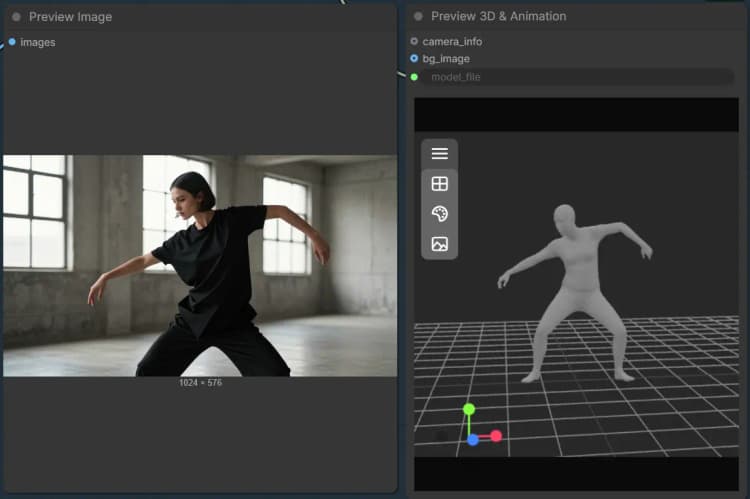
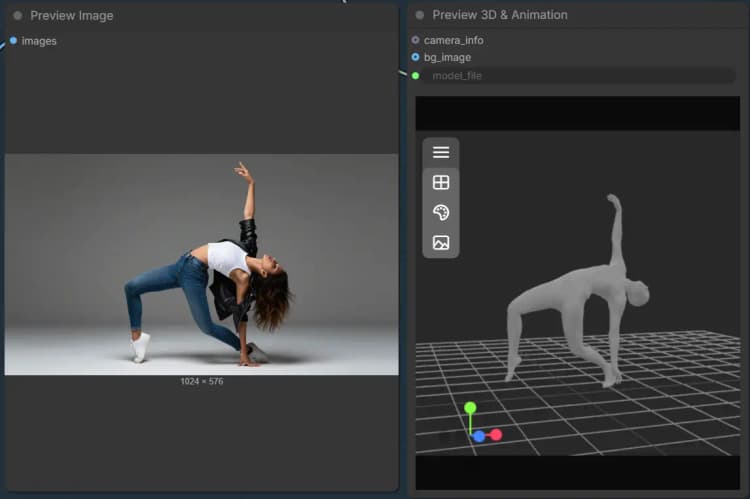
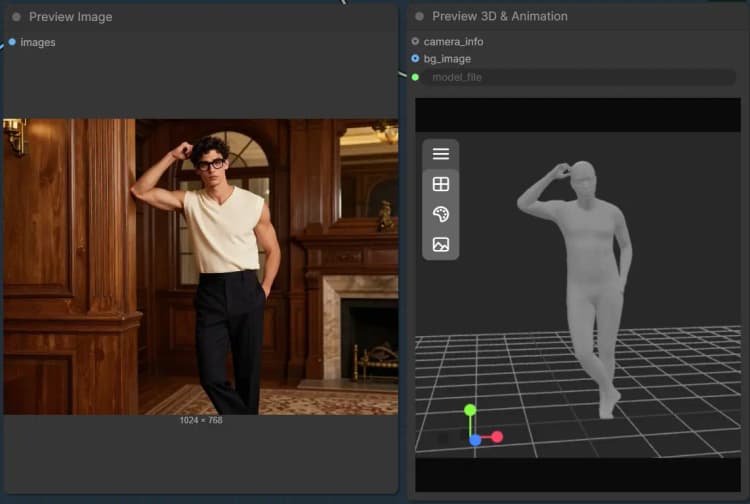
SAM 3D ComfyUI Object and Body Motion Control#
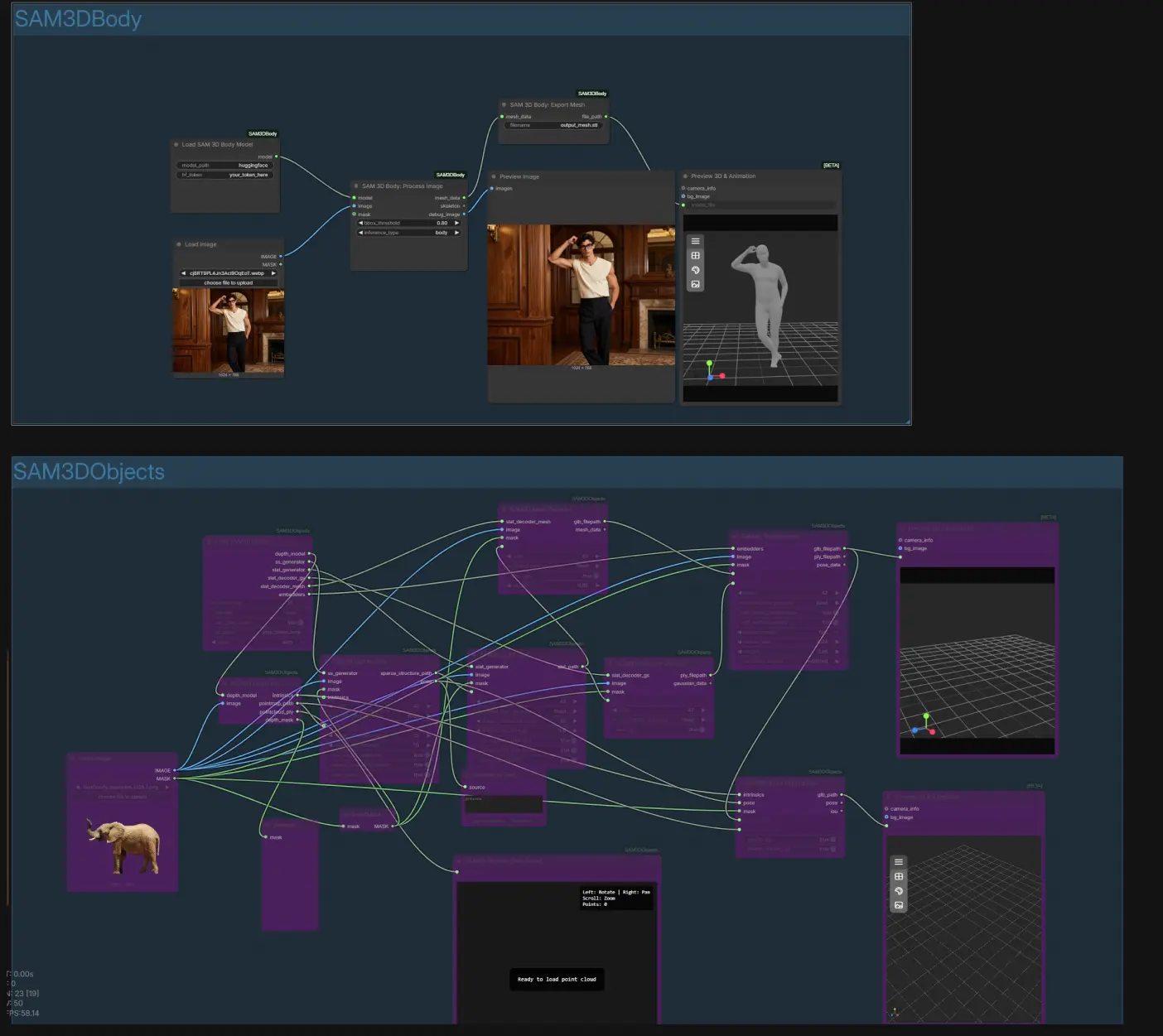
This workflow delivers 3D-aware, structure-guided generation from a single image using Segment Anything–based masking and depth reasoning. It includes two ready-to-run modes: Object Mode to extract and reconstruct any masked subject as a textured 3D mesh or 3D Gaussian, and Body Mode to build a body-part–aware human mesh. The SAM 3D ComfyUI design emphasizes spatial consistency, making it ideal for object motion control, body motion guidance, and creating controllable assets for downstream video or 3D pipelines.
Built on top of the open source SAM3D projects, this SAM 3D ComfyUI workflow turns a simple image plus mask into exportable GLB, STL, and PLY assets with pose alignment and texture baking. It is well suited for creators who want fast, controllable results without fine-tuning.
Note: This 3D "Object" workflow is recommended to run on Medium, Large or XLarge machines. Bigger machine types may lead to runtime errors or unstable results. "Body" workflow works fine for all machine types. Due to the complexity of 3D reconstruction and optimization, the "3D Object" workflow can take ~40 minutes or more to complete.
Key models in Comfyui SAM 3D ComfyUI workflow#
- Segment Anything Model (SAM). Used for high-quality, promptable segmentation that anchors spatial constraints. See the original paper for details: Segment Anything.
- SAM3D Objects pretrained components. Provide depth, sparse structure, SLAT generation, mesh and Gaussian decoders, and texture embedders for object reconstruction. Source: PozzettiAndrea/ComfyUI-SAM3DObjects.
- SAM3D Body pretrained components. Provide body-part–aware processing to generate human meshes and a debug view. Source: PozzettiAndrea/ComfyUI-SAM3DBody.
- Monocular depth estimator bundled in the SAM3D repositories. Supplies camera intrinsics, a point map, and a depth-informed mask that improve reconstruction and pose alignment. See the two SAM3D repositories above.
- 3D Gaussian Splatting formulation. Enables fast, photorealistic point-based scene representations that are useful for quick previews and certain renderers: 3D Gaussian Splatting for Real-Time Rendering.
How to use Comfyui SAM 3D ComfyUI workflow#
At a high level, you load a single image and its mask, then choose either the Object group or the Body group. Object Mode reconstructs a textured mesh and a 3D Gaussian representation with optional pose refinement. Body Mode constructs a body-part–aware mesh and exports it for quick inspection or downstream use.
SAM3DObjects group#
This group turns your masked subject into a 3D asset. Provide an image with a mask that isolates the object you want to control; the workflow automatically handles inversion to treat the subject as foreground. Depth and camera intrinsics are estimated to produce a point map, then a sparse structure and initial pose are created. From there a SLAT representation is generated and decoded into both a mesh and a 3D Gaussian; a texture bake transfers appearance from the source image to the mesh. Finally, pose optimization refines alignment before you preview and export; see SAM3D_DepthEstimate (#59), SAM3DSparseGen (#52), SAM3DSLATGen (#35), SAM3DMeshDecode (#45), SAM3DGaussianDecode (#37), SAM3DTextureBake (#47), and SAM3D_PoseOptimization (#57).
SAM3DBody group#
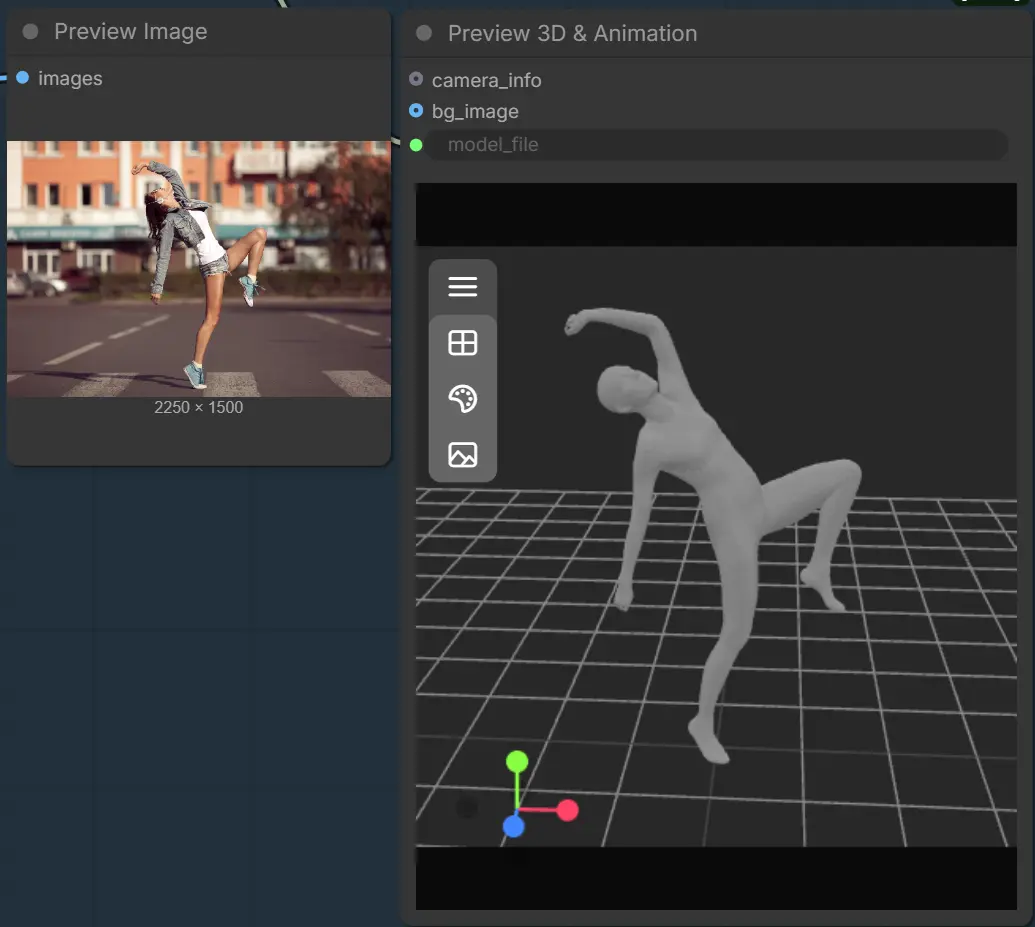
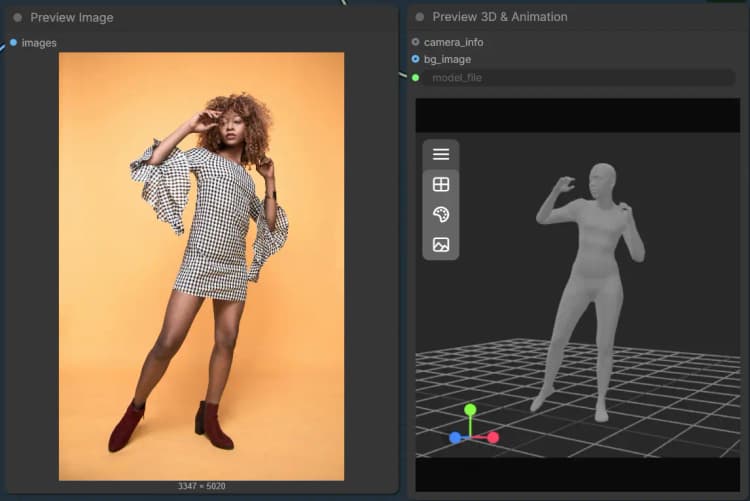
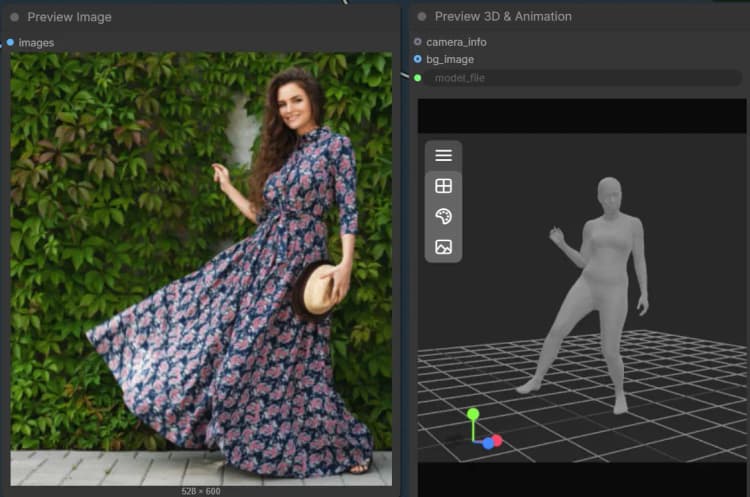
This group focuses on human subjects. Supply an image and a mask that covers the person. The body processor produces a body-part–aware mesh and a debug image so you can verify segmentation quality. You can export the result as a mesh for inspection or rigging, then preview it interactively. The essential steps run through LoadSAM3DBodyModel (#62), SAM3DBodyProcess (#61), SAM3DBodyExportMesh (#64), and Preview3D (#65).
Key nodes in Comfyui SAM 3D ComfyUI workflow#
LoadSAM3DModel (#44) Loads all object-mode weights in one place, including depth, sparse structure generator, SLAT generator and decoders, plus texture embedders. If the weights are hosted on Hugging Face, enter your token and keep the provider set accordingly. Use automatic precision unless you have a reason to force a specific dtype. Once loaded, the same handles feed the entire object pipeline.
SAM3D_DepthEstimate (#59) Estimates monocular depth, camera intrinsics, a point map, and a depth-informed mask from your input image. Good framing matters: keep the subject reasonably centered and avoid extreme crops for more stable intrinsics. Use the built-in point cloud preview to sanity-check geometry before committing to long bakes. The intrinsics and point map produced here are reused later for pose optimization.
SAM3DSparseGen (#52) Builds a sparse structure and an initial pose by combining the image, the foreground mask, and depth outputs. If your mask is too loose, expect floaters and weaker structure; tighten edges for crisper results. The node also emits a pose object that you can preview to ensure orientation looks right. This sparse structure directly conditions the SLAT generator.
SAM3DSLATGen (#35) Converts the sparse structure into a SLAT representation that is compact yet geometry-aware. A cleaner SLAT typically follows from a precise mask and good depth. If you plan to rely on mesh output over Gaussian, favor settings that preserve detail rather than extreme sparsity. The emitted SLAT path feeds both decoders.
SAM3DMeshDecode (#45) Decodes SLAT into a watertight 3D mesh suitable for texturing and export. Choose mesh when you need topology that works in DCC tools and game engines. If you see over-smoothing or holes, revisit the mask and sparse structure density upstream. This path produces a GLB that will be baked and optionally pose-aligned later.
SAM3DGaussianDecode (#37) Generates a 3D Gaussian representation from the same SLAT for fast previews and certain renderers. It is useful when you want to validate geometry and viewpoint coverage quickly. If your Gaussian looks noisy, improve the mask or increase structure quality rather than over-tuning this node. The resulting PLY also assists texture baking.
SAM3DTextureBake (#47) Projects appearance from the source image onto the decoded mesh. Use a higher texture resolution when you need close-ups, and a faster preset for quick iteration. The renderer choice can impact sharpness and speed; pick the faster option for previews and the higher quality option for finals. This node outputs the textured GLB for preview and pose refinement.
SAM3D_PoseOptimization (#57) Refines the GLB’s alignment using camera intrinsics, the point map, the original mask, and the initial pose. Increase the optimization budget if you observe misalignment around thin structures like limbs or handles. Keep the foreground mask clean to prevent the optimizer from drifting toward background geometry. The optimized GLB is then ready for inspection in the 3D preview.
SAM3DBodyProcess (#61) Performs body-part–aware processing to produce a human mesh and a debug overlay. Select the mode that fits your use case, such as full body vs a specific region, to guide mesh coverage. If hands or hair clip, refine the mask around those areas for better fidelity. Export to STL for quick checks or convert later as needed.
Optional extras#
- Use a clean, high-contrast mask. Feather only slightly; hard edges usually reconstruct better in SAM 3D ComfyUI object mode.
- For fast iteration, rely on the Gaussian path first, then switch to mesh decode and higher-res texture bakes.
- If weights require authentication, paste a valid Hugging Face token in the loader nodes before queueing the graph.
- Inspect the point cloud and pose previews before long bakes to catch framing or mask issues early.
- Export formats: GLB is ideal for DCC and engines, PLY Gaussians for compatible renderers, STL from body mode for quick print-scale checks.
- Keep subject scale consistent across shots if you plan to use SAM 3D ComfyUI outputs to drive downstream motion or multi-view sequences.
Acknowledgements#
This workflow implements and builds upon the following works and resources. We gratefully acknowledge PozzettiAndrea for SAM 3D Objects and SAM 3D Body for their contributions and maintenance. For authoritative details, please refer to the original documentation and repositories linked below.
Resources#
- PozzettiAndrea/SAM 3D Objects
- PozzettiAndrea/SAM 3D Body
- GitHub: PozzettiAndrea/ComfyUI-SAM3DBody
Note: Use of the referenced models, datasets, and code is subject to the respective licenses and terms provided by their authors and maintainers.