

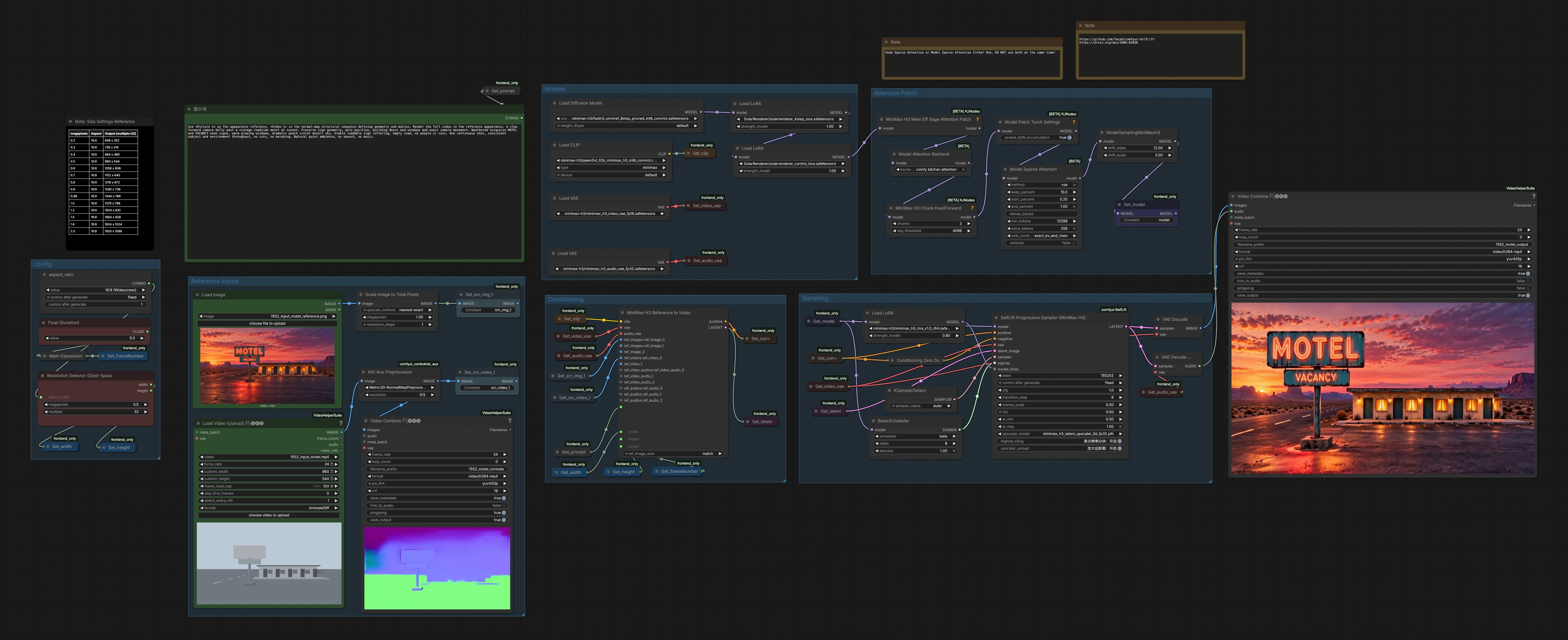
MiniMax H3 Video to Video with SolarRenderer#
MiniMax H3 Video to Video with SolarRenderer is a ComfyUI workflow for re-rendering a source clip using an appearance reference and normal maps extracted from the video. It preserves scene structure and camera motion while changing materials, lighting, and overall look. This makes it a strong choice for architectural previews, wildlife footage refinement, and cinematic scene restyling where consistent geometry and movement matter.
The workflow combines FastH3-Omni for reference-to-video generation with SolarRenderer control LoRAs and SelfLift sampling. Normal maps guide geometry and motion, while the SolarRenderer LoRAs steer physically plausible shading and materials. The result is a coherent, restyled sequence that follows the original shot’s timing and trajectory.
Key models in Comfyui MiniMax H3 Video to Video with SolarRenderer workflow#
- FastH3-Omni for ComfyUI. The core MiniMax H3 diffusion model that performs reference-to-video generation, enabling appearance transfer while respecting motion and layout. See the model card for details on reference conditioning and temporal behavior. FastH3-Omni-Comfy on Hugging Face
- SolarRenderer LoRAs. A pair of LoRAs that inject renderer-style control to achieve stable lighting, materials, and shadows across frames, useful for architectural or product-like realism. Explore the project and weights here: SolarRenderer on GitHub and SolarRenderer on Hugging Face
- MiniMax H3 VAEs. Separate video and audio VAEs handle latent encoding and decoding, keeping visual frames and sound in sync during generation. Find the official MiniMax H3 assets in the collection: Comfy-Org/MiniMax-H3
- ControlNet Auxiliary Normal Map Estimator. The Metric3D-based normal preprocessor extracts per-frame surface normals from the source clip, providing reliable structure and motion guidance. Implementation within ComfyUI is provided by the auxiliary processors: comfyui_controlnet_aux
How to use Comfyui MiniMax H3 Video to Video with SolarRenderer workflow#
This workflow is organized into groups. You provide a reference image and a source video, normals are extracted from the video, conditioning is built, and SelfLift sampling renders the new sequence before decoding to an MP4 with optional audio.
- Reference Inputs
- Use
LoadImage(#278) to provide the appearance reference that defines materials, palette, and surface qualities. Load your source clip withVHS_LoadVideo(#273). - The source clip is passed through
AIO_Preprocessor(#274) set to a Metric3D normal extractor to produce a normal-map sequence.VHS_VideoCombine(#276) can preview these normals so you can confirm geometry is captured cleanly. ImageScaleToTotalPixels(#226) scales the reference image to a target pixel budget while keeping aspect ratio, ensuring a good balance between detail and speed.- If you change inputs, re-preview normals to catch motion or lighting artifacts before rendering.
- Use
- Models
- The workflow loads MiniMax H3 components: UNet, text encoder, and the video and audio VAEs. It then applies the SolarRenderer control LoRA and the SolarRenderer 4-step LoRA to steer rendering style.
- These model choices prioritize stable motion and renderer-like consistency. You usually do not need to touch them beyond selecting or swapping LoRAs to taste.
- Conditioning
MiniMaxH3ReferenceToVideo(#11) is where appearance, structure, and timing meet. It consumes the reference image, the normal-map video, your prompt, and the chosen width, height, and frame length to produce positive conditioning and an initial latent sequence.- Negative conditioning is handled via a zeroed stream so the model focuses on your positive signals from the reference, normals, and prompt.
- If you need specific subject or environment constraints, phrase them in the prompt while keeping it consistent across shots.
- Attention Patch
- The workflow includes both a memory efficient attention patch and a sparse attention backend for longer clips or constrained VRAM. Use only one path at a time to avoid conflicts; keep the other disabled.
- This section is purely about throughput and stability, not image style. Switch approaches if you encounter VRAM errors or slowdowns.
- Sampling
BasicSchedulerandKSamplerSelectprovide the stepping strategy. The main rendering happens inSelfLiftH3Sampler(#233), which lifts a low-resolution latent pass to higher fidelity while respecting the normal-map structure and reference appearance.- The sampler can tile high resolution content, use a specialized 3D latent upscaler, and blend control strengths to balance geometry fidelity with material restyling.
- Finally,
VAEDecodereconstructs frames, optionalVAEDecodeAudiorestores audio, andVHS_VideoCombine(#243) writes the MP4 with your chosen file name and frame rate.
- config
ResolutionSelector(#20) defines output size by aspect and megapixels, then stores width and height for the graph. Pick a size that matches your delivery and compute budget.- Duration is expressed in seconds; the workflow converts it to frames and snaps to a multiple of 17 for sampler stability and temporal smoothness.
- Keep aspect parity with your source clip for the most faithful camera motion and composition.
Key nodes in Comfyui MiniMax H3 Video to Video with SolarRenderer workflow#
MiniMaxH3ReferenceToVideo(#11)- Builds the positive conditioning and initial latent sequence from your prompt, reference image, and the source clip’s normal maps. Use it to set width, height, and frame length. Choose a
ref_image_sizestrategy that aligns with your resolution so appearance features transfer consistently. See the base model family for context: FastH3-Omni-Comfy
- Builds the positive conditioning and initial latent sequence from your prompt, reference image, and the source clip’s normal maps. Use it to set width, height, and frame length. Choose a
SelfLiftH3Sampler(#233)- Performs temporally aware sampling with an integrated high-resolution lift. Key adjustments include
cfgfor prompt adherence,transition_stepfor when the sampler switches from coarse to fine detail,w_minandw_maxto balance structural guidance,lowres_scalefor the initial pass, andhighres_tilingif VRAM is limited. The node also supports a 3D latent upscaler for sharper, more stable detail. Background on the method: comfyui-SelfLift and the paper summary on arXiv: SelfLift
- Performs temporally aware sampling with an integrated high-resolution lift. Key adjustments include
AIO_Preprocessor(#274)- Runs the Metric3D normal map extractor over the source frames to provide robust geometric cues. If edges or surfaces look soft in the preview, increase the preprocessor resolution or improve input video quality. Implementation reference: comfyui_controlnet_aux
LoraLoaderModelOnlySolarRenderer Control (#281) and 4-step (#121)- These two LoRAs guide consistent lighting, shading, and material response. Start with Control and add 4-step for extra renderer-style stability. If textures look overbaked, gently lower the
strength_model. Project and weights: SolarRenderer on GitHub and SolarRenderer on Hugging Face
- These two LoRAs guide consistent lighting, shading, and material response. Start with Control and add 4-step for extra renderer-style stability. If textures look overbaked, gently lower the
ResolutionSelector(#20)- Sets output size by aspect and megapixels, then routes width and height to the graph. Use it to match your target shot framing and compute budget. Keeping multiples consistent improves temporal stability in MiniMax H3.
VHS_VideoCombine(#243)- Muxes frames and optional audio into the final MP4. Set
filename_prefix,frame_rate, and whether to save output. The node belongs to Video Helper Suite, which streamlines preview and export. Reference: ComfyUI-VideoHelperSuite
- Muxes frames and optional audio into the final MP4. Set
Optional extras#
- For the most faithful motion, keep the output aspect close to the source and use the normal-map preview to verify geometry before rendering.
- If you encounter VRAM pressure, enable tiling in
SelfLiftH3Sampler, or switch between memory efficient attention and sparse attention. Do not enable both paths at once. - When the result looks too glossy or artificial, reduce SolarRenderer LoRA strength or add texture hints in the prompt while keeping scene constraints stable.
- Fix the random seed for repeatability when comparing LoRA strengths or prompt variants.
Acknowledgements#
This workflow implements and builds upon the following works and resources. We gratefully acknowledge Innovate Futures for the workflow source, Enderfga for the SolarRenderer project and models, FastVideo for the FastH3-Omni ComfyUI model, and facok for the SelfLift sampling nodes for their contributions and maintenance. For authoritative details, please refer to the original documentation and repositories linked below.
Resources#
- Workflow source by Innovate Futures
- Docs / Release Notes: Patreon post
- SolarRenderer project
- GitHub: Enderfga/SolarRenderer
- Hugging Face: Enderfga/SolarRenderer
- arXiv: arXiv:2610.28630
- SolarRenderer models
- Hugging Face: Enderfga/SolarRenderer
- GitHub: Enderfga/SolarRenderer
- arXiv: arXiv:2610.28630
- FastH3-Omni ComfyUI model
- Hugging Face: FastVideo/FastH3-Omni-Comfy
- SelfLift sampling nodes
- GitHub: facok/comfyui-SelfLift
- arXiv: arXiv:2609.02036
Note: Use of the referenced models, datasets, and code is subject to the respective licenses and terms provided by their authors and maintainers.