LTX 2.3 Sulphur T2V workflow: prompt‑to‑cinema with microexpressions, mood, and guided camera#
The LTX 2.3 Sulphur T2V workflow turns well‑written prompts into cinematic clips that emphasize believable microexpressions, atmospheric scene detail, and story‑driven motion. It combines a distilled LTX 2.3 generation pass with Sulphur style guidance, optional camera-control guidance, and a stable tiled decode path for reliable text-to-video results.
Built for creators who want grounded acting beats and controllable camera movement, this ComfyUI setup balances narrative fidelity with temporal stability. You can run pure text‑to‑video or start from a still image, then decode the stable first-pass latent into a clean editor-friendly sequence with a placeholder audio track for easy editing.
Key models in Comfyui LTX 2.3 Sulphur T2V workflow#
- Lightricks LTX‑2.3 22B FP8 checkpoint. The base text‑to‑video model powering generation and decoding. Model repository
- LTX‑2.3 distilled LoRA. A distilled adapter that keeps quality while enabling faster, lower‑step sampling and stable motion. Model family
- LTX‑2.3 spatial upscaler x2. Included in the graph for experimentation, while the default export path uses the stable first-pass decode for cleaner results on this setup. Upscaler
- LTX‑2 19B LoRA Camera Control Dolly Left. Optional guidance for steady dolly‑in movement and gentle parallax when your scene calls for it. LoRA
- LTX text encoder (Gemma 3 12B variants). The tokenizer and embedding model that interprets your prompt and beat notes. Text encoders
- LTX audio VAE. Packs a silent audio stream so the resulting video loads cleanly in NLEs. Model repository
- Sulphur LoRA (bundled). A style and acting‑beat adapter curated for expressive yet restrained microexpressions and cinematic color harmony.
How to use Comfyui LTX 2.3 Sulphur T2V workflow#
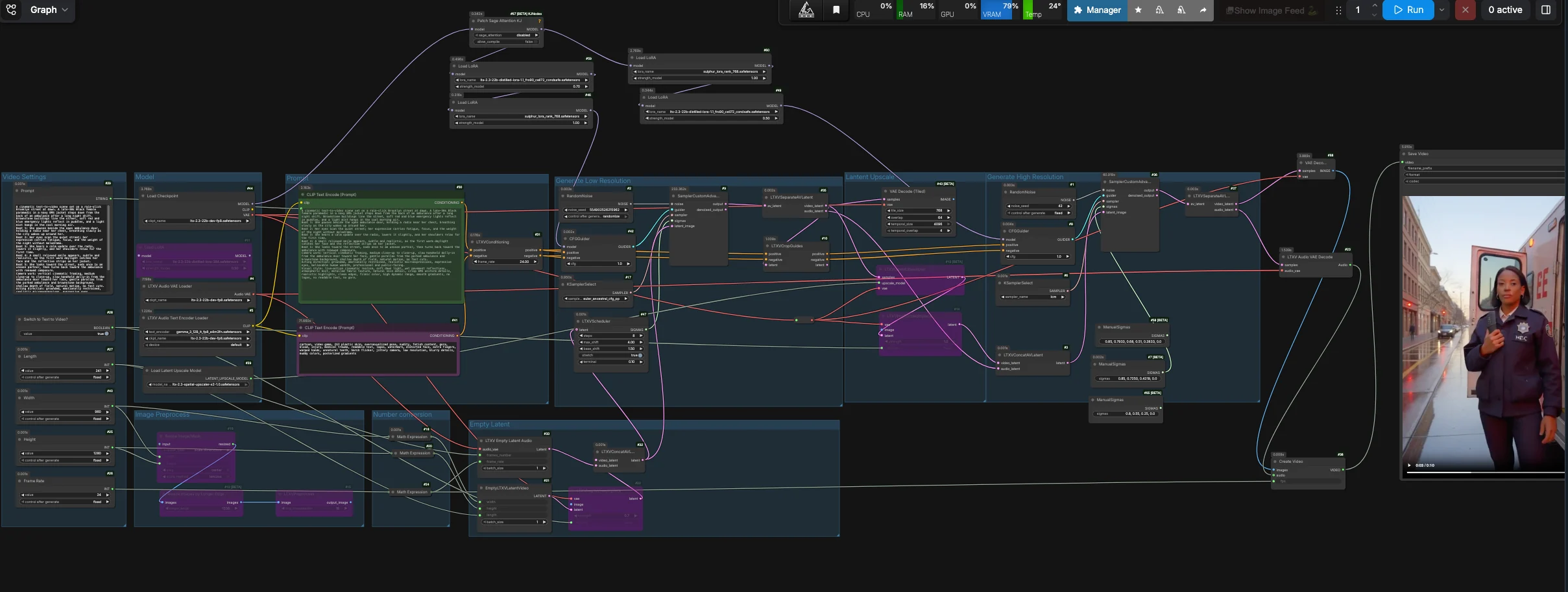
This workflow defaults to a stable first-pass text-to-video path. It generates a coherent video latent, separates the video and audio lanes, decodes the first-pass video latent with tiled VAE decoding, then packages the frames and silent audio into a ready-to-edit video file. The latent upscale and refinement nodes remain in the graph for advanced experimentation, but the default output bypasses that branch for reliability.
Model#
The Model group loads the LTX‑2.3 FP8 checkpoint, the LTX text encoder, the audio VAE, and the adapters used throughout. Distilled and Sulphur LoRAs are applied to the base model so the scene adheres closely to your beats and facial intent. If you want dolly motion, enable the camera-control LoRA in the provided LoraLoader nodes. The default path feeds the primary sampler through CFGGuider (#42), while the refinement branch is kept available for manual experimentation.
Prompt#
Write your scene in the Prompt field (#29) as short beat lines plus brief camera notes. The positive text is encoded by CLIPTextEncode (#30), while a curated negative list in CLIPTextEncode (#41) suppresses CGI sheen, artifacts, jitter, and hard flicker. Keep acting direction concise and specific to eyes, shoulders, and breath to unlock the microexpressions this workflow is tuned for. Camera language like “slow handheld dolly‑in” and “gentle parallax” maps well to the scheduler and optional camera LoRA.
Video Settings#
Choose output Width, Height, Frame Rate, and Length in the Video Settings group (#40, #25, #26, #27). Internally, the workflow derives a half-resolution latent for the generation pass to improve temporal coherence, then decodes that stable latent directly. Use Switch to Text to Video? (#28) to run pure T2V, or turn it off and feed a starting still through the Image Preprocess path for controlled I2V. Dimensions should stay on common multiples for fast, tile-friendly decoding.
Empty Latent#
EmptyLTXVLatentVideo (#21) creates a blank video latent according to your settings, and LTXVEmptyLatentAudio (#33) creates a matching audio latent so the container mux is editor‑friendly. If you want to start from an image, LTXVImgToVideoInplace (#22) can inject it into the latent timeline at a controllable strength. When bypass is on, the node yields a pure text‑driven init.
Generate Low Resolution#
Audio and video latents are merged by LTXVConcatAVLatent (#32) and timed by LTXVScheduler (#47), which sets a video-aware sigma schedule for smooth motion and camera travel. CFGGuider (#42) combines your positive and negative conditioning with the model stack, and SamplerCustomAdvanced (#9) runs the primary generation pass. LTXVSeparateAVLatent (#35) then splits the clip back into video and audio latents; the default output uses this stable video latent for tiled decoding.
Optional Latent Upscale#
LTXVLatentUpsampler (#13) applies the LTX x2 spatial upscaler from LatentUpscaleModelLoader (#39) while keeping temporal structure intact. LTXVImgToVideoInplace (#14) rewraps the upscaled video latent together with the existing audio lane. This branch remains available if you want to experiment with higher-resolution refinement, but it is not connected to the default final output.
Optional Refinement#
The refinement branch uses CFGGuider (#8) and SamplerCustomAdvanced (#36) with a short, manual sigma schedule. It is useful for advanced users who want to test the high-resolution path, but the default workflow output bypasses this branch because the stable first-pass tiled decode gives cleaner results on the provided RunComfy setup.
Output#
VAEDecodeTiled (#43) decodes the stable video latent from LTXVSeparateAVLatent (#35), and LTXVAudioVAEDecode (#23) produces a silent track that keeps editors happy. CreateVideo (#38) assembles the sequence at your chosen fps, and SaveVideo (#45) writes it to disk. You get a ready-to-share video with stable motion, clean gradients, and controlled camera flow.
Key nodes in Comfyui LTX 2.3 Sulphur T2V workflow#
LTXVScheduler (#47)#
Orchestrates the video‑aware sigma sequence for the first pass. Its shift controls influence how strongly motion accumulates between frames; higher shifts emphasize camera travel and faster subject movement, while lower values favor steadier framing. If you enable a camera‑control LoRA, modest shifts pair best to avoid exaggerated drift.
LTXVCropGuides (#10)#
Generates crop‑aware conditioning channels from your text so important regions, especially faces, resolve with higher fidelity. Use it to steer microexpressions and eye detail without over‑cranking the global sampler. If close‑ups look soft, tighten your acting beats and let Crop Guides do the fine steering.
LTXVImgToVideoInplace (#22, #14)#
Transforms a still into a temporally consistent latent or rewraps an upscaled latent for optional refinement. The strength control sets how much of the source image is preserved across the timeline; lower values allow more generative adaptation, higher values keep framing and identity locked. Toggle bypass to switch cleanly between I2V and pure T2V.
LTXVLatentUpsampler (#13)#
Applies the LTX x2 spatial upscaler in-latent to lift texture and edges for optional refinement experiments. The default export path does not depend on this node, so you can compare the stable first-pass output against the refinement branch without changing the main output chain.
CFGGuider (#42, #8) and KSamplerSelect (#17, #6)#
These pairings define how strictly the model follows your text and how aggressively it samples. Keep guidance conservative for video realism; raising it may increase prompt adherence but can stiffen motion or add flicker. The default export relies on the primary sampler for stable motion, while the secondary sampler is reserved for optional refinement testing.
Optional extras#
- Write 3 to 6 beats that describe intention and body language rather than plot; microexpressions emerge from specific cues like “eyes soften” or “shoulders release.”
- Keep camera language compact: one movement verb plus a subject, for example “slow dolly‑in on her face” or “gentle parallax from parked cars.”
- If you want static framing, disable the camera‑control LoRA and reduce scheduler shifts slightly; for more travel, enable the LoRA and bump shift modestly.
- Use width and height that are clean multiples of 32 for predictable tiling and decode.
- For reproducibility, lock seeds in
RandomNoise(#2, #1); change only one seed when exploring variations. - The negative prompt already suppresses CGI artifacts and flicker; keep it focused and let your positive text carry style and intent.
Acknowledgements#
This workflow implements and builds upon the following works and resources. We gratefully acknowledge RunningHub for the workflow reference, Lightricks for the LTX 2.3 model, distilled LoRA and spatial upscaler, and camera-control LoRA, and Comfy-Org for the LTX text encoder for their contributions and maintenance. For authoritative details, please refer to the original documentation and repositories linked below.
Resources#
- RunningHub/Workflow Reference
- Docs / Release Notes: Post
- Lightricks/LTX-2.3-fp8
- Hugging Face: Lightricks/LTX-2.3-fp8
- Lightricks/LTX-2.3
- Hugging Face: Lightricks/LTX-2.3
- Lightricks/LTX-2-19b-LoRA-Camera-Control-Dolly-Left
- Hugging Face: Lightricks/LTX-2-19b-LoRA-Camera-Control-Dolly-Left
- Comfy-Org/ltx-2
- Hugging Face: Comfy-Org/ltx-2
Note: Use of the referenced models, datasets, and code is subject to the respective licenses and terms provided by their authors and maintainers.