

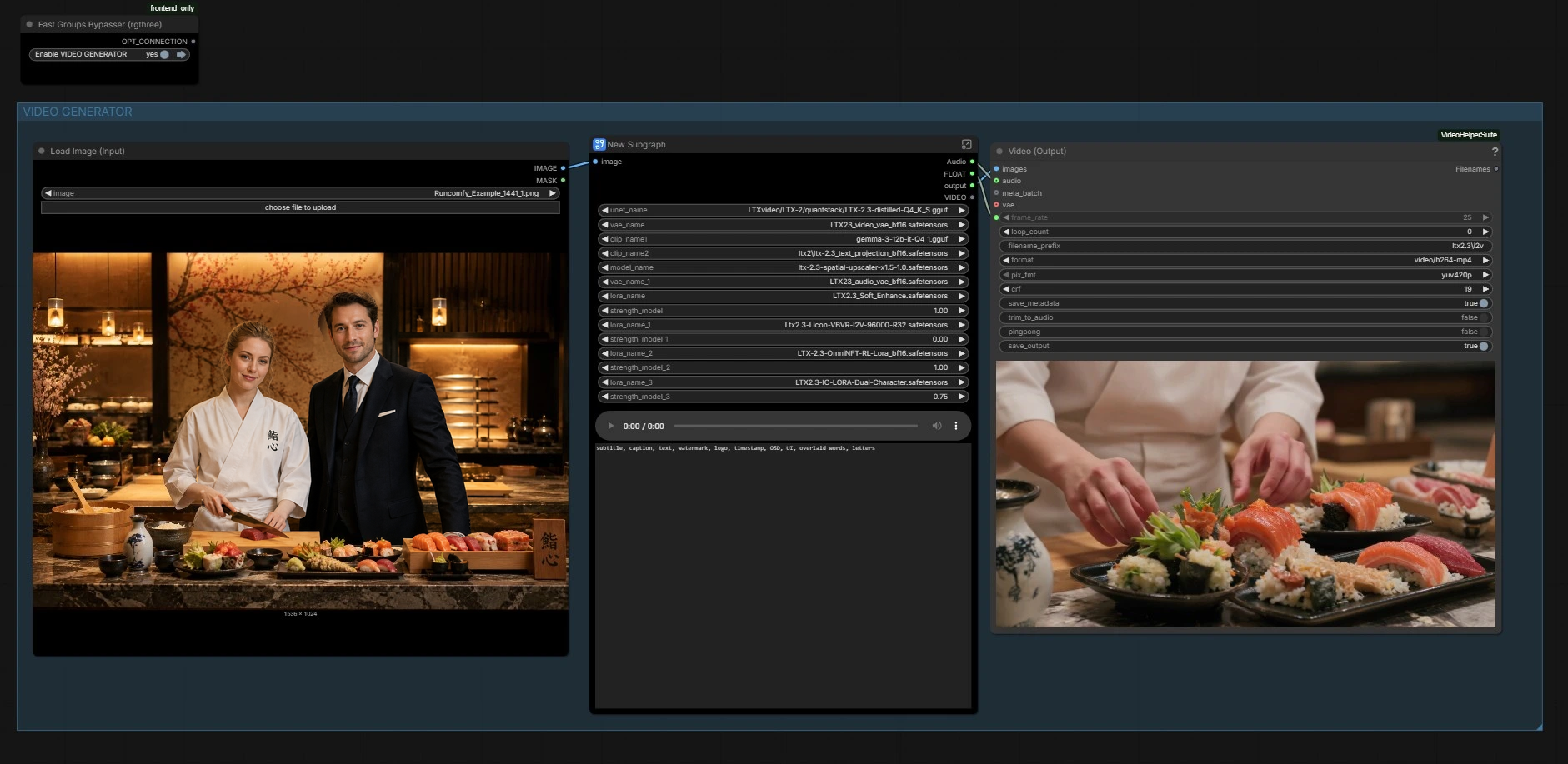
LTX 2.3 Dual Character Lip Sync LoRA: two‑character lip‑sync video from one image and one audio track#
This ComfyUI workflow turns a single still image and a recorded two‑speaker conversation into a coherent, identity‑stable video with synchronized speech for both on‑screen characters. Built around the LTX‑2.3 video backbone and the LTX 2.3 Dual Character Lip Sync LoRA, it maps phonemes and timing from your dialogue to each face while preserving expressions, gaze, and scene consistency across frames.
Designed for interviews, cinematic dialogue, podcasts with video hosts, and virtual character interactions, the workflow couples text prompting for scene layout with audio‑driven motion. It includes an image bootstrap stage for quick look development, two‑stage LTX sampling for temporal stability, and a latent upscaler for crisp results. The final output is an MP4 with embedded audio.
Key models in Comfyui LTX 2.3 Dual Character Lip Sync LoRA workflow#
- LTX‑2.3 video generation model. Provides the multimodal diffusion backbone that synthesizes temporally consistent video conditioned on text, image, and audio. Lightricks/LTX-2.3
- LTX‑2.3 Video VAE and Audio VAE. Encode and decode video and audio latents used by the model to keep generation efficient and synchronized. Shipped with the LTX‑2.3 release. Lightricks/LTX-2.3
- LTX spatial latent upscaler. Refines detail after the base pass by upsampling in latent space for cleaner textures and edges. Variants are available alongside LTX assets. Lightricks/LTX-2
- LTX 2.3 Dual Character Lip Sync LoRA. Injects training that encourages per‑speaker mouth motion and timing for two faces in the same shot while retaining facial identity.
- Z‑Image Turbo text‑to‑image model. Rapidly produces a high‑quality reference still that anchors identity, framing, and lighting before video synthesis. Comfy‑Org/z_image_turbo
Related node packs used by this workflow: ComfyUI‑KJNodes, ComfyUI‑VideoHelperSuite, rgthree‑comfy, and ComfyUI‑PromptRelay.
How to use Comfyui LTX 2.3 Dual Character Lip Sync LoRA workflow#
The workflow has two coordinated parts: an image generator that creates the hero frame, and a video generator that drives motion and lip sync from audio while preserving the look. Use the groups below as your guide.
IMAGE GENERATOR#
This section builds the anchor still. Use the scene presets in the prompt list to quickly draft compositions, then refine the text with character descriptions for both people. A compact image diffusion stack (“Z IMG TURBO” subgraph) encodes your prompt and samples a clean reference still. The image is decoded and saved for inspection, then passed forward to seed identity and layout for video.
Key inputs you touch here: the descriptive prompt for scene, wardrobe, and two distinct characters; avoid lens or rendering jargon that fights realism unless that look is intentional.
Models#
Here the graph loads the LTX‑2.3 backbone, its video and audio VAEs, the text encoders, and the latent upscaler. It also applies the LTX 2.3 Dual Character Lip Sync LoRA, plus optional style or enhancement LoRAs if you enable them. This is where the base model’s capabilities are combined with the LoRA’s two‑speaker lip‑sync behavior to steer mouth motion without sacrificing identity. No action is needed unless you want to swap weights or adjust LoRA influence.
CUSTOM AUDIO#
Supply your conversation track here. The audio file is loaded and encoded into an audio latent that carries timing and phonetic cues through the pipeline. If you do not provide audio, the workflow can generate motion using an empty audio latent, but the LTX 2.3 Dual Character Lip Sync LoRA is designed to shine with real dialogue. Use a clean two‑speaker mix with clear turn‑taking for best separation of mouth movements.
Video PARAMETERS#
Set the target duration and frame rate. These values are stored and reused throughout sampling, scheduling, cropping guides, and final rendering so lips, blinks, and shot timing remain aligned. Keep your video length consistent with the provided audio to avoid extra lead‑in or tail.
LATENT GENERATION#
Your selected still is preprocessed and its dimensions are detected. The workflow creates a video latent of the right length, then inserts the still in‑place so the first frame matches your design. A full‑frame noise mask is applied to control how much the background can evolve versus the faces. The prepared audio latent is then paired with the video latent so both modalities are ready for conditioning.
Notable nodes: LTXVPreprocess scales your still for LTX, EmptyLTXVLatentVideo builds the timeline, and LTXVImgToVideoInplaceKJ (#5881) locks identity by seeding the first frame from the still.
Conditioning#
Text prompts are encoded and attached as positive and negative conditions. Use the global prompt box to describe staging and intent in natural language; you can include a short shot list if helpful. A dedicated negative text encoder suppresses on‑frame subtitles, watermarks, and UI so the faces stay clean. Crop guide helpers analyze the latent to place attention on both faces, improving per‑speaker expression tracking with the LTX 2.3 Dual Character Lip Sync LoRA active.
Representative components: PromptRelayEncode (#5903) merges your scene description with the latent context, and LTXVConditioning attaches frame‑rate aware guidance for both modalities.
1st Sampling#
The first denoising pass generates a temporally coherent base video with lip motion blocked in. A lightweight scheduler and sampler pair are selected automatically, with parameters routed from the stored timing values. The model variant coming out of LTX2_NAG adds noise‑aware guidance for video and audio conditions so speech timing stays anchored as content forms.
Core sampler path: SamplerCustom (#5891) with KSamplerSelect and a basic scheduler; adjust only if you have specific sampler preferences.
Stage #2 Upscale and refinement#
The second stage improves sharpness and micro‑expressions. The latent upscaler increases spatial detail, audio and video latents are re‑joined, and a refinement sampler makes subtle corrections while preserving the established motion. Afterward the latents are separated and decoded back to an image sequence and an audio waveform.
Important blocks: LTXVLatentUpsampler (#5927) for clarity, SamplerCustomAdvanced (#5929) for the refinement pass, followed by VAEDecode and LTXVAudioVAEDecode to return to pixel and audio space.
Output#
Finally, frames and audio are packed into an MP4 for playback and review. The frame rate used for conditioning is reused here so visual cadence and phoneme timing match what the model saw during generation. You can also preview audio mid‑graph if you need a quick check.
Output path: CreateVideo (#5931) builds the clip; an auxiliary VHS_VideoCombine (#5905) path is provided for alternate exports with metadata controls.
Key nodes in Comfyui LTX 2.3 Dual Character Lip Sync LoRA workflow#
LTXICLoRALoaderModelOnly(#5958) Loads the LTX 2.3 Dual Character Lip Sync LoRA into the LTX‑2.3 backbone. Increasestrength_modelwhen you need tighter mouth articulation and speaker separation; lower it when you want the base model’s motion and style to dominate, especially if you stack additional style LoRAs.PromptRelayEncode(#5903) Central place to write the scene description and, optionally, a brief shot plan. It fuses the global prompt with model context and the current latent so guidance remains consistent across the timeline. Keep language clear and describe both characters distinctly to help identity and role separation.LTXVImgToVideoInplaceKJ(#5881) Seeds the first frame of the video latent directly from your generated or loaded still. This locks in identity, wardrobe, and lighting, reducing drift over time. Use a medium or medium‑wide two‑shot with both faces unobstructed for best results.LTXVAudioVAEEncode(#5851) Converts the supplied dialogue track into an audio latent the model can use for phoneme timing. Feed a clean mix without heavy compression; ensure the start time corresponds to the first on‑screen speech to avoid offset lip motion.SamplerCustom(#5891) andSamplerCustomAdvanced(#5929) Two complementary denoising stages. Keep sampler families consistent between stages to maintain motion continuity, and avoid drastic changes in noise scheduling once you have a look you like.LTXVLatentUpsampler(#5927) Applies the LTX latent upscaler before refinement to add crispness without destabilizing the established motion. Choose an upscaler variant appropriate for your target resolution and texture realism.
Optional extras#
- Use a two‑speaker WAV at 24 kHz with minimal background noise; add short natural pauses between lines to help the LTX 2.3 Dual Character Lip Sync LoRA separate turns.
- Generate or supply a still where both subjects are visible, facing generally toward camera, with consistent lighting across faces.
- Keep the negative text prompt that excludes “subtitle, caption, logo, timestamp” to avoid burnt‑in UI elements during sampling.
- Start with a short clip to validate timing, then extend duration or raise resolution once you like the behavior.
- If you add style LoRAs, balance them against the LTX 2.3 Dual Character Lip Sync LoRA so articulation stays accurate while the scene retains your chosen aesthetic.
Acknowledgements#
This workflow implements and builds upon the following works and resources. We gratefully acknowledge the creators of “LTX 2.3 Dual Character Lip Sync LoRA Workflow Source” for the workflow. For authoritative details, please refer to the original documentation and repositories linked below.
Resources#
- LTX 2.3 Dual Character Lip Sync LoRA Workflow Source/LTX 2.3 Dual Character Lip Sync LoRA Workflow Source
- Docs / Release Notes: YouTube video
Note: Use of the referenced models, datasets, and code is subject to the respective licenses and terms provided by their authors and maintainers.
