





LongCat Image Edit Turbo: Fast prompt-guided image editing in ComfyUI#
LongCat Image Edit Turbo is a purpose-built ComfyUI workflow for rapid, prompt-guided edits that keep your subject and composition intact. It combines the LongCat Image Edit Turbo model with Qwen2.5-VL conditioning and the AE VAE to deliver character restyling, mask-like localized changes, and cinematic lighting tweaks in a quick, iteration-friendly loop.
Designed for creators and power users, this LongCat Image Edit Turbo graph accepts any source image, interprets your edit intent through a vision-language encoder, and returns high-fidelity results that preserve the original framing. It is RunComfy-ready and optimized for quick previews and controlled refinement.
Key models in Comfyui LongCat Image Edit Turbo workflow#
- LongCat Image Edit Turbo (bf16). The diffusion model that powers fast, composition-preserving image edits while responding strongly to text guidance. Model file
- Qwen2.5-VL 7B text encoder (FP8 scaled, ComfyUI packaged). Produces rich conditioning by understanding both your prompt and visual context from the input image. Encoder file
- AE VAE (ae.safetensors). Reconstructs images from latents with low loss, helping LongCat Image Edit Turbo preserve fine detail after sampling. VAE file
How to use Comfyui LongCat Image Edit Turbo workflow#
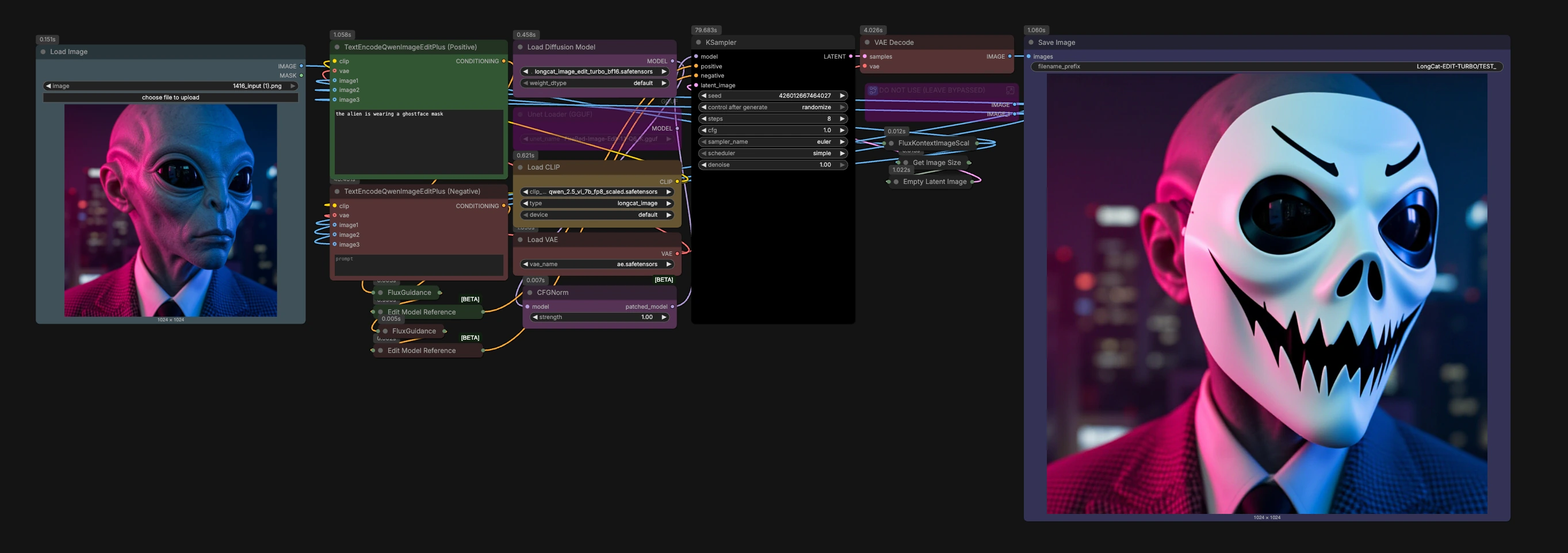
The workflow follows a clear path from your image and prompt to a decoded result. Stages are organized around a few decisive components that keep edits fast and stable.
Load and prepare your source image#
- Import your picture with
LoadImage(#79). The graph routes it throughFluxKontextImageScale(#64) to standardize scale for robust editing. - The image then sets the working canvas via
GetImageSize(#72) andEmptyLatentImage(#61), which helps LongCat Image Edit Turbo maintain composition and subject placement. - This preparation ensures that subsequent edits act like smart, mask-like adjustments rather than wholesale re-synthesis.
Encode your edit intent with Qwen#
- The workflow loads the Qwen2.5-VL encoder using
CLIPLoader(#19). - Describe the change you want in
TextEncodeQwenImageEditPlus (Positive)(#53). Use clear style, lighting, or attribute cues for LongCat Image Edit Turbo to apply. - Use
TextEncodeQwenImageEditPlus (Negative)(#54) to list elements to avoid or protect, which helps preserve identity and unwanted alterations. - The encoder reads both your text and the source image, creating edit-aware conditioning that anchors changes to the original scene.
Shape guidance and reference mixing#
FluxGuidance(#21) andFluxGuidance(#22) adjust how strongly positive and negative instructions influence the result. Higher emphasis pushes bolder edits; lower favors subtle, composition-safe tweaks.FluxKontextMultiReferenceLatentMethod(#51) andFluxKontextMultiReferenceLatentMethod(#52) control how multiple references are blended if you choose to add them. By default, the helper subgraph labeled “DO NOT USE (LEAVE BYPASSED)” remains inactive; replace it with your own image loaders if you want additional style or attribute references.
Run the sampler#
- The LongCat Image Edit Turbo UNet is loaded by
UNETLoader(#18) and normalized for stable guidance withCFGNorm(#23). KSampler(#27) performs the actual diffusion steps, turning your intent and context into a new latent. Start with fast iterations for previews, then refine your prompt or guidance strength as needed for final quality.- Keep edits focused on a single, clear goal per pass for the most predictable outcomes.
Decode and export#
- The AE VAE is brought in via
VAELoader(#20) and used byVAEDecode(#25) to reconstruct the image from the sampled latent with high fidelity. SaveImage(#9) writes the result to your output directory with a clear prefix, making it easy to track variations across runs.
Key nodes in Comfyui LongCat Image Edit Turbo workflow#
TextEncodeQwenImageEditPlus (Positive)(#53). Converts your desired change into edit-aware conditioning using Qwen2.5-VL and the source image. Focus your prompt on the subject and change you want, such as outfit, mood, lighting, or material, to guide LongCat Image Edit Turbo without drifting the scene.TextEncodeQwenImageEditPlus (Negative)(#54). Protects identity and composition by specifying what to avoid. Use it to reduce artifacts or prevent unwanted restyling while keeping the scene coherent.FluxGuidance(#21). Tunes how assertively positive instructions drive the edit. Increase for stronger restyling or dramatic lighting; decrease to preserve more of the original look. Balance this with how detailed your prompt is and how many references you provide.FluxKontextMultiReferenceLatentMethod(#51). Determines how multiple references are mixed into the conditioning. Choose a method that matches your goal, for example stronger fusion for style transfer vs lighter influence for attribute nudges.CFGNorm(#23). Normalizes guidance behavior so changes remain consistent across different settings. It helps LongCat Image Edit Turbo stay stable when you iterate prompts or switch samplers.KSampler(#27). The heart of generation. Use it to iterate quickly, lock in a seed for reproducibility, and experiment with different samplers once you like the direction. Adjust in tandem withFluxGuidanceto trade off edit strength versus fidelity to the original.FluxKontextImageScale(#64). Prepares and scales the input image for downstream nodes. This step is key to keeping framing and proportions steady through the edit.
Optional extras#
- Add more references. If you want multi-image guidance, replace the bypassed helper subgraph with your own
LoadImagenodes and plug them into the extra reference inputs of the Qwen encode nodes. This is useful for style or wardrobe transfers while keeping pose and layout. - Quick iteration tips. Start with concise prompts, run a fast preview, then refine wording or guidance strength. Use seeds to reproduce a favorite look and branch small variations.
- Localized changes by wording. Specify the target clearly, such as “change only the jacket to red” or “soft rim light on the subject,” to drive mask-like edits without requiring an explicit mask.
- GGUF variant. For CPU or very low VRAM scenarios, you can swap to quantized LongCat Image Edit Turbo weights with
UnetLoaderGGUF(#77). See the GGUF pack for available quantizations. Model variants
Acknowledgements#
This workflow implements and builds upon the following works and resources. We gratefully acknowledge Comfy-Org for LongCat Image Edit Turbo and related components, vantagewithai for LongCat Image Edit Turbo GGUF models, and the Civitai community for the LongCat Image Edit Turbo workflow for their contributions and maintenance. For authoritative details, please refer to the original documentation and repositories linked below.
Resources#
- Civitai/Civitai workflow source
- Docs / Release Notes: Civitai model page
- Comfy-Org/LongCat Image Edit Turbo bf16 model
- Hugging Face: Comfy-Org/LongCat-Image
- vantagewithai/LongCat Image Edit Turbo GGUF models
- Hugging Face: vantagewithai/LongCat-Image-Edit-Turbo-GGUF
- Comfy-Org/Qwen 2.5 VL text encoder
- Hugging Face: Comfy-Org/Qwen-Image_ComfyUI
- Comfy-Org/AE VAE
- Hugging Face: Comfy-Org/z_image_turbo
Note: Use of the referenced models, datasets, and code is subject to the respective licenses and terms provided by their authors and maintainers.