

Fish Audio S2 TTS for ComfyUI: high‑quality TTS, voice cloning, and multi‑speaker dialogue#
Fish Audio S2 TTS is a ready‑to‑run ComfyUI workflow that turns text into natural speech, clones a voice from a short reference clip, and generates multi‑speaker conversations. It is powered by the Fish Audio S2‑Pro family and supports rich style control via emotion and prosody tags such as [excited], [whisper], and [laughing].
This workflow is ideal for creators, product teams, and developers who want flexible, expressive speech synthesis inside ComfyUI. It includes optional speech‑to‑text for quick transcript capture, automatic language detection, and multiple precision choices including fp8 and sage_attention for efficient inference.
Note: Run this workflow on a 2X Large or larger machine when you change to s2-pro model. Smaller instances may run out of memory (OOM).
Key models in Comfyui Fish Audio S2 TTS workflow#
- Fish Audio S2‑Pro — the core generative text‑to‑speech model used for single‑speaker TTS, voice cloning, and multi‑speaker dialogue. It supports extensive style tokens and multilingual synthesis model card and is part of the Fish‑Speech project repo.
- Fish Audio S2‑Pro FP8 — a memory‑efficient variant of S2‑Pro that reduces VRAM needs with minimal quality trade‑offs, recommended for constrained GPUs model card.
- OpenAI Whisper large‑v3 — an optional speech‑to‑text model used to auto‑transcribe your reference audio when preparing voice cloning prompts repo.
How to use Comfyui Fish Audio S2 TTS workflow#
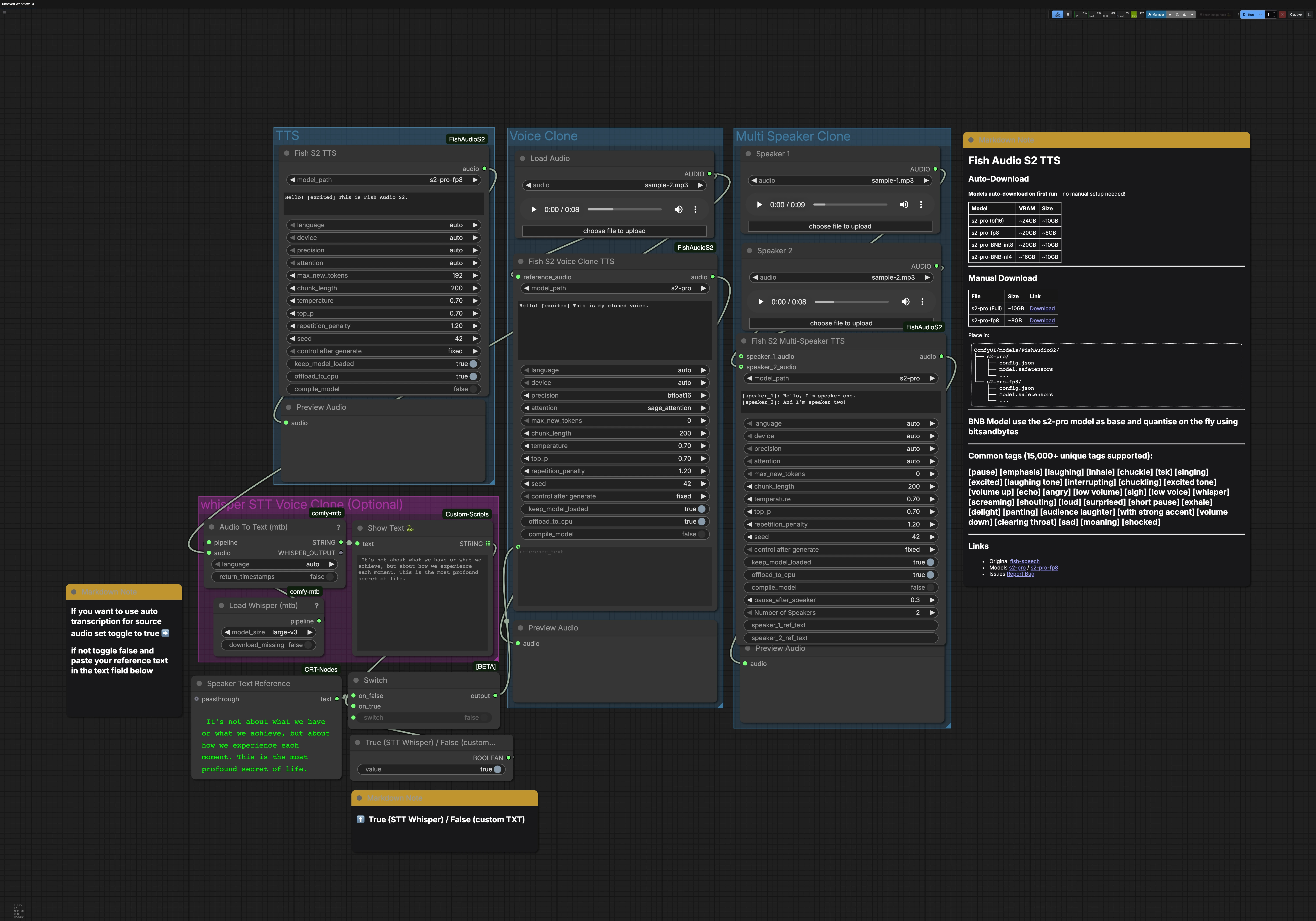
This workflow contains three main paths that can be run independently: TTS, Voice Clone, and Multi Speaker Clone. An optional Whisper STT group can generate the transcript for voice cloning. Each path ends with an audio preview so you can monitor results quickly.
TTS group#
The FishS2TTS (#42) node performs direct text‑to‑speech with Fish Audio S2 TTS. Enter your script in the node’s text box and sprinkle style tags like [excited], [pause], or [whisper] to shape emotion and pacing. Language detection is automatic, so you can write in the target language and the model adapts. Choose the S2‑Pro variant that fits your GPU memory, for example fp8 for lighter loads. The output routes to PreviewAudio for instant listening.
Voice Clone group#
Use LoadAudio to provide a short, clean reference clip of the target voice, then route it into FishS2VoiceCloneTTS (#14). Supply the transcript that matches the speaking style you want; accurate text helps the model preserve rhythm and accent. You can drive the reference text from the STT group or type your own, and you can add style tags to refine emotion and delivery. Precision and attention backend choices balance speed, memory, and stability for long lines. The synthesized clone is sent to PreviewAudio so you can iterate quickly.
Multi Speaker Clone group#
Load one reference clip per speaker using the LoadAudio nodes, then connect them to FishS2MultiSpeakerTTS (#41). Provide a dialogue script that labels each turn with [speaker_1], [speaker_2], and so on. This template includes two speakers by default, and the node supports scaling up to eight distinct voices when configured accordingly. You can mix narrative prose, tags, and dialogue to control flow and emotion for each character. The final mix is previewed so timing and clarity can be verified.
Whisper STT for voice cloning (optional)#
Load Whisper (mtb) (#6) with large‑v3 powers Audio To Text (mtb) (#7) to transcribe a reference clip automatically. The recognized text is displayed by ShowText|pysssss (#8). A small toggle built with ComfySwitchNode (#34) and a boolean control lets you choose between STT output (true) or your own typed text from Text Box line spot (#31) (false). This is useful when you want a quick baseline transcript or when crafting a precise prompt for cloning.
Key nodes in Comfyui Fish Audio S2 TTS workflow#
FishS2TTS (#42)#
Generates single‑speaker speech from text with optional style tags and automatic language detection. Adjust the model variant to match your hardware, for example choosing fp8 when VRAM is tight. Use the seed control for repeatable takes and introduce small changes when exploring alternate deliveries. For long scripts, select an attention backend optimized for stability.
FishS2VoiceCloneTTS (#14)#
Creates a cloned voice by conditioning on reference_audio and reference_text. Better results come from clean speech with consistent tone and a transcript that mirrors intended cadence. Style tags can be mixed into the final text to steer mood without harming identity. Precision and attention settings help balance quality and memory for extended lines.
FishS2MultiSpeakerTTS (#41)#
Synthesizes multi‑speaker conversations by pairing each speaker’s reference audio with a dialogue marked by [speaker_n] labels. Increase the number of speakers as needed and assign distinct clips for stronger separation. Keep each speaker’s reference consistent in tone to avoid blending. Use the seed for deterministic mixing when rendering multi‑take scenes.
Optional extras#
- Use style tags thoughtfully. Start with a few like [excited], [whisper], [emphasis], [pause], and build up only as needed for clarity.
- For voice cloning, trim silence from the start and end of the reference and avoid background noise to preserve timbre.
- If GPU memory is limited, prefer S2‑Pro fp8 or runtime quantized options. For maximum fidelity, use higher precision.
- Punctuation matters. Commas and periods improve phrasing, and tags placed at clause boundaries tend to sound more natural.
- For multi‑speaker scripts, keep one utterance per line and always prefix with the correct [speaker_n] label to maintain separation.
Resources:
- Fish Audio S2‑Pro model card: Hugging Face
- S2‑Pro fp8 variant: Hugging Face
- Fish‑Speech project: GitHub
- ComfyUI Fish Audio S2 nodes: GitHub
- Whisper large‑v3: GitHub
Acknowledgements#
This workflow implements and builds upon the following works and resources. We gratefully acknowledge Saganaki22 for ComfyUI-FishAudioS2 Custom Nodes, and Fish Audio for the S2-Pro Model for their contributions and maintenance. For authoritative details, please refer to the original documentation and repositories linked below.
Resources#
- Saganaki22/ComfyUI-FishAudioS2 Custom Nodes
- GitHub: Saganaki22/ComfyUI-FishAudioS2
- Fish Audio/S2-Pro Model
- Hugging Face: fishaudio/s2-pro
Note: Use of the referenced models, datasets, and code is subject to the respective licenses and terms provided by their authors and maintainers.