

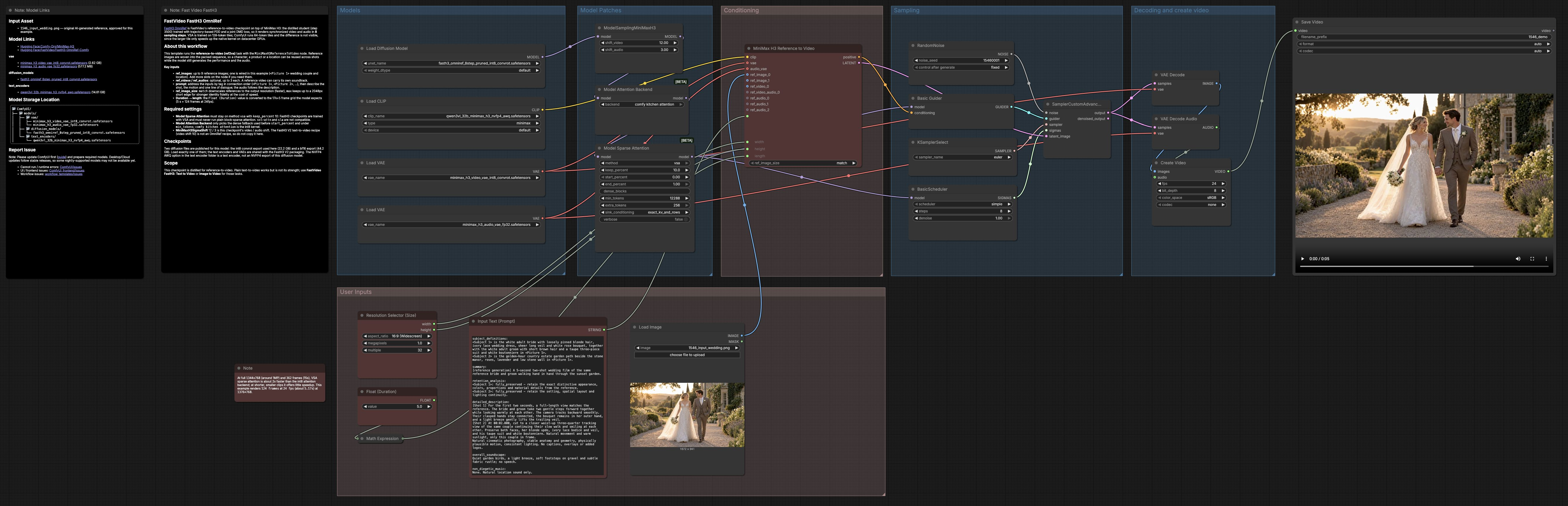
FastH3 Omni Reference to Video: reference‑guided video with synchronized sound in 8 steps#
FastH3 Omni Reference to Video is a ComfyUI workflow for turning a single reference image and a prompt into a short video with matching audio. It is powered by FastVideo’s distilled FastH3 OmniRef checkpoint on the MiniMax H3 backbone, which is optimized for fast 8‑step sampling. The workflow is ideal for cinematic character shots, glossy product clips, and travel scenes where you want the look from a reference but the motion, camera work, and sound to follow your prompt.
This ComfyUI graph wires reference inputs, text prompting, sparse attention, and a joint video‑and‑audio diffusion pass into a clean pipeline. You control scene content, camera moves, and sound effects or dialogue directly in the prompt. The result is a reference‑faithful clip at 24 fps with audio that reflects the written scene.
Key models in Comfyui FastH3 Omni Reference to Video workflow#
- FastVideo FastH3 OmniRef (Comfy). The core 8‑step diffusion checkpoint that generates both the video and the audio from reference inputs plus a prompt. It is distilled for reference‑to‑video tasks, producing strong identity and synchronized sound with minimal steps. Model card
- MiniMax H3 Video VAE (int8 convrot). The video VAE that encodes and decodes spatiotemporal latents used by the diffusion model, enabling compact sampling and fast reconstruction. Model file
- MiniMax H3 Audio VAE (fp32). The audio VAE that handles the waveform latent path so the generated soundtrack aligns with the visual timeline. Model file
- Qwen3‑VL 32B MiniMax H3 NVFP4 AWQ text encoder. The large vision‑language text encoder used to parse the prompt and align it with references for coherent action, camera directives, and sound cues. Model file
- Reference template. The official Comfy‑Org reference‑to‑video template that this workflow follows, adapted for FastH3 Omni Reference to Video. Template JSON
How to use Comfyui FastH3 Omni Reference to Video workflow#
At a high level, the workflow loads models, applies attention and sigma patches, builds conditioning from your prompt and references, runs an 8‑step joint video‑audio diffusion, decodes to frames and waveform, then muxes and saves a video.
Models#
This group loads the FastVideo FastH3 OmniRef diffusion model, the MiniMax H3 video and audio VAEs, and the NVFP4 AWQ text encoder. Keeping these components matched ensures the 8‑step schedule and the joint audio path behave as expected. You do not need to tweak anything here beyond selecting the correct checkpoint. Load exactly one diffusion model; VAEs and text encoder are separate assets.
Model Patches#
The model is patched with MiniMaxH3SigmaShift to align the noise schedule for video and audio, and an attention backend is selected. ModelAttentionBackend uses the fast int8 kernel for dense regions, while BlockSparseAttention is configured for VSA so long clips at higher resolutions remain efficient. Leave these choices as provided for FastH3 Omni Reference to Video since the checkpoint is trained for VSA and the shown sigma shifts.
Conditioning#
MiniMaxH3ReferenceToVideo builds the conditioning from your prompt and references. Plug your reference image into the first slot and write a prompt that calls it by tag, for example “<Picture 1> walks toward camera, handheld tracking, ocean wind, distant gulls.” Width and height come from the resolution selector, and a simple duration control in seconds is converted to the model’s frame grid so playback stays aligned. If identity fidelity is critical, set the node’s ref_image_size to max; for speed, use match.
Sampling#
The sampling group combines fixed or random RandomNoise, BasicGuider, a simple scheduler, and the SamplerCustomAdvanced stage. The schedule is 8 steps to match the distilled FastH3 OmniRef recipe, which balances speed and fidelity for reference‑to‑video. You can change the seed to explore variations without touching other settings. The video and audio latents are evolved together so motion and sound cues remain synchronized.
Decoding and create video#
After sampling, VAEDecode reconstructs frames from the video latents and VAEDecodeAudio reconstructs the soundtrack. CreateVideo multiplexes frames and audio at 24 fps in sRGB and produces a single stream. SaveVideo writes the final file to disk using sensible defaults. The result is a compact clip that reflects both your reference and your written scene.
User Inputs#
- Resolution Selector (Size). Choose aspect and pixel count to control detail and runtime; widescreen 16:9 works well for most shots.
- Float (Duration). Set the clip length in seconds; it is rounded to the nearest value on the model’s 17k+5 frame grid so timing lands cleanly. For example, 5 s becomes 124 frames at 24 fps.
- Input Text (Prompt). Describe subject actions, camera language, and sound design or dialogue. Refer to your references in order using tags like “<Picture 1>”.
- LoadImage. Add a clean, well‑lit reference for appearance or setting. You can extend the node to add more reference slots if needed.
Key nodes in Comfyui FastH3 Omni Reference to Video workflow#
MiniMaxH3ReferenceToVideo (#136) This node fuses the prompt with one or more references and prepares the joint video‑audio latent. Use it to direct identity retention, camera moves, and sonic events in one place. Adjust width, height, length, and ref_image_size to balance fidelity and speed. Keep prompts concise but explicit about motion and sound for best synchronization.
BlockSparseAttention (#143) The attention patch enables VSA block‑sparse attention for longer clips and higher resolutions. In this workflow it is set to VSA with a conservative keep percentage to preserve quality while saving compute. Leave the selection on VSA for FastH3 Omni Reference to Video; switching to other sparse modes can degrade results. Raising the keep ratio increases compute, while lowering it may reduce fidelity.
MiniMaxH3SigmaShift (#141) Sigma shifting aligns the diffusion noise schedule between video and audio so both converge cleanly in 8 steps. The provided video and audio shifts are tailored to the OmniRef checkpoint and should be kept as is for consistent output. If you swap to a different MiniMax H3 family checkpoint, consult its model card before changing these values.
BasicScheduler (#124) The scheduler drives the 8‑step trajectory used by the distilled model. Keeping steps at 8 retains the intended speed‑quality trade‑off; more steps typically add time without clear gains. Combine it with a fixed seed for reproducibility, or randomize the seed to explore alternates with the same structure.
Optional extras#
- Write prompts that pair action and camera verbs with ambient sound or brief dialogue for tight audio‑visual alignment.
- For maximum identity, use a high‑resolution, front‑facing reference and set
ref_image_sizetomax; for faster iteration, usematch. - If you see memory pressure at long durations, reduce resolution or shorten the clip before touching attention settings.
- Use a fixed seed while developing a look, then swap to random seeds to generate a variety of takes from the same setup.
- To build a multi‑shot sequence, render several short clips from the same reference with different camera prompts and cut them in your video editor.
Acknowledgements#
This workflow implements and builds upon the following works and resources. We gratefully acknowledge FastVideo for the FastH3-Omni-Comfy model and the FastH3 Omni model collection, Hao AI Lab for the FastVideo OmniRef release blog, and Comfy-Org for the reference-to-video workflow template, for their contributions and maintenance. For authoritative details, please refer to the original documentation and repositories linked below.
Resources#
- FastVideo/FastH3-Omni-Comfy
- Hugging Face: FastVideo/FastH3-Omni-Comfy
- Hao AI Lab/FastVideo OmniRef release blog
- Docs / Release Notes: FastVideo OmniRef update
- Comfy-Org/reference-to-video workflow template
- FastVideo/fasth3-omni (collection)
- Hugging Face: FastVideo/fasth3-omni
Note: Use of the referenced models, datasets, and code is subject to the respective licenses and terms provided by their authors and maintainers.