

Consistent Character Creator 4.0: Build a reusable character dataset from one image#
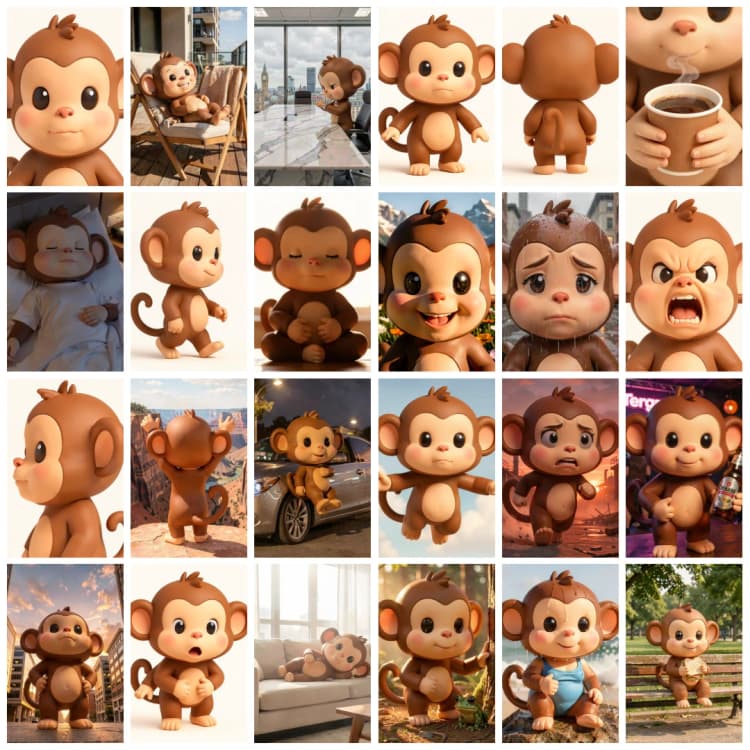
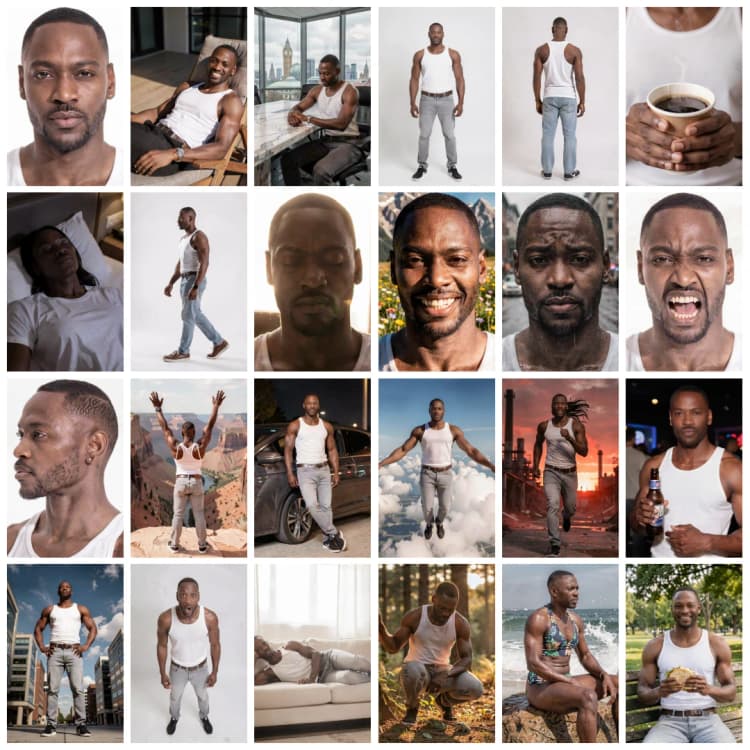
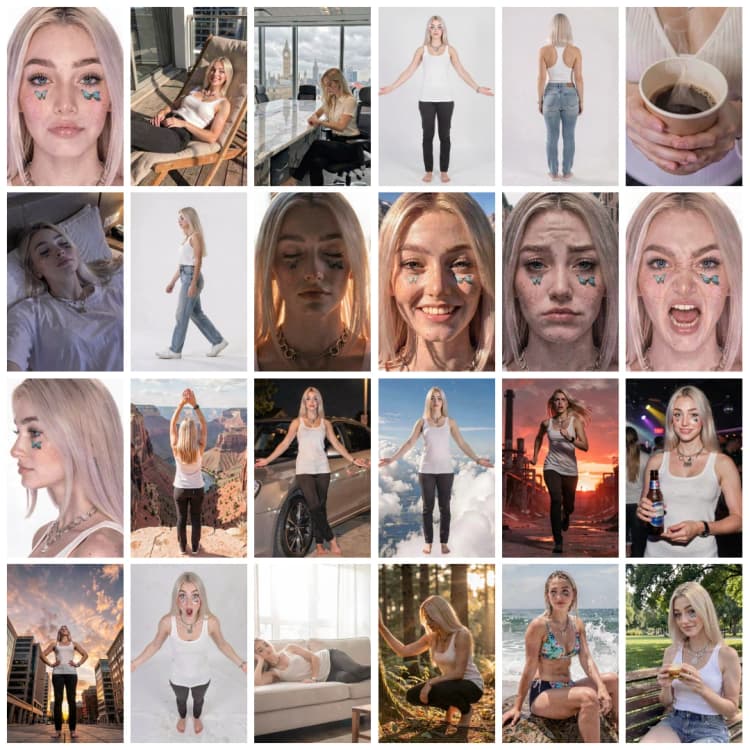
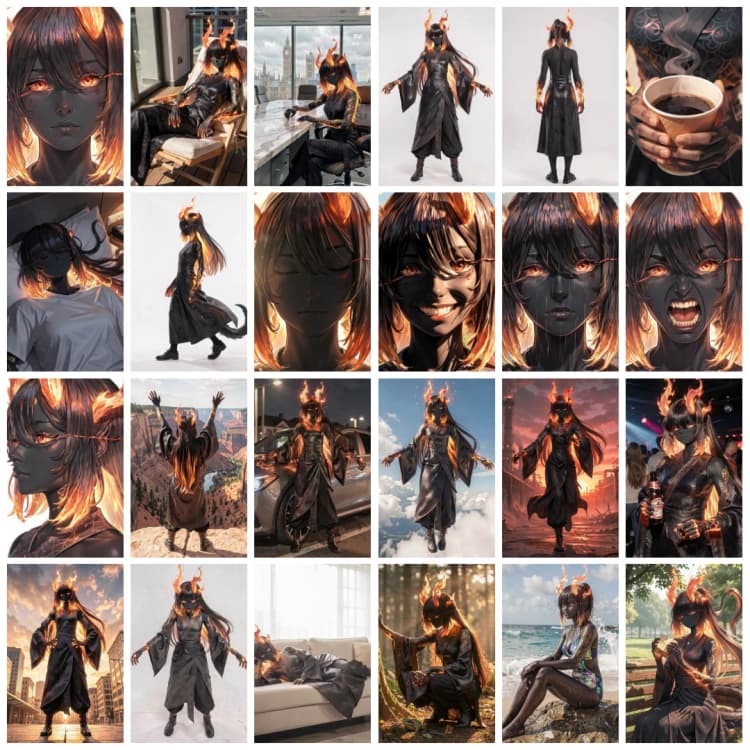
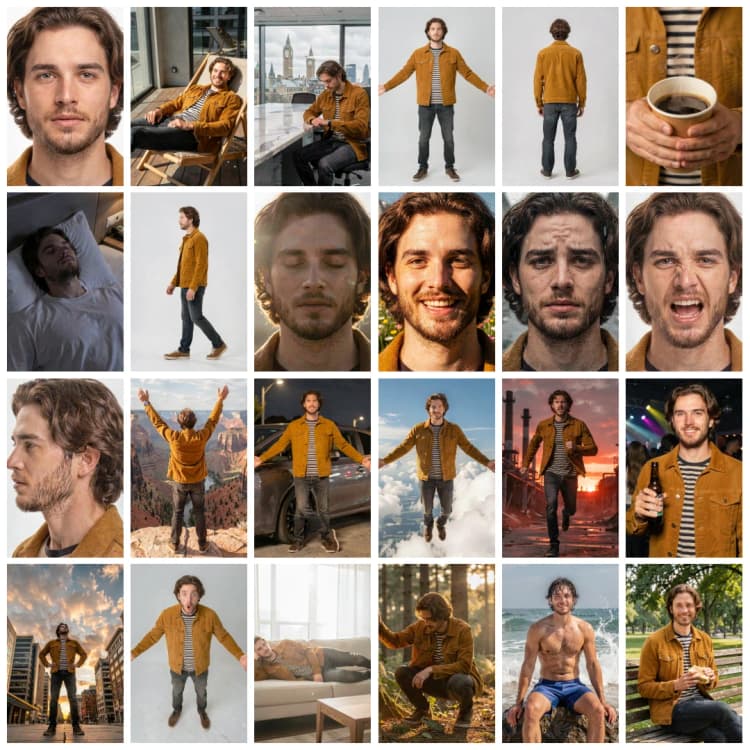
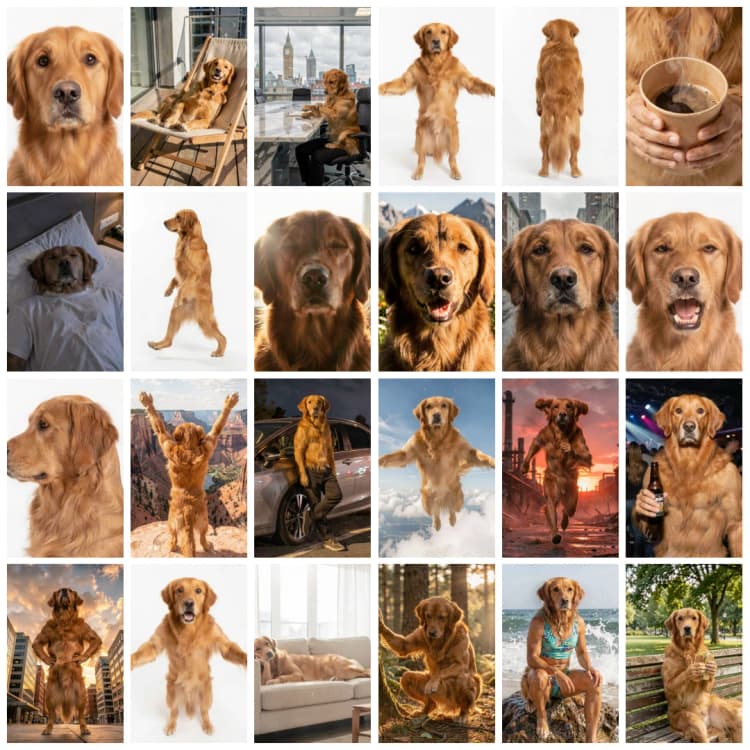
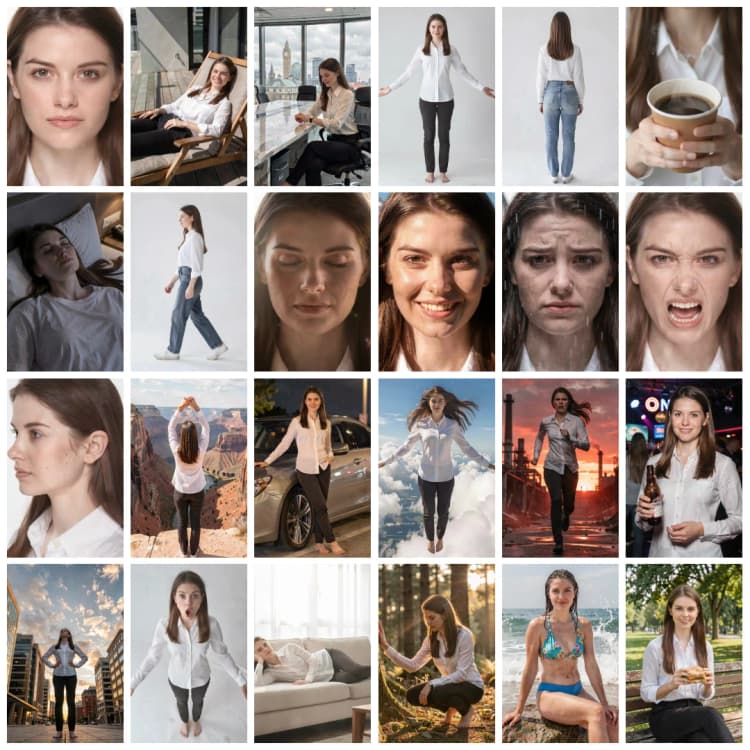
Consistent Character Creator 4.0 is a modular ComfyUI workflow that turns one reference image into a 24-shot character dataset. It covers neutral views, close-ups, expressions, lighting tests, action poses, and story scenes while keeping the character's face, body, clothing, and visual style recognizable across the full board.
This version is built around FLUX.2 Klein 9B FP8, a Qwen3 8B text encoder, the FLUX.2 VAE, a dedicated consistency LoRA, and latent-space identity guidance. The simple edition keeps the graph practical by leaving out the upscaler and Face Detailer stages found in the advanced version. You can preview the complete batch, save only the images that pass your identity check, and route the accepted results into a named dataset folder ready for captioning and LoRA training.
Key models in the Consistent Character Creator 4.0 ComfyUI workflow#
- FLUX.2 Klein 9B FP8. The main image-generation and editing model. It follows the reference image and scene prompts across the 24 dataset modules while supporting new poses, camera angles, expressions, and environments. The 9B model is released under the FLUX Non-Commercial License, so review its terms before using outputs or derivatives commercially. See black-forest-labs/FLUX.2-klein-9b-fp8.
- Qwen3 8B FP8 mixed text encoder. Loaded in
flux2mode, it translates each module's instruction into conditioning for FLUX.2 Klein. The graph usesqwen_3_8b_fp8mixed.safetensorsfrom the ComfyUI-ready encoder package: Comfy-Org/vae-text-encorder-for-flux-klein-9b. - FLUX.2 VAE.
flux2-vae.safetensorsencodes the reference image for identity guidance and decodes generated latents into the final dataset images. The packaged asset is available from Comfy-Org/flux2-dev. - FLUX.2 Klein 9B Consistency V2 LoRA. This adapter reinforces character consistency across different poses, expressions, and scenes. The workflow loads
Flux2-Klein-9B-consistency-V2.safetensorsat strength0.35; keep that value for the first run before testing small adjustments. See dx8152/Flux2-Klein-9B-Consistency. - FLUX.2 Klein Identity Guidance. This sampling-time model patch compares the current denoised latent with the encoded reference and pulls matching identity features back toward the source. The graph uses adaptive guidance so the face and character design stay anchored without freezing the requested pose or background. See capitan01R/ComfyUI-Flux2Klein-Enhancer.
How to use the Consistent Character Creator 4.0 ComfyUI workflow#
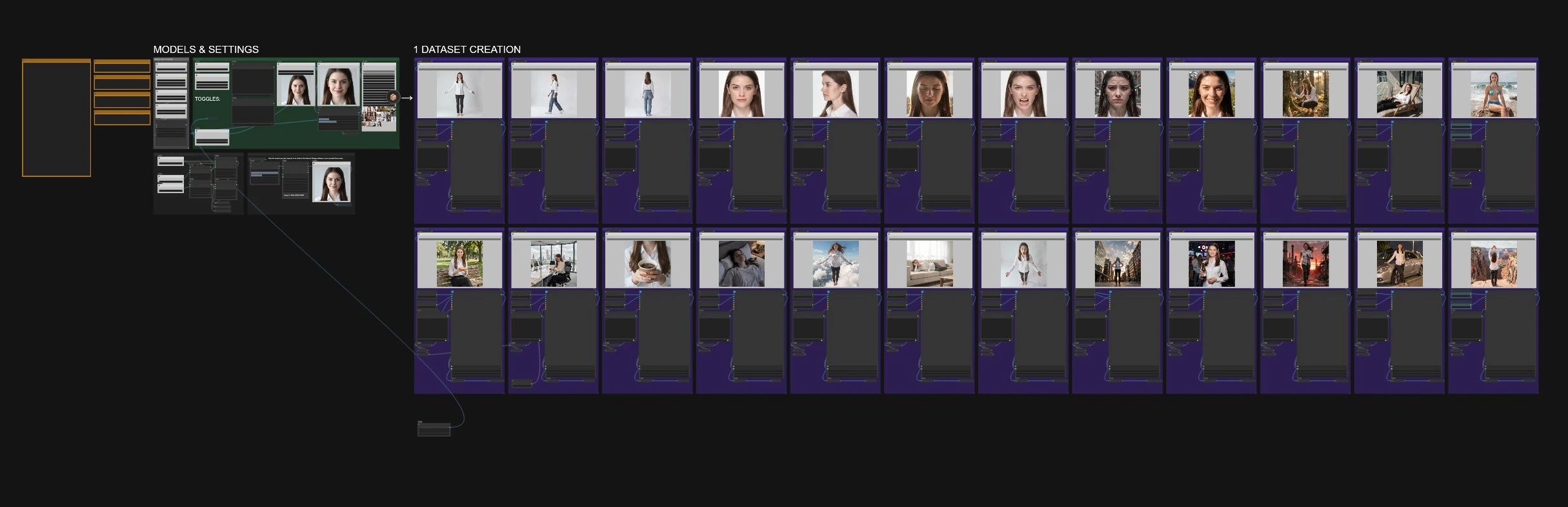
The graph is organized into shared setup controls on the left and 24 self-contained generation modules on the right. Configure the reference, naming, style, and save mode once, then queue the graph to build a review board covering the character from neutral documentation shots to difficult lighting and action scenes.
Model selection#
The MODELSELECTION group loads the four required model assets. UNETLoader (#527) selects FLUX.2 Klein 9B FP8, CLIPLoader (#528) loads Qwen3 8B with type flux2, and VAELoader (#529) loads the FLUX.2 VAE. LoraLoaderModelOnly (#664) then applies the consistency LoRA at 0.35, while IdentityGuidance (#824) adds adaptive latent correction. Leave these defaults unchanged for your first dataset so you can evaluate the reference and prompts before tuning the model stack.
Reference image and face preparation#
Load one clear source image in LoadImage (#535). A front-facing or three-quarter portrait with visible clothing, clean lighting, and an unobstructed face gives the workflow the strongest identity anchor. AutoCropFaces (#537) extracts a square face reference, and ImageResizeKJv2 (#562) prepares the image for the shared conditioning path. A second face crop later in the graph is used when a close-up output needs a tighter identity check.
Use the optional STYLE and CLOTHES fields to describe details that must remain stable. Keep these descriptions short and concrete. Name the hairstyle, garment, color, material, and rendering style instead of repeating a long scene prompt in every module.
Output naming and save mode#
Set NAME (CHARACTER) (#2905) before running the graph. The workflow combines this value with its root folder and output type, placing saved images under ComfyUI/output/CCC/<NAME>/. A unique, simple name prevents multiple characters from being mixed into the same training set.
Save Dataset (1 = save | 2 = preview only) (#2922) controls whether the reviewed batch is written to disk. Start with 2 to inspect the board without committing files. Switch to 1 when the outputs preserve the intended identity; Image Save (#2053) then writes the selected batch using the configured dataset path and prefix.
Neutral identity anchors#
Run the neutral modules first because they reveal identity drift before the harder scenes begin:
T-POSEcreates a full-body studio view that exposes proportions, clothing, and silhouette.SIDE-WALKtests a clean side profile while introducing natural body motion.BACK-VIEWchecks hair length, garment shape, and rear-body proportions.CLOSE-FRONTandCLOSE-PROFILEestablish detailed facial anchors for frontal and side views.
These outputs are especially useful for character sheets, rigging references, turnaround studies, and the core of a LoRA dataset. If the face already drifts here, improve the source image or clarify STYLE and CLOTHES before generating the remaining scenes.
Expressions and lighting tests#
The close-up modules create CLOSE-SMILE, CLOSE-SAD, and CLOSE-ANGRY variants without changing the underlying face. BACKLIT, LOW-ANGLE, HIGH-ANGLE, and SKY-LOOKUP then stress-test identity under harder illumination and camera positions. Together, these images help a future training set cover emotional range and viewpoint changes instead of overfitting to one neutral portrait.
Review fine details such as eye shape, jawline, hairline, skin tone, and recurring accessories. Keep only images that still look like the same character; a smaller clean dataset is more useful than a larger set with obvious identity drift.
Everyday scenes and environment coverage#
The workflow includes practical scenes such as COFFEE, FOREST, DECKCHAIR, BED, OFFICE, NIGHTCLUB, PARK-SMOKE, BEACH, and CANYON. These modules vary location, framing, props, weather, and clothing exposure while reusing the same identity stack. They are useful for checking whether a character remains recognizable in lifestyle, editorial, cinematic, and outdoor contexts.
The prompts are editable. Change scene details while preserving the instruction to match the reference character's face, style, and clothing. When a prop or pose causes distortion, simplify that module's prompt rather than weakening identity guidance across the entire graph.
Action and fantasy coverage#
RUNNING, FLYING, and FLYING-LAVA push the character into large pose and environment changes. These are deliberately difficult consistency tests: they introduce motion, unusual perspective, strong lighting, and more freedom in the background. Use them after the neutral and close-up groups are stable. If they drift, strengthen the character description, reuse a clean neutral output as an additional reference where supported, or remove the failed shot from the saved dataset.
Sampling and batch assembly#
Each generation module uses a repeated Image Edit (Flux.2 Dev) subgraph. It encodes available reference images into reference latents, applies the module prompt, samples with the shared model and identity controls, and decodes the result. The supplied graph uses a 20-step FLUX.2 schedule and Euler sampling as a reliable starting point. ImageCollect nodes gather the module outputs, BatchImagesNode (#2893) assembles the final batch, and the save switch routes it either to preview or to the named dataset folder.
Key nodes in the Consistent Character Creator 4.0 ComfyUI workflow#
IdentityGuidance (#824)#
Preserves identity during sampling by comparing the generated latent with the VAE-encoded reference. The provided adaptive settings favor matching regions while leaving room for pose, expression, and scene changes. If identity is weak across most modules, make small strength changes only after confirming the reference crop and consistency LoRA are correct.
LoraLoaderModelOnly (#664)#
Loads the FLUX.2 Klein Consistency V2 LoRA at 0.35. This is the shared consistency control for every generation module. Raising it too far can make poses rigid or copy the source framing; lowering it can increase drift. Keep the original value while establishing a baseline.
AutoCropFaces (#537 and #1895)#
Creates focused face references from the source and selected outputs. The first crop anchors identity at setup, while the later crop supports close-up and downstream reference paths. Use an input with one clearly visible face so automatic cropping does not select the wrong subject.
ResolutionSelector (#2903)#
Sets the common canvas dimensions used by the dataset modules. The supplied workflow uses a square format, which works well for mixed close-ups and full-body references. Keep one resolution across a dataset unless your training pipeline explicitly expects multiple aspect ratios.
ImpactInversedSwitch (#2922)#
Separates preview from save behavior. Use output 2 during review and output 1 only after the full board passes your consistency check. This makes it easy to iterate without filling the final dataset folder with rejected generations.
Image Save (#2053)#
Writes the accepted batch to the path built from the root folder, character name, and dataset type. Set the name before queueing and keep it stable across reruns so captions and future LoRA training files remain organized.
Optional extras#
- Start in preview mode and judge the neutral views before the environment or action modules.
- Use a sharp reference with a visible face and body cues; avoid heavy occlusion, extreme blur, or multiple people.
- Describe the character in the optional style and clothing fields so repeated scene prompts do not have to carry all identity details.
- Keep the CLIP loader on
flux2and the consistency LoRA at0.35for the first run. - Save only outputs that match the character. Reject inconsistent eyes, facial proportions, hairstyle, clothing details, or body shape.
- Caption the cleaned dataset after review, then inspect those captions before starting LoRA training.
- FLUX.2 Klein 9B is non-commercial under its published model license. Check the model, LoRA, and custom-node licenses for your intended use before distributing outputs or trained derivatives.
Acknowledgements#
This workflow was created and shared by MickMumpitz as the simple edition of Consistent Character Creator 4.0. It builds on FLUX.2 Klein 9B from Black Forest Labs, the FLUX.2 ComfyUI assets from Comfy-Org, the FLUX.2 Klein Consistency LoRA from dx8152, and identity-preservation nodes from capitan01R. We gratefully acknowledge the authors and maintainers of these models, nodes, and workflow resources.
Resources#
- MickMumpitz/Consistent Character Creator 4.0 source
- Workflow guide and downloads: The Consistent Character Creator 4.0 is here
- MickMumpitz/ComfyUI custom nodes
- Black Forest Labs/FLUX.2 Klein 9B FP8
- Hugging Face: black-forest-labs/FLUX.2-klein-9b-fp8
- Comfy-Org/FLUX.2 VAE and Qwen3 encoder assets
- VAE: Comfy-Org/flux2-dev
- Text encoder: Comfy-Org/vae-text-encorder-for-flux-klein-9b
- dx8152/FLUX.2 Klein 9B Consistency LoRA
- Hugging Face: dx8152/Flux2-Klein-9B-Consistency
- capitan01R/FLUX.2 Klein identity guidance nodes
Note: Use of the referenced models, datasets, and code is subject to the licenses and terms provided by their authors and maintainers.