

ChatterBox TTS ComfyUI: Multi-mode TTS, voice conversion, multilingual, and dialog synthesis in one graph#
ChatterBox TTS ComfyUI is a compact, creator-friendly audio workflow that lets you generate speech in several modes from a single canvas: standard TTS, Turbo TTS for rapid drafts, multilingual narration, reference-guided voice cloning, voice conversion, and scripted two-speaker dialog. It is powered by the FL ChatterBox node suite from ComfyUI_Fill-ChatterBox, which integrates the open-source Resemble AI Chatterbox project.
Use this workflow to prototype AI voices, localize lines to other languages, convert one performance into another voice, or block out character exchanges. The layout keeps each path separate, so you can audition results side by side and quickly decide which ChatterBox TTS ComfyUI mode fits your task.
Key models in Comfyui ChatterBox TTS ComfyUI workflow#
- Resemble AI Chatterbox TTS models. Core neural TTS that turns a script into natural speech, with optional reference audio to steer voice and style. Resemble AI Chatterbox
- Resemble AI Chatterbox Turbo TTS. A low-latency TTS variant optimized for speed when you need quick takes and iterative prompting. Resemble AI Chatterbox
- Resemble AI Chatterbox Multilingual TTS. Models that render text in multiple languages while preserving a chosen style or reference voice. Resemble AI Chatterbox
- Resemble AI Chatterbox Voice Conversion. Transforms the timbre of one recording into a target voice while keeping timing and content. Resemble AI Chatterbox
How to use Comfyui ChatterBox TTS ComfyUI workflow#
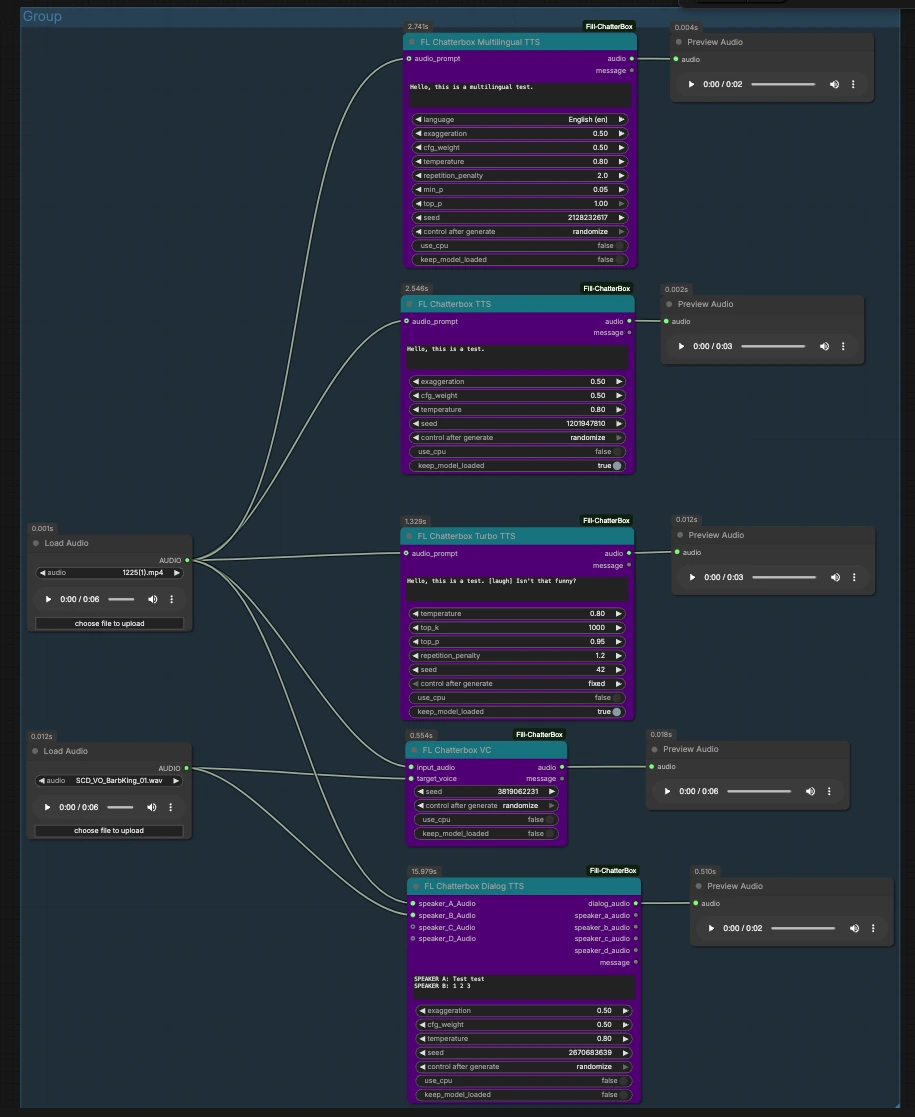
This graph is organized as parallel paths that start from shared audio inputs and flow into ChatterBox nodes, each previewing its own result. Load or replace the two input clips, then trigger the path you want.
Inputs: reference and source audio#
Two LoadAudio nodes provide reusable inputs. LoadAudio (#12) feeds several paths as a style or source reference. LoadAudio (#20) serves as an alternate reference or target voice. You can point these to short, clean clips that represent the speaking style or the identity you want to emulate. Both accept common audio files and can also extract audio from video.
Standard TTS with optional style reference#
FL_ChatterboxTTS (#16) generates speech from your script and can optionally take audio_prompt from LoadAudio (#12) to capture voice and delivery. Enter your text, connect a suitable reference if you want voice similarity, and queue the node. Use the attached PreviewAudio to audition. Fix the seed when you need reproducible takes, or randomize to explore variations.
Turbo TTS for rapid iteration#
FL_ChatterboxTurboTTS (#15) focuses on fast synthesis for quick drafts and interactive editing. It accepts an audio_prompt from LoadAudio (#20) if you want to nudge tone or identity. Keep scripts concise when moving fast, and experiment with markup like the example’s “[laugh]” to test nonverbal cues. Preview the output, then switch to standard or multilingual TTS if you want richer delivery.
Multilingual narration#
FL_ChatterboxMultilingualTTS (#25) renders your script in the selected language and can borrow style from audio_prompt on LoadAudio (#12). Choose the language label (for example, English (en) as shown in the graph) and provide text in that language. A short reference clip helps maintain a consistent accent or persona across languages. Listen in PreviewAudio and iterate on phrasing for clarity.
Voice conversion#
FL_ChatterboxVC (#19) converts the timbre of an input_audio line from LoadAudio (#12) into the target_voice from LoadAudio (#20). This is ideal when you already have a timing-perfect read and just want it spoken by another voice. Trim silence and keep the target voice clean to reduce artifacts. Use the preview to confirm content is preserved while the identity changes.
Two‑speaker dialog synthesis#
FL_ChatterboxDialogTTS (#23) turns a multi-line script into a single dialog_audio track. Provide optional speaker_A_Audio and speaker_B_Audio from the two LoadAudio nodes to anchor each character’s voice. In the script box, prefix lines with speaker tags like “SPEAKER A:” and “SPEAKER B:” to assign turns, as demonstrated in the graph. You can extend to speakers C and D by adding reference clips to their inputs.
Preview and compare#
Each path fans out to its own PreviewAudio so you can listen immediately and compare modes. Run one path at a time or queue several to audition differences between standard, Turbo, multilingual, conversion, and dialog outputs within the same ChatterBox TTS ComfyUI session.
Key nodes in Comfyui ChatterBox TTS ComfyUI workflow#
FL_ChatterboxTTS (#16)#
General-purpose TTS that accepts a script and an optional audio_prompt reference to imitate style. Use it when quality and controllability matter most. Keep the same reference clip across takes for consistent identity, and lock the seed when you need exact reproducibility.
FL_ChatterboxTurboTTS (#15)#
Fast TTS for drafting lines, iterating on prompts, or previewing markup ideas. It also accepts audio_prompt for voice steering. If you notice thinner prosody compared with the standard path, finalize with FL_ChatterboxTTS using the same script and reference.
FL_ChatterboxMultilingualTTS (#25)#
Language-aware TTS that preserves a chosen persona while switching languages. Pick the language label and provide text in that language. A matching audio_prompt keeps accent and energy aligned with your reference voice.
FL_ChatterboxVC (#19)#
Voice conversion that maps an input_audio performance to a target_voice. Use a clean, representative target clip and a well-paced source read. For best results, trim long silences and avoid heavy background noise in either clip.
FL_ChatterboxDialogTTS (#23)#
Multi-speaker TTS that parses tagged lines into a single conversation. Assign references for each character input you plan to use, then structure the script with clear “SPEAKER X:” tags. Keep turns reasonably short for natural pacing and easier timing edits later.
Optional extras#
- Keep reference clips short, clean, and expressive; room tone and noise reduce voice fidelity.
- Use a fixed seed when you need to match timing and delivery across revisions; randomize to explore alternatives.
- If a path sounds too loud or clipped, normalize your references and reduce input gain before synthesis.
- Turbo is great for prompt exploration; re-run promising lines with standard or multilingual TTS for final polish.
- Dialog scripts are easier to maintain if you place one utterance per line and consistently tag speakers.
- Add a
SaveAudionode after any preview if you want to export files directly from the canvas.
ChatterBox TTS ComfyUI gives you a flexible, single-graph playground to try voices, languages, and dialog without context switching, all backed by ComfyUI_Fill-ChatterBox and Resemble AI Chatterbox.
Acknowledgements#
This workflow implements and builds upon the following works and resources. We gratefully acknowledge filliptm for ComfyUI_Fill-ChatterBox, and Resemble AI for Chatterbox, for their contributions and maintenance. For authoritative details, please refer to the original documentation and repositories linked below.
Resources#
- filliptm/ComfyUI_Fill-ChatterBox
- GitHub: filliptm/ComfyUI_Fill-ChatterBox
- resemble-ai/chatterbox
- GitHub: resemble-ai/chatterbox
Note: Use of the referenced models, datasets, and code is subject to the respective licenses and terms provided by their authors and maintainers.