

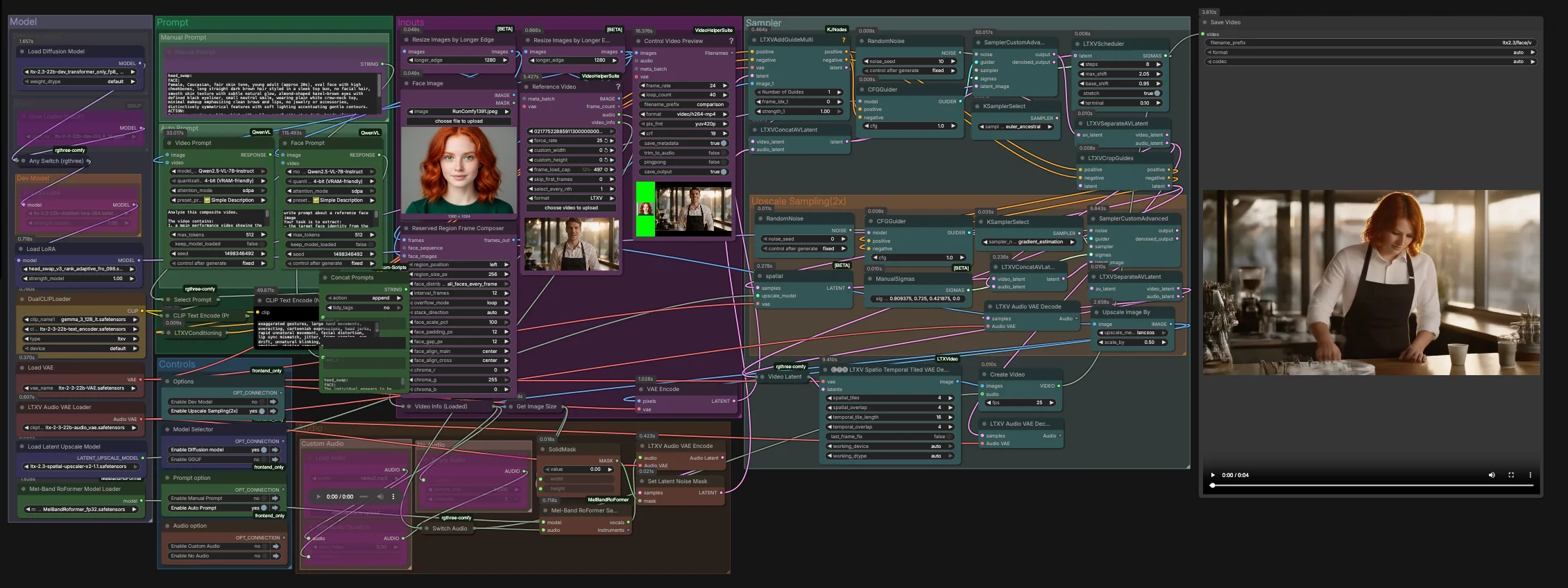
LTX-2.3-Video-Face-Swap for ComfyUI#
This workflow delivers high‑fidelity, temporally stable video face replacement using the LTX 2.3 family. Built for RunComfy and ComfyUI, it fuses an identity guide image with a target video and optional audio guidance to preserve expressions, lighting, and motion across frames. The result is a realistic, flicker‑resistant swap that holds up in close‑ups and medium shots.
Creators, VFX artists, and AI filmmakers can use LTX-2.3-Video-Face-Swap to keep full creative control: prompt manually or generate structured prompts from the inputs, pick between dev, distilled, FP8, or GGUF variants, and finish with a spatio‑temporal decode and optional 2x latent upscaling for crisp details.
Key models in Comfyui LTX-2.3-Video-Face-Swap workflow#
- LTX 2.3 22B Video Diffusion Transformer. Core video generation and editing model that drives identity preservation and temporal coherence. See the official model family at Lightricks/LTX-2.3.
- LTX 2.3 Text Encoders. The graph pairs the LTX 2.3 text encoder with a Gemma 3 12B instruct encoder to improve prompt alignment for video editing. Example artifacts: ltx-2-3-22b-text_encoder.safetensors and gemma_3_12B_it.safetensors.
- LTX 2.3 VAE and Audio VAE. Encoders/decoders used to compress and reconstruct visual frames and audio tracks while preserving detail and sync. See Lightricks/LTX-2.3 VAE files and audio VAE variants in the split repository vantagewithai/LTX-2.3-Split.
- LTX 2.3 Spatial Upscaler x2. Latent‑space 2x upscaler that raises spatial fidelity before final decoding, ideal for face details. ltx-2.3-spatial-upscaler-x2-1.1.safetensors.
- Head‑swap LoRA. A rank‑adaptive LoRA specialized for identity transfer that improves likeness and stability when driving the edit. Example: head_swap_v3_rank_adaptive_fro_098.safetensors.
- MelBandRoFormer. Optional music source separation model used here to isolate vocals for stronger mouth‑motion guidance. Kijai/MelBandRoFormer_comfy.
- Optional deployment variants. FP8 transformer‑only weights for speed on supported GPUs Kijai/LTX2.3_comfy and lightweight UNet GGUF builds for CPU or low‑VRAM scenarios vantagewithai/LTX-2.3-GGUF.
How to use Comfyui LTX-2.3-Video-Face-Swap workflow#
This graph runs in two stages. Stage one performs the core swap at the native latent resolution with audio‑aware guidance. Stage two upsamples in latent space and refines the face region before a spatio‑temporal decode and final mux to video.
Inputs#
- Load your identity image in
Face Image(LoadImage(#255)). Use a well‑lit, frontal or three‑quarter shot for the most reliable identity extraction. - Load the target footage in
Reference Video(VHS_LoadVideo(#393)). The frames are normalized and previewed viaResizeImagesByLongerEdgeandControl Video Preview(VHS_VideoCombine(#396)) for quick checks before sampling. - The
ReservedRegionFrameComposer(#395) prepares guide frames that align the face image to the scene layout, helping the model focus on the swap area during conditioning.
Prompt#
- You can describe the desired look and action manually in
Manual Promptor let the graph auto‑compose a structured prompt.Video Prompt(AILab_QwenVL(#400)) extracts the body movement and scene from the video whileFace Prompt(AILab_QwenVL(#401)) extracts identity details from the face image. Concat Promptsmerges identity and action into one concise instruction, thenSelect Promptroutes either your manual text or the auto prompt toCLIP Text Encode. Negative prompt text is encoded separately to suppress common video artifacts.
Model#
- The
Modelgroup loads the LTX 2.3 UNet or its GGUF variant, applies the distilled LoRA and the head‑swap LoRA, and brings up the LTX VAEs and dual text encoders. The two‑encoder setup improves alignment for spoken content and camera blocking without over‑constraining identity. - If you are optimizing for speed or memory, switch between dev, distilled, FP8 transformer‑only, or GGUF in the provided model selector. No extra setup is needed in RunComfy.
Sampler#
- Stage one combines video and audio latents in
LTXVConcatAVLatent(#321), then denoises withCFGGuider(#326),LTXVScheduler(#324), andSamplerCustomAdvanced(#257). TheLTXVAddGuideMulti(#392) injects your identity guide so the face is established early and remains stable over time. - After a first pass,
LTXVSeparateAVLatent(#323) splits streams soLTXVCropGuides(#282) can focus the edit around the face. This concentrates compute where it matters and improves temporal consistency.
Upscale Sampling (2x)#
LTXVLatentUpsampler(#279) applies the LTX 2.3 x2 spatial upscaler in latent space. The upsampled video latent is then re‑joined with the audio latent inLTXVConcatAVLatent(#287) and refined by a secondSamplerCustomAdvanced(#288) pass guided byCFGGuider(#284).- This two‑stage strategy yields sharper skin, eyes, and hair while keeping the swap locked to the intended identity.
Audio#
- The
Audiogroup lets you route original audio, silence, or a trimmed segment viaSwitch Audio. For stronger lip‑motion cues, the selected track is sent throughMelBandRoFormerSampler(#355) to isolate vocals, then encoded withLTXVAudioVAEEncode(#364). - A solid noise mask (
SetLatentNoiseMask(#365)) prevents unintended audio‑driven changes outside the mouth region while still leveraging speech timing to guide expressions.
Decode and export#
- Final frames are reconstructed with
LTXVSpatioTemporalTiledVAEDecode(#377), which decodes with time‑aware tiling to avoid seams and maintain motion continuity.CreateVideo(#292) muxes the images with your chosen audio, andSaveVideowrites the finished clip.
Key nodes in Comfyui LTX-2.3-Video-Face-Swap workflow#
LTXVAddGuideMulti(#392). Feeds the aligned face guide into the conditioning stream so the model locks onto the target identity from the first steps. If the likeness drifts in fast motion, increase the number or frequency of guide frames rather than raising guidance globally.LTXVCropGuides(#282). Automatically focuses the second pass on the facial region derived from stage‑one latents and prompts. Use it to tighten the edit area when backgrounds or hands compete for attention.SamplerCustomAdvanced(#257). Primary denoise pass that establishes identity, lighting, and coarse motion. Pair it with theLTXVSchedulerfor step shaping and keep the sampler choice stable across experiments to make comparisons meaningful.LTXVLatentUpsampler(#279). Performs a 2x latent upscale using the LTX spatial upscaler before refinement. Use this when you need crisper pores, eyelashes, and hat seams without introducing flicker from post‑decode pixel upscalers.SamplerCustomAdvanced(#288). Refinement pass after upscaling. Adjust guidance moderately here to sharpen features while preserving the identity set by the first pass.LTXVSpatioTemporalTiledVAEDecode(#377). Time‑aware decoder that reduces tile seams across frames. If you hit VRAM limits on long clips, prefer adjusting its tile layout rather than lowering resolution.MelBandRoFormerSampler(#355). Vocal separation used only for guidance. If the source audio is noisy, switch to original or silent audio to avoid propagating artifacts into mouth motion.
Optional extras#
- Face image quality matters. Use a neutral, well‑lit, front‑facing or slight three‑quarter photo at a similar age and expression to the performance.
- Keep the reference video steady. Static or tripod shots produce the most stable LTX-2.3-Video-Face-Swap results, especially in medium and close shots.
- Prompts should be concise. State the scene and action in a single paragraph and reserve identity adjectives for the face prompt, not the action prompt.
- Audio guidance is optional. Clear speech improves mouth shapes; music‑only tracks provide little benefit, so pick silence to focus compute on visuals.
- For low VRAM or CPU‑only runs, prefer the GGUF UNet build; for high throughput on modern GPUs, FP8 transformer‑only weights are a good default.
- Use responsibly. Obtain consent for any likeness you swap and comply with applicable laws and platform policies.
Acknowledgements#
This workflow implements and builds upon the following works and resources. We gratefully acknowledge LTX-2.3 for the LTX-2.3 model, and EyeForAILabs for the YouTube tutorial, for their contributions and maintenance. For authoritative details, please refer to the original documentation and repositories linked below.
Resources#
- LTX-2.3/LTX-2.3 Model
- Hugging Face: Hugging Face Model
- EyeForAILabs/YouTube Tutorial
- Docs / Release Notes: EyeForAILabs YouTube Tutorial
Note: Use of the referenced models, datasets, and code is subject to the respective licenses and terms provided by their authors and maintainers.