Wan Dancer: image-and-music to rhythm‑synced dance video in ComfyUI#
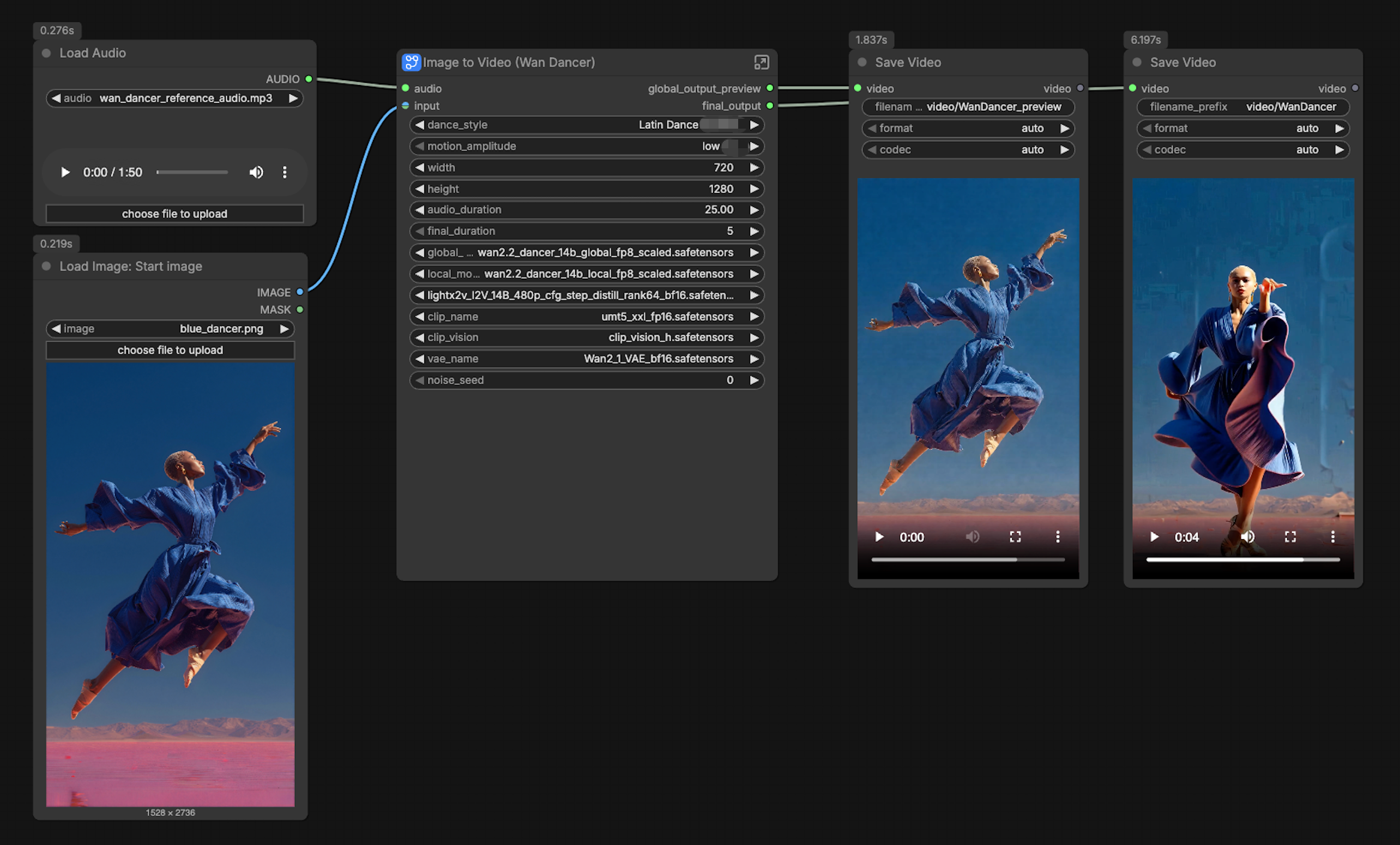
This Wan Dancer workflow turns a single reference image and a music track into a short, rhythm‑synchronized dance video. It is designed for creators who want direct image‑and‑audio control over choreography, with simple switches for dance style and motion amplitude. The pipeline runs a global planning pass to draft whole‑body movement and timing, then a local refinement pass that sharpens details and smooths motion before rendering the final video.
Because Wan Dancer produces a complete sequence in one go, it is ideal for concepting dance‑performance shots, quick character animation studies, and music‑driven social clips. You provide a clean character image, pick a style, set amplitude, and Wan Dancer aligns motion to the audio while preserving identity.
Key models in Comfyui Wan Dancer workflow#
- Wan-Dancer-14B (Global model). Plans long‑range choreography and body coordination from image and audio, producing a coherent motion blueprint. See the official model card at Wan-AI/Wan-Dancer-14B and the Comfy‑ready weights at Comfy-Org/Wan-Dancer.
- Wan-Dancer-14B (Local model). Refines and interpolates frame‑level motion to add precision in limbs, hands, and head movement while staying faithful to the global plan. Weights are provided alongside the global model in Comfy-Org/Wan-Dancer.
- UMT5‑XXL text encoder. Interprets short textual prompts that describe the dance style and appearance cues; packaged for ComfyUI in Comfy-Org/Wan_2.1_ComfyUI_repackaged.
- CLIP Vision H encoder. Extracts robust visual features from the reference image to preserve identity and clothing; provided in the same Comfy‑ready pack: clip_vision_h.safetensors.
- Wan 2.1 VAE. Handles latent encode/decode for video frames with stable color and contrast; a Comfy‑tested build is available in Kijai/WanVideo_comfy.
- Optional LightX2V Lightning LoRA for I2V. A lightweight adapter that can accelerate and crispen motion synthesis when enabled, packaged at Kijai/WanVideo_comfy.
How to use Comfyui Wan Dancer workflow#
At a high level, the graph runs two coordinated passes. Global Generation drafts the choreography and produces a quick video preview. Local Generation then pads keyframes, re‑aligns to the audio, and refines details for the final output. You control the look and motion through compact prompt selectors, plus a small set of video and duration choices.
Video Settings#
This group defines output width, height, and sequence length for both passes. Dimensions are automatically adjusted to hardware‑friendly multiples, so you can focus on aspect ratio and resolution. Longer clips and larger frames consume more VRAM, so use this panel to balance speed and quality. These settings feed directly into the global WanDancerVideo (#647) and the local WanDancerVideo (#668).
Prompt#
Here you choose a dance style and a motion amplitude. The style selector writes a short phrase into the global and local text prompts, while the amplitude selector modulates how energetic the body movement should be. The template ships with styles like Chinese Classic Dance, K‑Pop, Street Dance, Latin Dance, and Tap Dance, and you can append your own. The original prompt strings are in Chinese; feel free to localize or enrich them to suit your project.
Trim Audio#
Use this group to shorten a long music file for previews or to match a specific final clip duration. The audio is trimmed once and passed to both global and local stages, keeping beat timing consistent. If you change the final duration, the downstream keyframe padding and local pass will adapt automatically. For quick iteration, shorten the audio, verify motion, then restore the length for the final render.
Common Models#
This group loads shared assets: the UMT5‑XXL text encoder, CLIP Vision H, and the Wan 2.1 VAE. They provide prompt understanding, identity features from your image, and stable decode of frames. No user action is typically needed here unless you swap encoders or a different VAE build.
Global Model#
Loads the Wan‑Dancer‑14B global weights. In this pass, the workflow encodes your reference image and trimmed audio, applies the global choreography model, and produces a motion‑only preview video. This stage is fast and great for validating style and amplitude before committing to refinement.
Global Generation#
This block converts the reference image and audio into a coherent draft of the dance. The encoder nodes extract text and visual features, WanDancerEncodeAudio (#651) turns music into rhythm cues, and WanDancerVideo (#647) synthesizes the full sequence. A scheduler and sampler then denoise the latent to images, and a video node assembles a preview. If the draft feels off‑beat or too static, adjust amplitude or try a different style and re‑preview.
Switch#
A small control section toggles whether to run the model through the Lightning LoRA path or the original weights. Leave Lightning on for faster iteration and switch it off when you need the most faithful reproduction to the base Wan Dancer checkpoint. Additional switches gate which step count and guidance value the sampler should use, letting you trade speed for quality per stage.
Sampler#
Defines the denoiser and noise schedule used to turn latent plans into frames. The configuration is shared between the global and local passes for consistent look. Advanced users can experiment with samplers, but the provided setting is a solid default for Wan Dancer video. If you see flicker, a slightly stronger guidance coupled with a steadier sampler can help.
Local Model#
Loads the Wan‑Dancer‑14B local weights and, when enabled, applies the same Lightning LoRA to this refinement path. This model focuses on interpolation and fine details like hands, hair, and subtle torso motion while preserving the identity traits encoded from your image. Keep this stage enabled for final renders.
Local Generation (interpolating)#
The local pass starts by padding keyframes from the global preview to cover the full timeline. WanDancerEncodeAudio (#669) re‑encodes the music for the local frame count, and WanDancerVideo (#668) produces higher‑fidelity motion aligned to the audio. The refined latents are decoded to frames, then rebatch and assemble into the final video with synchronized sound. Use this output to judge realism, hand motion, and overall polish.
Sampling#
This supporting group ties together the scheduler, guider, and sampler used in the local refinement. It ensures the local pass inherits consistent timing and resolution from earlier groups while letting you push quality where it matters. If you change duration or resolution upstream, this sampler path will adapt without breaking alignment.
Key nodes in Comfyui Wan Dancer workflow#
Custom Combo (Dance Style) (#695)#
Selects the dance category that gets inserted into both the global and local text prompts. Choose a style that matches your track’s genre for best results, or add your own entries to the list. If the motion looks mismatched to the beat, try a style with clearer rhythmic accents before adjusting other controls.
Custom Combo (Motion Amplitude) (#694)#
Controls how energetic the choreography should be. Lower values keep motion contained for gentle music; higher values increase travel and limb velocity for energetic tracks. If you notice identity drift or artifacts in extreme poses, reduce amplitude one step and re‑preview.
WanDancerEncodeAudio (#651)#
Encodes the trimmed music into rhythm and intensity features for the global pass. This drives beat alignment inside WanDancerVideo (#647). For very soft intros or long fades, consider trimming to the section with a clear beat to help the encoder lock on quickly.
WanDancerVideo (#647)#
Synthesizes the global choreography from text, image, and audio features at the chosen resolution and sequence length. Treat this as a motion planner: verify timing, style, and general pose dynamics here before moving on. If the preview is too chroma‑noisy, keep going; color fidelity is solidified in the local pass.
WanDancerPadKeyframesList (#670)#
Builds a timeline of keyframes from the global output and aligns them to the chosen duration. This ensures the local pass sees both visual anchors and the correct audio segment. If you extend duration, this node fills gaps smoothly so the local model can interpolate cleanly.
WanDancerEncodeAudio (#669)#
Re‑encodes audio for the local frame budget after keyframe padding. This keeps the refined motion phase‑locked to the music. When changing clip length, always run this node so the local model hears the correct segment.
WanDancerVideo (#668)#
Generates the refined, high‑fidelity motion conditioned on keyframes, image features, and re‑encoded audio. Use it to resolve hands, hair, clothing ripples, and subtle head turns while maintaining identity. If small jitters appear, try a steadier sampler or a touch more guidance in your denoiser.
Switch(Model) (#644)#
Toggles between the base Wan Dancer weights and the Lightning LoRA‑augmented path. Keep it enabled for fast drafts; disable for maximum adherence to the base checkpoint. For delicate material like flowing sleeves or long hair, the base path can preserve micro‑details better.
TrimAudioDuration (#494)#
Shortens the input track for previews or to enforce a target length. It is the quickest way to iterate on style and amplitude without increasing VRAM usage. After you like the motion, restore the full section and render the final.
Optional extras#
- Wan Dancer processes many frames per pass and benefits from a strong GPU. For lighter hardware, reduce resolution or shorten duration during previews.
- Use a clean, well‑lit portrait or full‑body reference with minimal occlusion; busy backgrounds can confuse identity features.
- Match dance style to the track’s groove before raising motion amplitude; style choice has the biggest impact on believable movement.
- Fix the noise seed to reproduce results across runs; change it when exploring alternative choreographies from the same inputs.
- Two outputs are saved: a motion‑only global preview and the final audio‑synchronized render. Review the preview first to save time.
Acknowledgements#
This workflow implements and builds upon the following works and resources. We gratefully acknowledge Comfy-Org for the Official ComfyUI Wan Dancer workflow guide, Wan-AI for the Wan-Dancer-14B official model, and Comfy-Org for the Wan Dancer model files for their contributions and maintenance. For authoritative details, please refer to the original documentation and repositories linked below.
Resources#
- Comfy-Org/Official ComfyUI Wan Dancer workflow guide
- GitHub: Comfy-Org/docs
- Hugging Face: Comfy-Org/Wan-Dancer
- Docs / Release Notes: Official ComfyUI Wan Dancer workflow guide
- Wan-AI/Wan-Dancer-14B official model
- GitHub: Wan-Video/Wan-Dancer
- Hugging Face: Wan-AI/Wan-Dancer-14B
- arXiv: 2607.09581
- Comfy-Org/Wan Dancer model files
- Hugging Face: Comfy-Org/Wan-Dancer
Note: Use of the referenced models, datasets, and code is subject to the respective licenses and terms provided by their authors and maintainers.