

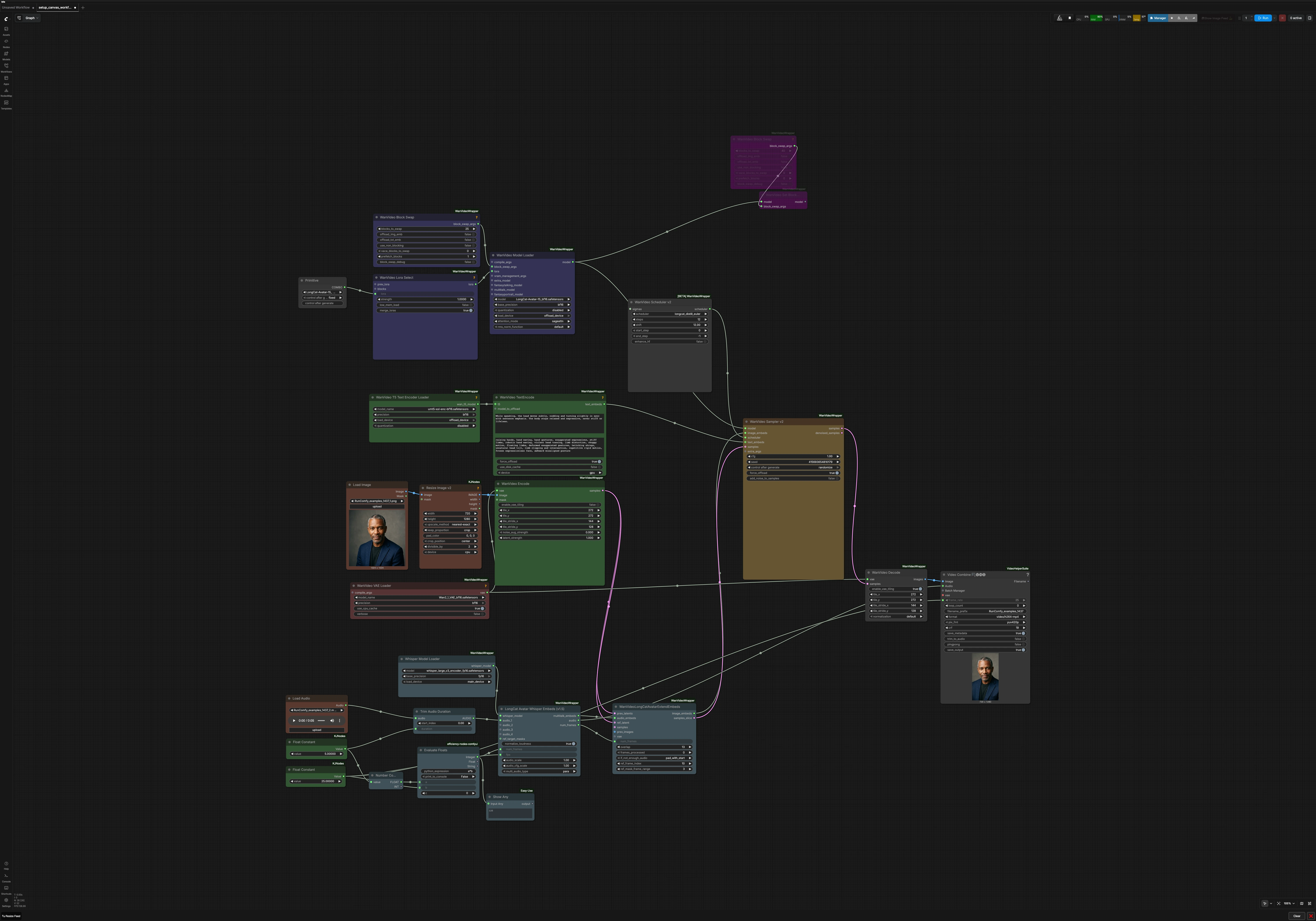
LongCat Video Avatar 1.5 Single Character ComfyUI#
This workflow turns a single reference image and a voice track into a lip‑synced vertical talking avatar. Built around LongCat-Avatar-15 and the WanVideoWrapper custom nodes, it uses Whisper to extract speech cues, Wan 2.1 VAE for latent encode/decode, and a distilled LongCat LoRA to preserve identity. The result is an MP4 portrait video that keeps character look and mouth motion in sync.
Designed as the single‑character path, the LongCat Video Avatar 1.5 Single Character ComfyUI workflow is ideal for creators who want a RunComfy‑ready template with clear inputs and a reproducible output. You provide one face image and one audio clip, tune a few style prompts, and render a consistent avatar video without extra wiring.
Key models in Comfyui LongCat Video Avatar 1.5 Single Character ComfyUI workflow#
- LongCat-Avatar-15 (distilled) and LongCat Avatar LoRA: identity‑preserving video generation weights adapted for ComfyUI. Provided in the community pack so the avatar holds appearance while speaking. Model files
- Wan 2.1 VAE: video‑oriented variational autoencoder used for encoding the reference frame to latents and decoding final frames back to images. Included with the same community pack. Model files
- OpenAI Whisper large v3: speech representation that drives mouth shapes and timing for accurate lip sync. Model card
- Google UMT5‑XXL text encoder: converts positive/negative prompts into conditioning for motion and pose nuance. Model card
How to use Comfyui LongCat Video Avatar 1.5 Single Character ComfyUI workflow#
The graph follows a clear path from inputs to video: load assets, compute audio embeddings, prepare text guidance, encode the look, sample frames, then mux audio and save.
Reference image#
Load a single, front‑facing portrait into LoadImage (#26). The image is normalized by ImageResizeKJv2 (#25) to a vertical 9:16 canvas so the character fills the frame without distortion. Use a clean, evenly lit face with minimal occlusions for best identity retention. If your source is wider than tall, center‑crop around the head and shoulders.
Voice audio#
Drop an audio file into LoadAudio (#5). If needed, clip it with TrimAudioDuration (#29) so the final video length matches your target. The small math utility (Evaluate Floats (#39)) multiplies your chosen seconds by frames‑per‑second to set total frame count automatically. A quick way to control duration is to adjust seconds or FPS before rendering.
Speech embeddings (lip sync)#
LongCatAvatarWhisperEmbeds (#3) runs Whisper to produce MultiTalk embeddings that encode phonemes, pauses, and emphasis. These embeddings are the timing backbone for mouth shapes and subtle head motion. Make sure the total frames and FPS here match your export settings to prevent drift. Optionally enable loudness normalization when your recording varies in level.
Text guidance#
LoadWanVideoT5TextEncoder (#16) and WanVideoTextEncode (#15) turn your positive and negative prompts into conditioning. Use the positive prompt to describe natural behavior you want (calm head turns, subtle nods) and keep the negative prompt for artifacts to avoid (rigid motion, deformed hands). Text guidance nudges motion style without changing the character’s identity.
Encode the look#
WanVideoVAELoader (#19) and WanVideoEncode (#24) convert your portrait into latents. WanVideoLongCatAvatarExtendEmbeds (#6) then fuses the reference latent with the audio embeddings so identity is stable across frames while the mouth follows speech. If the audio is shorter than the clip, the node can pad or loop intelligently so timing stays smooth.
Load the avatar model#
WanVideoLoraSelect (#27) attaches the distilled LongCat Avatar LoRA to the base LongCat‑Avatar‑15 model, all loaded by WanVideoModelLoader (#8). This pairing preserves facial traits while enabling expressive talking motion. Internal block‑swap helpers keep VRAM use predictable on shared or modest GPUs.
Sample frames#
WanVideoSchedulerv2 (#52) picks a solver schedule tuned for LongCat distill, and WanVideoSamplerv2 (#51) generates the latent video. Set a seed for reproducible results and adjust guidance strength if you need more or less adherence to prompts. The sampler takes image, text, and audio‑driven image‑embeds together so mouth, head, and identity cohere.
Decode and save MP4#
WanVideoDecode (#20) turns the final latents back into images. VHS_VideoCombine (#14) merges frames and audio into an H.264 MP4 with the specified frame rate and filename prefix. The output is a ready‑to‑share vertical talking‑avatar clip that keeps lip sync and style intact.
Key nodes in Comfyui LongCat Video Avatar 1.5 Single Character ComfyUI workflow#
LongCatAvatarWhisperEmbeds (#3)#
Creates MultiTalk audio embeddings from Whisper that drive lip sync and micro‑timing. Keep fps and num_frames aligned with your export to avoid desync. When recordings vary in level, enable loudness normalization. This node comes from the WanVideoWrapper LongCat integration. Repo
WanVideoLongCatAvatarExtendEmbeds (#6)#
Fuses the reference latent and audio embeddings into frame‑aware image‑embeds. If your speech is shorter than the target length, choose how to pad or loop so motion remains natural. Overlap and reference‑frame settings help maintain identity stability between slices on longer clips. Repo
WanVideoModelLoader (#8)#
Loads the LongCat‑Avatar‑15 base with the selected LongCat Avatar LoRA for identity fidelity. Use it with the included VRAM management and block‑swap options when running on constrained hardware. Swap to a different LongCat variant or LoRA here to change style without rewiring. Repo
WanVideoSamplerv2 (#51)#
The main generator that synthesizes frames from model, scheduler, text, and image‑embeds. Tune the classifier‑free guidance if you need tighter prompt adherence or looser motion. Fix the seed to lock reproducibility across multiple renders. Repo
ImageResizeKJv2 (#25)#
Prepares a portrait‑oriented canvas so the avatar fills a 9:16 frame. Keep aspect‑correct crops around the face and shoulders for reliable identity encoding. Matching the encoder/decoder’s divisibility avoids edge artifacts.
VHS_VideoCombine (#14)#
Muxes frames and audio into a single MP4 with your chosen frame rate and filename prefix. Enable metadata saving for easier iteration tracking. This node is part of VideoHelperSuite. Repo
Optional extras#
- Use a neutral, forward‑facing photo with clear eyes and mouth; avoid heavy occlusions and extreme angles.
- Clean the audio (remove long silences, reduce background noise) for steadier mouth motion.
- Keep FPS consistent between the whisper‑embedding stage and the final export to maintain tight lip sync.
- For stronger identity preservation, stick with the provided LongCat Avatar LoRA; swap LoRAs only when you intend a style change. Model files
- Set a fixed seed when you need identical rerenders or A/B test only a single prompt change.
- On lower VRAM, enable block‑swap in the model loader to trade some speed for stability.
Acknowledgements#
This workflow implements and builds upon the following works and resources. We gratefully acknowledge RunningHub for the workflow source, Meigen AI for LongCat Video Avatar 1.5, and Kijai for the LongCat-Video_comfy model files and the ComfyUI-WanVideoWrapper for their contributions and maintenance. For authoritative details, please refer to the original documentation and repositories linked below.
Resources#
- RunningHub/Workflow source
- Docs / Release Notes: RunningHub workflow source
- Meigen AI/LongCat Video Avatar 1.5 project page
- Docs / Release Notes: LongCat Video Avatar 1.5 project page
- Kijai/LongCat Video Comfy model files
- Hugging Face: Kijai/LongCat-Video_comfy
- Kijai/ComfyUI-WanVideoWrapper
- GitHub: kijai/ComfyUI-WanVideoWrapper
Note: Use of the referenced models, datasets, and code is subject to the respective licenses and terms provided by their authors and maintainers.