

Controllable Animation in AI Video: WanVideo + TTM Motion Control Workflow for ComfyUI#
This workflow by mickmumpitz brings Controllable Animation in AI Video to ComfyUI using a training‑free, motion‑guided approach. It combines WanVideo’s image‑to‑video diffusion with Time‑to‑Move (TTM) latent guidance and region‑aware masks so you can direct how subjects move while preserving identity, texture, and scene continuity.
You can start from a video plate or from two keyframes, add region masks that focus the motion where you want it, and drive trajectories without any fine‑tuning. The result is precise, repeatable Controllable Animation in AI Video suitable for directed shots, object motion sequencing, and custom creative edits.
Key models in Comfyui Controllable Animation in AI Video workflow#
- Wan2.2 I2V A14B (HIGH/LOW). The core image‑to‑video diffusion model that synthesizes motion and temporal coherence from prompts and visual references. Two variants balance fidelity (HIGH) and agility (LOW) for different motion intensities. Model files are hosted in the community WanVideo collections on Hugging Face, e.g. Kijai’s WanVideo distributions. Links: Kijai/WanVideo_comfy_fp8_scaled, Kijai/WanVideo_comfy
- Lightx2v I2V LoRA. A lightweight adapter that tightens structure and motion consistency when composing Controllable Animation in AI Video with Wan2.2. It helps retain subject geometry under stronger motion cues. Link: Kijai/WanVideo_comfy – Lightx2v LoRA
- Wan2.1 VAE. The video autoencoder used to encode frames to latents and decode the sampler’s outputs back to images without sacrificing detail. Link: Kijai/WanVideo_comfy – Wan2_1_VAE_bf16.safetensors
- UMT5‑XXL text encoder. Provides rich text embeddings for prompt‑driven control alongside motion cues. Links: google/umt5-xxl, Kijai/WanVideo_comfy – encoder weights
- Segment Anything models for video masks. SAM3 and SAM2 create and propagate region masks across frames, enabling region‑dependent guidance that sharpens Controllable Animation in AI Video where it matters. Links: facebook/sam3, facebook/sam2
- Qwen‑Image‑Edit 2509 (optional). An image edit foundation and a lightning LoRA for quick start/end frame cleanup or object removal before animation. Links: QuantStack/Qwen‑Image‑Edit‑2509‑GGUF, lightx2v/Qwen‑Image‑Lightning, Comfy‑Org/Qwen‑Image_ComfyUI
- Time‑to‑Move (TTM) guidance. The workflow integrates TTM latents to inject trajectory control in a training‑free way for Controllable Animation in AI Video. Link: time‑to‑move/TTM
How to use Comfyui Controllable Animation in AI Video workflow#
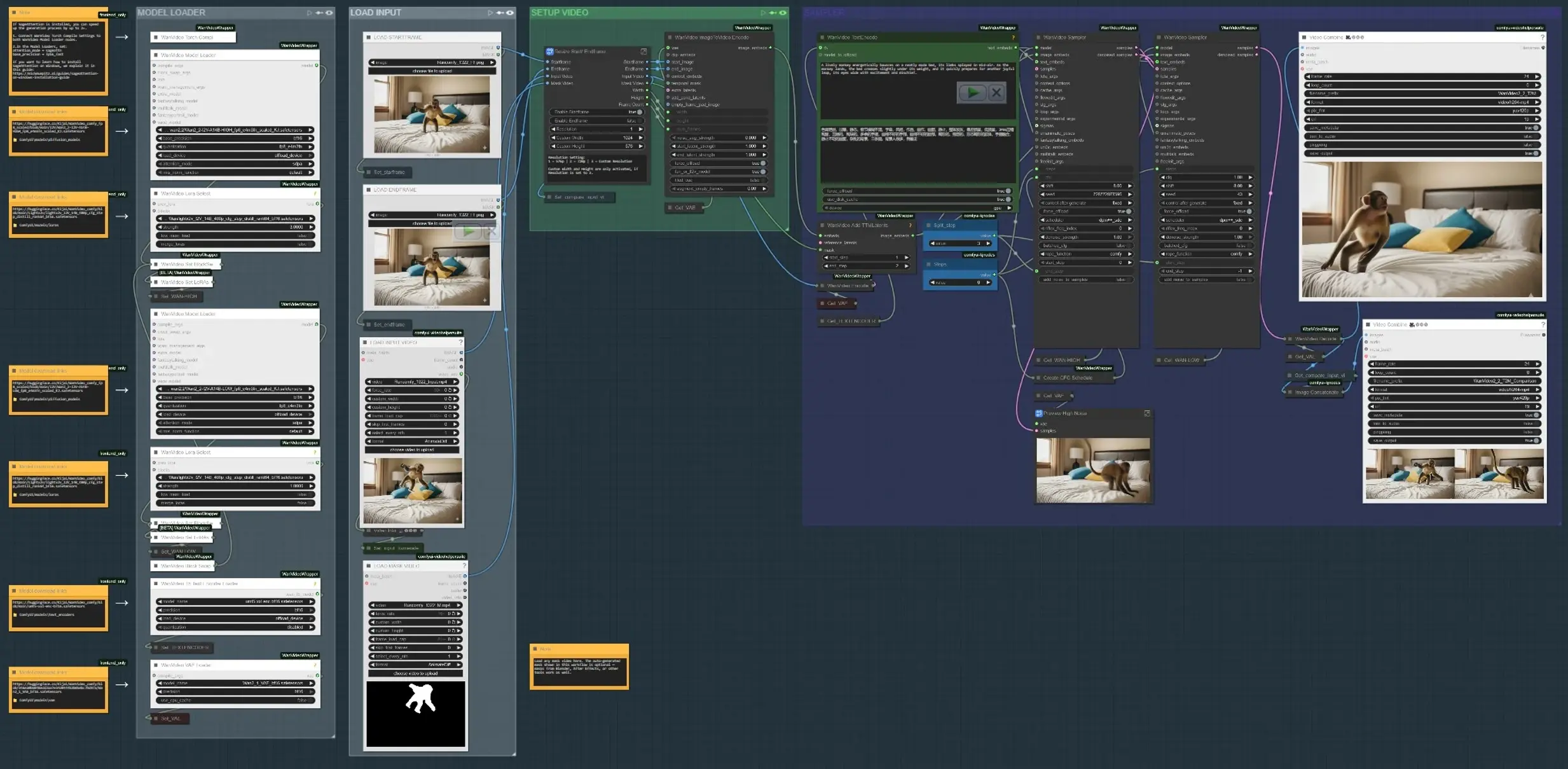
The workflow runs in four main phases: load inputs, define where motion should happen, encode text and motion cues, then synthesize and preview the result. Each group below maps to a labeled section in the graph.
- LOAD INPUT Use the “LOAD INPUT VIDEO” group to bring in a plate or reference clip, or load start and end keyframes if you are building motion between two states. The “Resize Start/Endframe” subgraph normalizes dimensions and optionally enables startframe and endframe gating. A side‑by‑side comparator builds an output that shows input versus result for quick review (
VHS_VideoCombine(#613)). - MODEL LOADER The “MODEL LOADER” group sets up Wan2.2 I2V (HIGH/LOW) and applies the Lightx2v LoRA. A block‑swap path blends variants for a good fidelity‑motion trade‑off before sampling. The Wan VAE is loaded once and shared across encode/decode. Text encoding uses UMT5‑XXL for strong prompt conditioning in Controllable Animation in AI Video.
- SAM3/SAM2 MASK SUBJECT In “SAM3 MASK SUBJECT” or “SAM2 MASK SUBJECT”, click a reference frame, add positive and negative points, and propagate masks across the clip. This yields temporally consistent masks that limit motion edits to the subject or region you choose, enabling region‑dependent guidance. You can also bypass and load your own mask video; masks from Blender/After Effects work fine when you want artist‑drawn control.
- STARTFRAME/ENDFRAME PREP (optional) The “STARTFRAME – QWEN REMOVE” and “ENDFRAME – QWEN REMOVE” groups provide an optional cleanup pass on specific frames using Qwen‑Image‑Edit. Use them to remove rigging, sticks, or plate artifacts that would otherwise pollute motion cues. Inpainting crops and stitches the edit back into full‑frame for a clean base.
- TEXT + MOTION ENCODE Prompts are encoded with UMT5‑XXL in
WanVideoTextEncode(#605). Startframe/endframe images are transformed into video latents inWanVideoImageToVideoEncode(#89). TTM motion latents and an optional temporal mask are merged viaWanVideoAddTTMLatents(#104) so the sampler receives both semantic (text) and trajectory cues, central to Controllable Animation in AI Video. - SAMPLER AND PREVIEW The Wan sampler (
WanVideoSampler(#27) andWanVideoSampler(#90)) denoises latents using a dual‑clock setup: one path governs global dynamics while the other preserves local appearance. Steps and a configurable CFG schedule shape motion intensity versus fidelity. The result decodes to frames and is saved as a video; a comparison output helps judge whether your Controllable Animation in AI Video matches the brief.
Key nodes in Comfyui Controllable Animation in AI Video workflow#
WanVideoImageToVideoEncode(#89) Encodes startframe/endframe imagery into video latents that seed motion synthesis. Adjust only when changing base resolution or frame count; keep these aligned with your input to avoid stretching. If you use a mask video, ensure its dimensions match the encoded latent size.WanVideoAddTTMLatents(#104) Fuses TTM motion latents and temporal masks into the control stream. Toggle the mask input to constrain motion to your subject; leaving it empty applies motion globally. Use this when you want trajectory‑specific Controllable Animation in AI Video without affecting the background.SAM3VideoSegmentation(#687) Collect a few positive and negative points, pick a track frame, then propagate across the clip. Use the visualization output to validate mask drift before sampling. For privacy‑sensitive or offline workflows, switch to the SAM2 group which does not require model gating.WanVideoSampler(#27) The denoiser that balances motion and identity. Couple “Steps” with the CFG schedule list to push or relax motion strength; excessive strength can overtake appearance, while too little underdelivers motion. When masks are active, the sampler concentrates updates within the region, improving stability for Controllable Animation in AI Video.
Optional extras#
- For fast iterations, start with the LOW Wan2.2 model, dial in motion with TTM, then swap to HIGH for the final pass to recover texture.
- Use artist‑drawn mask videos for complex silhouettes; the loader accepts external masks and will resize them to match.
- The “startframe/endframe” switches let you lock the first or last frame visually, useful for seamless hand‑offs in longer edits.
- If available in your environment, enabling optimized attention (e.g., SageAttention) can significantly speed up sampling.
- Match the output frame rate to the source in the combine node to avoid perceived timing differences in Controllable Animation in AI Video.
This workflow delivers training‑free, region‑aware motion control by combining text prompts, TTM latents, and robust segmentation. With a few targeted inputs, you can direct nuanced, production‑ready Controllable Animation in AI Video while keeping subjects on‑model and scenes coherent.
Acknowledgements#
This workflow implements and builds upon the following works and resources. We gratefully acknowledge Mickmumpitz who is the creator of Controllable Animation in AI Video for the tutorial/post, and the time-to-move team for TTM for their contributions and maintenance. For authoritative details, please refer to the original documentation and repositories linked below.
Resources#
- Patreon/Controllable Animation in AI Video
- Docs / Release Notes: Mickmumpitz Patreon post
- time-to-move/TTM
- GitHub: time-to-move/TTM
Note: Use of the referenced models, datasets, and code is subject to the respective licenses and terms provided by their authors and maintainers.