

SkyReels V3 ComfyUI: identity‑faithful image, video, and audio to video creation#
SkyReels V3 ComfyUI is a production‑ready workflow that brings the SkyReels V3 multimodal video model into ComfyUI so you can animate still images, extend existing shots, and build audio‑driven talking avatars with precise lip‑sync. It is designed for creators who want cinematic motion, strong subject identity, and temporal coherence while staying inside a flexible node graph.
The workflow ships with four focused pipelines that can be run independently or chained: image to video character animation, video to video continuation, audio to video talking avatars, and next‑shot generation for story flow. Each path includes clear input points and sensible defaults so you can drop in your assets and render high‑quality SkyReels V3 outputs quickly.
Note for 2X Large and larger machines (R2V workflow): Set
Patch Sage Attention KJ(#240)sage_attentiontodisabledbefore running. Leaving it enabled can triggerSM90 kernel is not availableerrors.
Key models in Comfyui SkyReels V3 ComfyUI workflow#
- SkyReels V3 video backbones (R2V, V2V Shot, A2V) from the WanVideo FP8 pack. These are the core generators that handle identity‑aware motion, video continuation, and audio‑conditioned lip‑sync. See the SkyReels V3 weights in the WanVideo pack on Hugging Face here.
- OpenCLIP Vision ViT models for image guidance and reference embedding. They provide robust visual features that help preserve look and style across frames. Project page: open_clip.
- UMT5 text encoder for prompt understanding. It supplies rich language conditioning to steer style, scene, and actions. Repo: umt5.
- Wav2Vec2 speech features for lip‑sync and audio analysis. The Chinese base variant is supported out of the box and similar English variants work as well. Model card: TencentGameMate/chinese-wav2vec2-base.
- Qwen3‑ASR‑1.7B for speech‑to‑text. Used to transcribe reference audio and bootstrap voice‑cloned TTS prompts. Model card: Qwen/Qwen3-ASR-1.7B.
- MelBandRoFormer for vocal separation. Helpful when you need clean speech tracks before lip‑sync embedding. Model card: Kijai/MelBandRoFormer_comfy.
- MiniCPM‑V for shot‑aware prompt generation. It analyzes prior footage and proposes the next shot for story continuity. Model hub: OpenBMB/MiniCPM-V.
How to use Comfyui SkyReels V3 ComfyUI workflow#
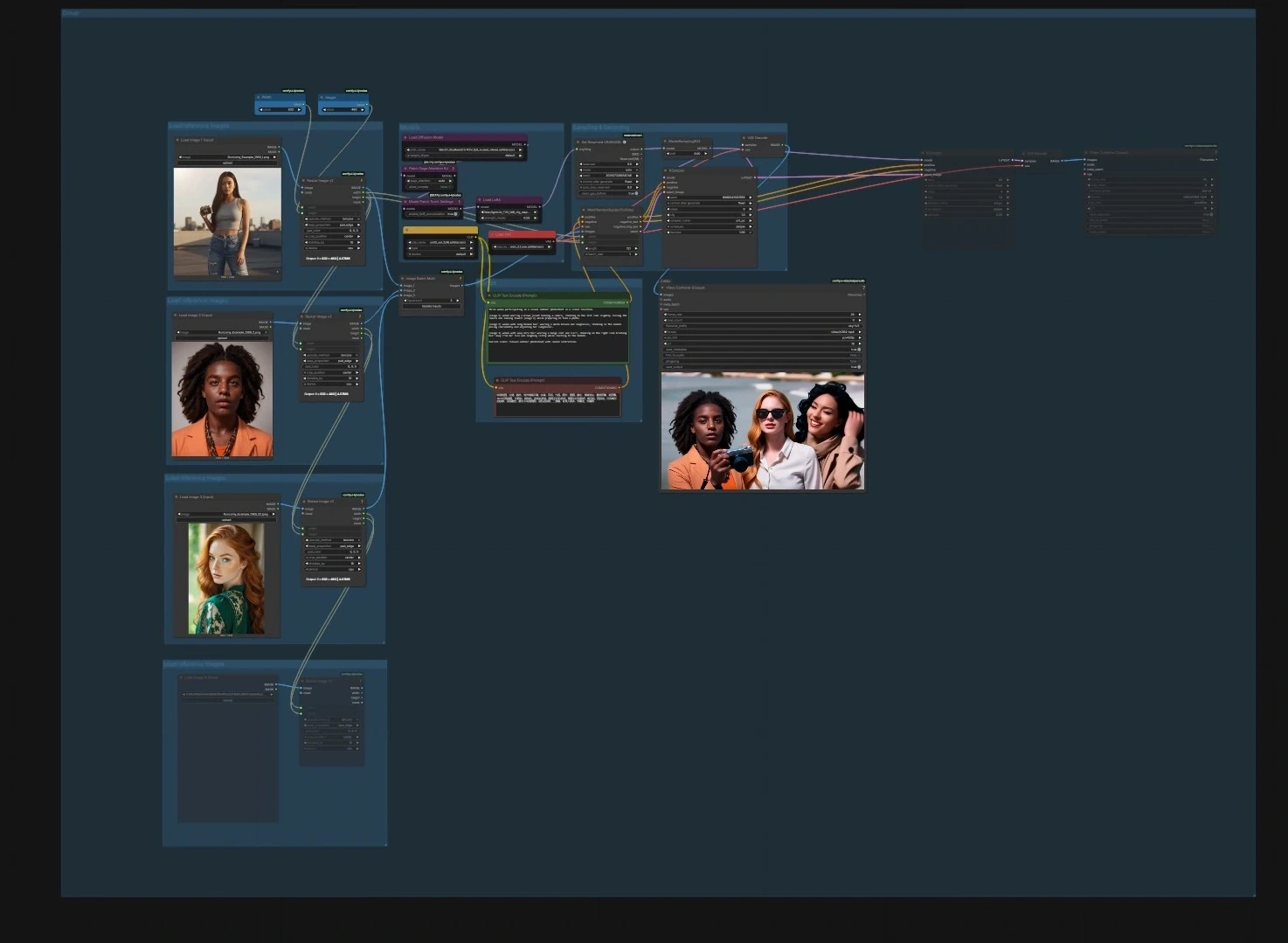
The graph is organized into four pipelines. You can run any one on its own or in sequence to build longer edits.
Image to Video character animation#
- Models. Load the UNet, CLIP, and VAE in the Models group using
UNETLoader(#241),CLIPLoader(#242), andVAELoader(#194). The model patch nodesPathchSageAttentionKJ(#240) andModelPatchTorchSettings(#239) optimize attention and math settings, whileLoraLoaderModelOnly(#250) lets you optionally blend a style or motion LoRA into the SkyReels model. - Load reference images. Use the three “Load reference images” groups to import 1–3 portraits or poses. The resize helpers
ImageResizeKJv2(#291, #298, #299, #304) align aspect ratio and batch them; cleaner identity photos yield more stable results. - Prompt. Enter scene and action text in the Prompt group with
CLIPTextEncode(#6) and an optional negative text encoderCLIPTextEncode(#7) to nudge away undesired traits. Keep language concise and specific to motion and framing. - Sampling and decoding.
WanPhantomSubjectToVideo(#249) fuses your references and prompts into an identity‑aware latent that feedsKSampler(#149) throughModelSamplingSD3(#48). The decoded frames fromVAEDecode(#264) are packaged into a movie withVHS_VideoCombine(#280); set your target frame rate and file format there.
Video to Video extend loop#
- Input video and settings. Bring in your source clip with
VHS_LoadVideo(#329). Set how many extra segments to generate and how much overlap between segments using the integer helpers “Number of Extend” (#342) and “Overlapping Frames” (#341).ImageResizeKJv2(#327) standardizes resolution for the sampler. - Loop sampling extend video. The loop pair
easy forLoopStart(#331) andeasy forLoopEnd(#332) walks over the clip in windows to stabilize transitions. Each window is encoded withWanVideoEncode(#326), receives neutral or control embeds viaWanVideoEmptyEmbeds(#328), and is denoised byWanVideoSampler(#320) fromWanVideoModelLoader(#319). Frames are decoded withWanVideoDecode(#321) and previewed or saved withVHS_VideoCombine(#322, #335). - Performance helpers.
WanVideoTorchCompileSettings(#323) andWanVideoBlockSwap(#325) enable compile and memory tricks for longer or higher‑resolution runs.
Audio to Video talking avatar#
- 1 – Create audio. You can generate a voice‑cloned speech track with
FB_Qwen3TTSVoiceClonePrompt(#416) andFB_Qwen3TTSVoiceClone(#412), or load any pre‑recorded voice withLoadAudio(#417).Qwen3ASRLoader(#414) plusQwen3ASRTranscribe(#413) help you extract text from a reference clip to seed the TTS prompt if desired. - 2 – Audio features.
DownloadAndLoadWav2VecModel(#348) feedsMultiTalkWav2VecEmbeds(#350) to create lip‑motion embeddings from your speech; length is aligned to the audio and previewable withPreviewAudio(#422). UseAny Switch (rgthree)(#435) to pick TTS output or your imported file as the driving track. - 3 – Input image. Load the talking face in the “3 - Input image” group and size it with
ImageResizeKJv2(#370). Clean, front‑facing portraits with consistent lighting work best. - Reference video gen. First, create a short visual anchor from the still using
WanVideoImageToVideoEncode(#392). CLIP‑Vision features fromCLIPVisionLoader(#352) andWanVideoClipVisionEncode(#351) stabilize identity across the next stage; a schedulerWanVideoSchedulerv2(#385) is prepared in the Sampling Setting group. - Generate audio lip‑sync.
WanVideoImageToVideoSkyreelsv3_audio(#383) combines the start image, optional reference frames, and CLIP‑Vision embeds into image conditioning.WanVideoSamplerv2(#384) then denoises with the SkyReels A2V model whileWanVideoSamplerExtraArgs(#386) injects theMultiTalklip‑sync embeddings for accurate mouth shapes.WanVideoPassImagesFromSamples(#381) streams decoded frames toVHS_VideoCombine(#346) where the final video is muxed with your audio.
Video to Video next‑shot generation#
- Video frames preprocess. Import the previous shot with
VHS_LoadVideo(#443) and resize it viaImageResizeKJv2(#441).GetImageRangeFromBatch(#445) selects a context slice thatWanVideoEncode(#440) turns into latents;WanVideoEmptyEmbeds(#442) prepares the conditioning window. - Auto video prompt.
CreateVideo(#450) assembles a compact proxy clip from the context frames whichAILab_MiniCPM_V_Advanced(#449) analyzes to draft a next‑shot prompt. Inspect or refine the draft inShowText|pysssss(#447) and embed it withWanVideoTextEncodeCached(#444) before sampling. - Models and sampling. Load the V2V Shot model with
WanVideoModelLoader(#436) andWanVideoVAELoader(#438); optionalWanVideoBlockSwap(#439) handles VRAM. TheWanVideoSampler(#451) generates the continuation,WanVideoDecode(#437) renders frames, andVHS_VideoCombine(#446) outputs the final shot. This SkyReels V3 ComfyUI path is ideal for storyboards and previz where each new cut should respect the last one.
Key nodes in Comfyui SkyReels V3 ComfyUI workflow#
WanPhantomSubjectToVideo(#249). Builds an identity‑aware latent from your batched reference images plus text cues, which then drives the sampler. Adjust the number and diversity of references to balance likeness lock versus creative motion; keep the resize nodes feeding it consistent to avoid drift. Reference: WanVideo Wrapper on GitHub contains implementation notes and expected inputs ComfyUI‑WanVideoWrapper.WanVideoImageToVideoEncode(#392). Encodes a still into a stable shot seed and optionally blends CLIP‑Vision guidance for pose and framing. Use it to create anchor frames before the audio‑driven stage so identity and camera setup remain consistent across pipelines. Wrapper docs: ComfyUI‑WanVideoWrapper.WanVideoImageToVideoSkyreelsv3_audio(#383). Prepares image embeds tailored for the A2V sampler and merges optional reference video frames. Ensure its width and height match the sampler path; pair it withWanVideoSamplerv2andMultiTalkWav2VecEmbedsfor precise lip‑sync.WanVideoSamplerv2(#384, #387). The main denoiser for SkyReels V3 that accepts image and text embeds plus scheduler settings. TheWanVideoSamplerExtraArgsnodes (#386, #409) are where lip‑sync, loop, or context features are injected; keep these connected when switching between A2V and I2V models. Implementation details: ComfyUI‑WanVideoWrapper.MultiTalkWav2VecEmbeds(#350). Converts speech into temporally aligned embeddings that drive mouth motion. Matching the intended frame budget and ensuring clean vocals significantly improves phoneme accuracy. Wav2Vec reference model: TencentGameMate/chinese-wav2vec2-base.AILab_MiniCPM_V_Advanced(#449). Analyzes the previous shot and drafts a structured prompt for character, background, action, mood, and lighting. Use this to keep narrative continuity when using the V2V next‑shot path; the resulting text flows intoWanVideoTextEncodeCached. Model family: OpenBMB/MiniCPM-V.
Optional extras#
- Keep image, video, and sampler resolutions consistent across connected nodes to avoid aspect warps and identity flicker.
- For longer extensions, increase window overlap in the V2V extend loop to smooth transitions between segments.
- If GPU memory is tight, leave the Reserved VRAM nodes (
ReservedVRAMSetter(#312, #448)) enabled and use the compile settings blocks before sampling. - When talking avatars drift off‑beat, prioritize clean speech or separate vocals with MelBandRoFormer before creating
MultiTalkembeddings. - Final delivery settings such as frame rate, pix format, and CRF are controlled in the
VHS_VideoCombineoutput nodes; match frame rate to your source for seamless edits.
This README covers the complete SkyReels V3 ComfyUI graph so you can choose the path that fits your project, combine them when needed, and render consistent, story‑ready video with minimal trial and error.
Acknowledgements#
This workflow implements and builds upon the following works and resources. We gratefully acknowledge @Benji’s AI Playground and SkyReels for the SkyReels V3 ComfyUI workflow for their contributions and maintenance. For authoritative details, please refer to the original documentation and repositories linked below.
Resources#
- SkyReels/V3 ComfyUI Source
- Docs / Release Notes: SkyReels V3 ComfyUI Source from @Benji’s AI Playground
Note: Use of the referenced models, datasets, and code is subject to the respective licenses and terms provided by their authors and maintainers.