One to All Animation: long‑form, pose‑aligned character video in ComfyUI#
This One to All Animation workflow turns a short reference clip into extended, high‑fidelity video while keeping motion, pose alignment, and character identity consistent across the entire sequence. Built around Wan 2.1 video generation with whole‑body pose guidance and a sliding‑window extender, it is ideal for dance, performance capture, and narrative shots where you want a single look to follow complex movement.
If you are a creator who needs stable, pose‑driven outputs without jitter or identity drift, One to All Animation gives you a clear path: extract poses from your source video, fuse them with a reference image and mask, generate the first chunk, then extend that chunk repeatedly until the full length is covered.
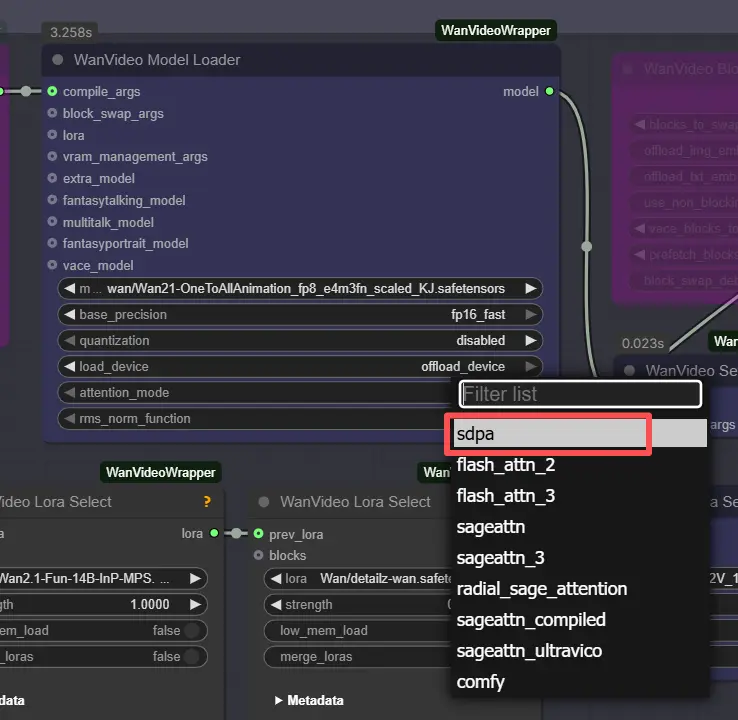
Note: On 2XL or 3XL machines, please set the attention_mode to "sdpa" in the WanVideo Model Loader node. The default segeattn backend may cause compatibility issues on high-end GPUs.
Key models in Comfyui One to All Animation workflow#
- Wan 2.1 OneToAllAnimation (video generation). The main diffusion model used for high‑quality motion and identity retention. Example weights: Wan21‑OneToAllAnimation fp8 scaled by Kijai. Model card
- UMT5‑XXL text encoder. Encodes prompts for Wan video generation. Model card
- ViTPose Whole‑Body (pose estimation). Produces dense skeletal keypoints that drive pose fidelity. See the ViTPose paper and whole‑body ONNX weights. Paper • Weights
- YOLOv10m detector (person/region detection). Speeds up robust pose extraction by focusing the estimator on the subject. Paper • Weights
- Optional ViTPose‑H alternative. Higher‑capacity whole‑body model for challenging motion. Weights and data file
- Optional LoRA packs for style/control. Example LoRAs used in this graph include Wan2.1‑Fun‑InP‑MPS, detailz‑wan, and lightx2v T2V; they refine texture, detail, or in‑place control without retraining.
How to use Comfyui One to All Animation workflow#
Overall flow
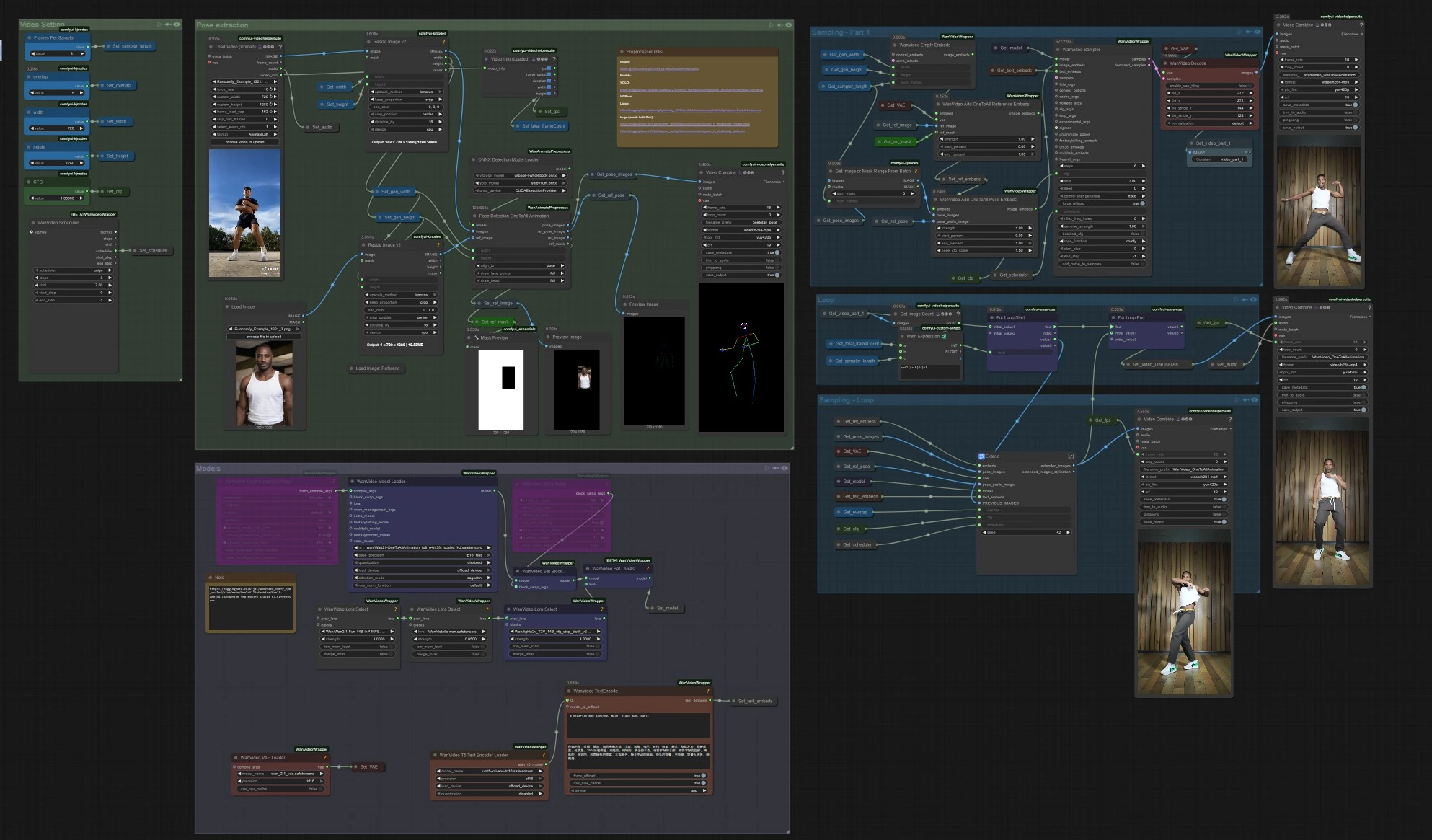
- The workflow reads your reference motion video, extracts whole‑body poses, prepares One to All Animation embeddings that fuse pose and a character reference, generates an initial clip, then repeatedly extends that clip with overlap until the entire duration is covered. Finally, it merges audio and exports a complete video.
Pose extraction
- Load your motion source in
VHS_LoadVideo(#454). Frames are resized withImageResizeKJv2(#131) to match the generation aspect ratio for stable sampling. OnnxDetectionModelLoader(#128) loads YOLOv10m and ViTPose whole‑body;PoseDetectionOneToAllAnimation(#141) then outputs a per‑frame pose map, a reference pose image, and a clean reference mask.- Use
PreviewImage(#145) to quickly inspect that poses track the subject. Clear, high‑contrast footage with minimal motion blur yields the best One to All Animation results.
Models
WanVideoModelLoader(#22) loads Wan 2.1 OneToAllAnimation weights;WanVideoVAELoader(#38) provides the paired VAE. If desired, stack style/control LoRAs viaWanVideoLoraSelect(#452, #451, #56) and apply them withWanVideoSetLoRAs(#80).- Text prompts are encoded by
WanVideoTextEncode(#16). Write a concise, identity‑focused positive prompt and a strong cleanup negative to keep the character on model.
Video setting
- Width and height are set in the “Video Setting” group and propagated to pose extraction and generation so everything stays aligned.
Note: ⚠️ Resolution Limit : This workflow is fixed to 720×1280 (720p). Using any other resolution will cause dimension mismatch errors unless the workflow is manually reconfigured.
WanVideoScheduler(#231) and theCFGcontrol select the noise schedule and prompt strength. Higher CFG adheres more to the prompt; lower values track pose a bit more loosely but can reduce artifacts.VHS_VideoInfoLoaded(#440) reads the source clip’s fps and frame count, which the loop uses to determine how many One to All Animation windows are needed.
Sampling – Part 1
WanVideoEmptyEmbeds(#99) creates a container for conditioning at the target size.WanVideoAddOneToAllReferenceEmbeds(#105) injects your reference image and itsref_maskto lock identity and preserve or ignore areas like background or clothing.WanVideoAddOneToAllPoseEmbeds(#98) attaches the extractedpose_imagesandpose_prefix_imageso the first generated chunk follows the source motion from frame one.WanVideoSampler(#27) produces the initial latent clip, which is decoded byWanVideoDecode(#28) and optionally previewed or saved withVHS_VideoCombine(#139). This is the seed segment to be extended.
Loop
VHS_GetImageCount(#327) andMathExpression|pysssss(#332) compute how many extension passes are required based on total frames and the per‑pass length.easy forLoopStart(#329) begins the extension passes using the initial clip as the starting context.
Sampling – Loop
Extend(#263) is the heart of long‑length One to All Animation. It recomputes conditioning withWanVideoAddOneToAllExtendEmbeds(inside the subgraph) to maintain continuity from the previous latents, then samples and decodes the next window.ImageBatchExtendWithOverlap(insideExtend) blends each new window onto the accumulated video using anoverlapregion, smoothing boundaries and reducing temporal seams.easy forLoopEnd(#334) appends each extended block. The result is stored viaSet_video_OneToAllAnimation(#386) for export.
Export
VHS_VideoCombine(#344) writes the final video, using the source fps and optional audio fromVHS_LoadVideo. If you prefer a silent result, omit or mute the audio input here.
Key nodes in Comfyui One to All Animation workflow#
PoseDetectionOneToAllAnimation (#141)
- Detects the subject and estimates whole‑body keypoints that drive pose guidance. Backed by YOLOv10 and ViTPose, it is robust to fast motion and partial occlusion. If your subject drifts or multi‑person scenes confuse the detector, crop your input or switch to the higher‑capacity ViTPose‑H weights linked above.
WanVideoAddOneToAllReferenceEmbeds (#105)
- Fuses a reference image and
ref_maskinto the conditioning so identity, outfit, or protected regions remain stable across frames. Tight masks preserve faces and hair; broader masks can lock backgrounds. When changing the look, swap the reference and keep the same motion.
WanVideoAddOneToAllPoseEmbeds (#98)
- Binds pose maps and a prefix pose to the One to All Animation embeddings. For stricter choreography, increase the pose influence; for freer interpretation, reduce it slightly. Combine with LoRAs when you want consistent texture while still matching movement.
WanVideoSampler (#27)
- The main video sampler that turns embeddings and text into the initial latent clip.
cfgcontrols prompt adherence, andschedulertrades quality, speed, and stability. Use the same sampler family here and in the loop to avoid flicker.
Extend (#263)
- A compact subgraph that performs sliding‑window extension with overlap. The
overlapsetting is the key dial: more overlap blends transitions more smoothly at the cost of extra compute; less overlap is faster but can reveal seams. This node also reuses previous latents to keep scene and character coherent across windows.
VHS_VideoCombine (#344)
- Final muxing and save. Set the
frame_ratefrom the detected fps to keep motion timing faithful to your source. You can trim or loop in post, but exporting at the original cadence preserves the feel of the performance.
Optional extras#
- Install notes for preprocessors. The pose extractor nodes come from the community add‑on. See the repo for setup and ONNX placement. ComfyUI‑WanAnimatePreprocess
- Prefer ViTPose‑H for difficult motion. Swap to ViTPose‑H when hands/feet are fast or partially occluded; download both the model and its data file from the linked pages above.
- Tuning for long runs. If you hit VRAM limits, reduce the per‑pass window length or simplify LoRA stacks. Overlap can then be nudged up a little to keep transitions clean.
- Strong identity retention. Use a high‑quality, front‑facing reference, and paint a precise
ref_maskto protect face, hair, or outfit. This is critical for long One to All Animation sequences. - Clean footage helps. High shutter speed, consistent lighting, and a clear foreground subject will dramatically improve pose tracking and reduce jitter in One to All Animation outputs.
- Video utilities. The exporter and helper nodes come from Video Helper Suite. If you want additional control over codecs or previews, check the project’s docs. Video Helper Suite
Acknowledgements#
This workflow implements and builds upon the following works and resources. We gratefully acknowledge Innovate Futures @ Benji for the One to All Animation workflow tutorial and ssj9596 for the One‑to‑All Animation project for their contributions and maintenance. For authoritative details, please refer to the original documentation and repositories linked below.
Resources#
- Innovate Futures @ Benji/One to All Animation Source
- GitHub: ssj9596/One-to-All-Animation
- Hugging Face: MochunniaN1/One-to-All-1.3b_1
- arXiv: 2511.22940
- Docs / Release Notes: Patreon post
Note: Use of the referenced models, datasets, and code is subject to the respective licenses and terms provided by their authors and maintainers.