

Textured-to-PBR authoring with the CHORD Model in ComfyUI#
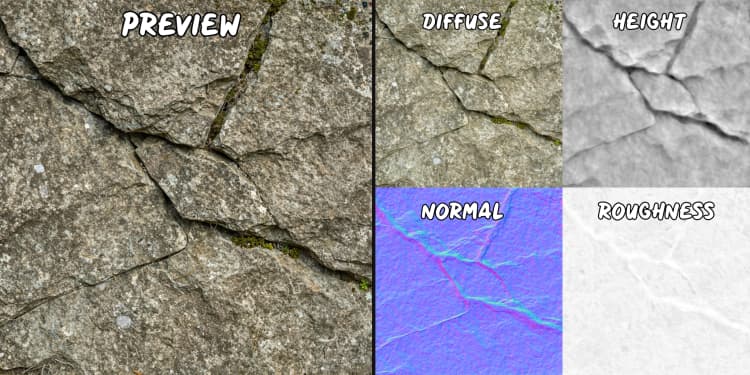
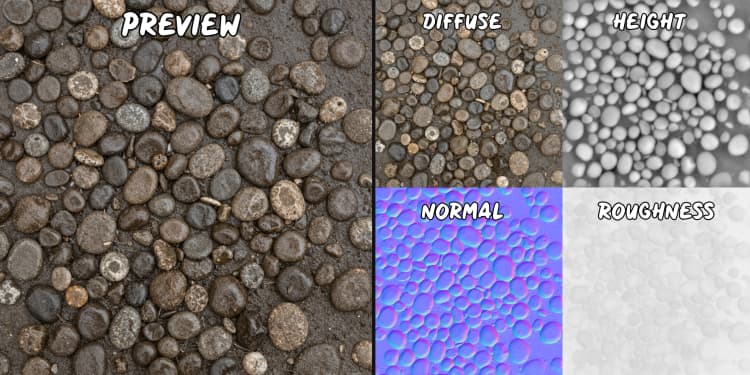
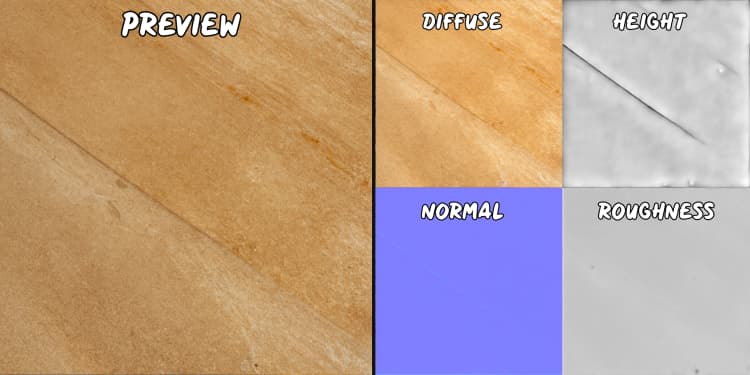
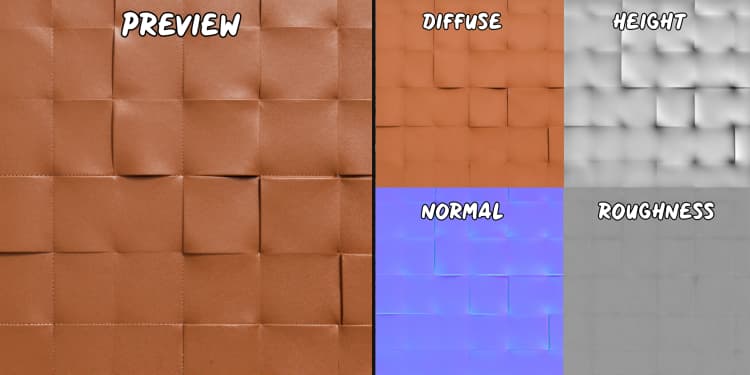
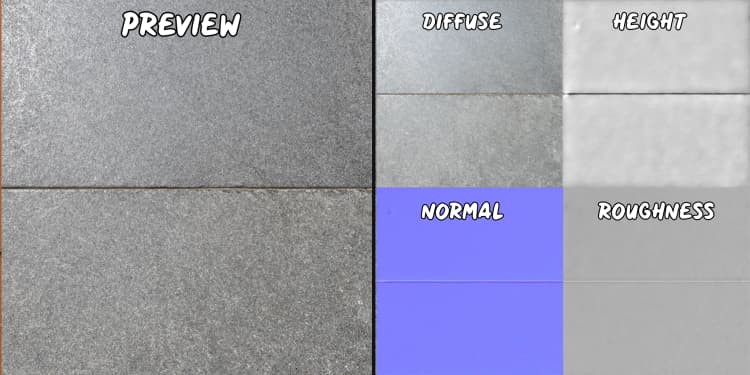
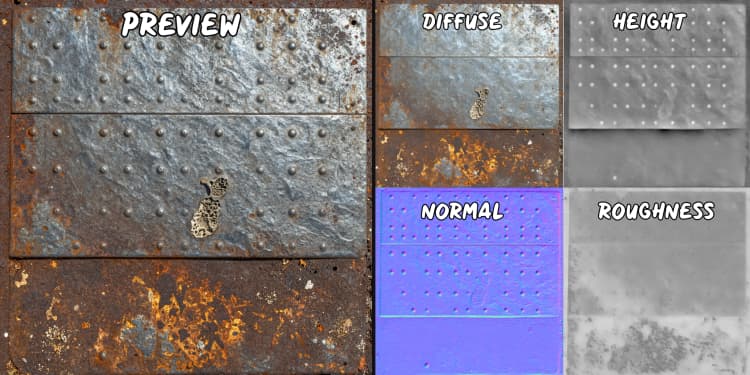
This workflow turns a short text prompt into a seamless texture, then converts that texture into full PBR material maps using the CHORD Model. Built for material artists, environment teams, and technical artists, it produces a tileable texture along with base color, normal, roughness, metalness, and an additional height map for displacement-ready assets.
The graph follows the two-stage generate and estimate idea behind the CHORD Model: first synthesize a tileable texture, then decompose it into SVBRDF channels suitable for real-time engines and DCC tools. You can also skip generation and feed any reference texture directly to the estimation stage.
Key models in Comfyui CHORD Model workflow#
- Ubisoft La Forge CHORD v1. Supervised SVBRDF estimation that predicts base color, normal, roughness, and metalness from a single texture image. Checkpoint: Ubisoft/ubisoft-laforge-chord. ComfyUI custom nodes: ubisoft/ComfyUI-Chord.
- Comfy-Org z_image_turbo UNet. Fast diffusion backbone used to synthesize the tileable texture from your prompt. Checkpoints and pack: Comfy-Org/z_image_turbo.
- Text encoder packaged with z_image_turbo (Qwen 3 4B). Encodes your prompt for the generator as a CLIP-compatible conditioning. Provided inside the same model pack as above.
- Autoencoder VAE from the z_image_turbo pack. Decodes the latent produced by the sampler into an RGB texture image. Included in Comfy-Org/z_image_turbo.
How to use Comfyui CHORD Model workflow#
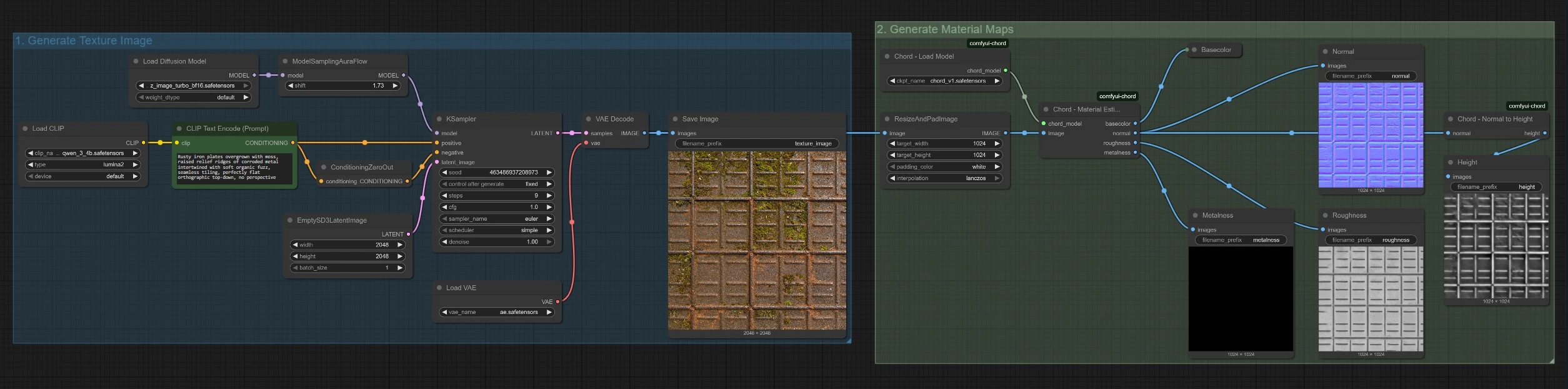
This graph is organized into two groups that can run end to end or independently. Group 1 creates a tileable texture from text. Group 2 runs the CHORD Model to estimate PBR maps from that texture or from a texture you provide.
1. Generate Texture Image#
This group turns your prompt into a seamless, flat-lit texture. The prompt is encoded by CLIPTextEncode (#4) and sent to KSampler (#7), which samples the z_image_turbo UNet with an AuraFlow scheduler set by ModelSamplingAuraFlow (#2). An empty latent from EmptySD3LatentImage (#6) defines the working resolution and batch. The decoded image from VAEDecode (#9) is saved as a reference texture and also forwarded downstream for material estimation. Write prompts that call out material identity, microstructure, and tiling intent, for example include phrases like seamless tiling and orthographic top-down.
2. Generate Material Maps#
This group loads the CHORD Model with ChordLoadModel (#12) and prepares the texture with ResizeAndPadImage (#11) to a square canvas. ChordMaterialEstimation (#20) predicts base color, normal, roughness, and metalness directly from the input texture. The graph also produces a height map by converting the predicted normal using ChordNormalToHeight (#18), which is valuable for displacement or parallax workflows. If you already have a texture, bypass Group 1 and feed it here; keep it flat-lit and free of baked shadows for best CHORD Model results.
Key nodes in Comfyui CHORD Model workflow#
CLIPTextEncode (#4)#
Encodes your text into conditioning for the texture generator. Be explicit about material class, surface qualities, and tiling intent. Terms like orthographic, seamless, grout lines, pores, fibers, or micro-scratches help the generator produce structures that the CHORD Model can decompose reliably.
KSampler (#7)#
Drives the latent diffusion process that creates the texture. Use it to trade speed for fidelity, switch samplers, and explore variations via the seed. A blank negative prompt is provided by ConditioningZeroOut (#5); add typical negatives only if you see artifacts you want to suppress.
ModelSamplingAuraFlow (#2)#
Applies an AuraFlow-style scheduling to the UNet for sharper, coherent texture synthesis with z_image_turbo. Change the scheduler here when you experiment with different sampling behaviors packed with the model.
ChordMaterialEstimation (#20)#
Runs the CHORD Model to estimate SVBRDF maps from the input texture. Results are production-ready base color, normal, roughness, and metalness. Use flat, evenly lit inputs without perspective to maximize accuracy; complex shadows or highlights can bias the decomposition.
ChordNormalToHeight (#18)#
Converts the CHORD-predicted normal into a height map suited for displacement. Treat height as a relative surface signal and calibrate intensity in your renderer to match the intended scale.
EmptySD3LatentImage (#6)#
Sets the canvas size and batch for texture synthesis. Choose a square resolution that matches your downstream material targets and keep this consistent across generations for predictable texel density.
Optional extras#
- Replace the generated texture with your own by connecting a reference image directly to
ResizeAndPadImage(#11) in Group 2. - Use physically meaningful wording in prompts so the generator produces structures the CHORD Model can interpret, for example grain direction, flake size, weave density, or oxidized patches.
- Keep source textures neutral and free of AO, highlights, or shadows to avoid baking lighting into CHORD Model outputs.
- Validate normal orientation in your engine and flip the green channel if required before judging the height map derived from it.
- Pack outputs to match engine conventions, for example metalness and roughness into combined channels, after you review the individual maps.
Acknowledgements#
This workflow implements and builds upon the following works and resources. We gratefully acknowledge Ubisoft La Forge for the CHORD (Chain of Rendering Decomposition) model, for their contributions and maintenance. For authoritative details, please refer to the original documentation and repositories linked below.
Resources#
- Ubisoft La Forge/CHORD Model
- GitHub: ubisoft/ubisoft-laforge-chord
- Hugging Face: Ubisoft/ubisoft-laforge-chord
- Docs / Release Notes: Ubisoft Open-Sources the CHORD Model and ComfyUI Nodes
Note: Use of the referenced models, datasets, and code is subject to the respective licenses and terms provided by their authors and maintainers.