

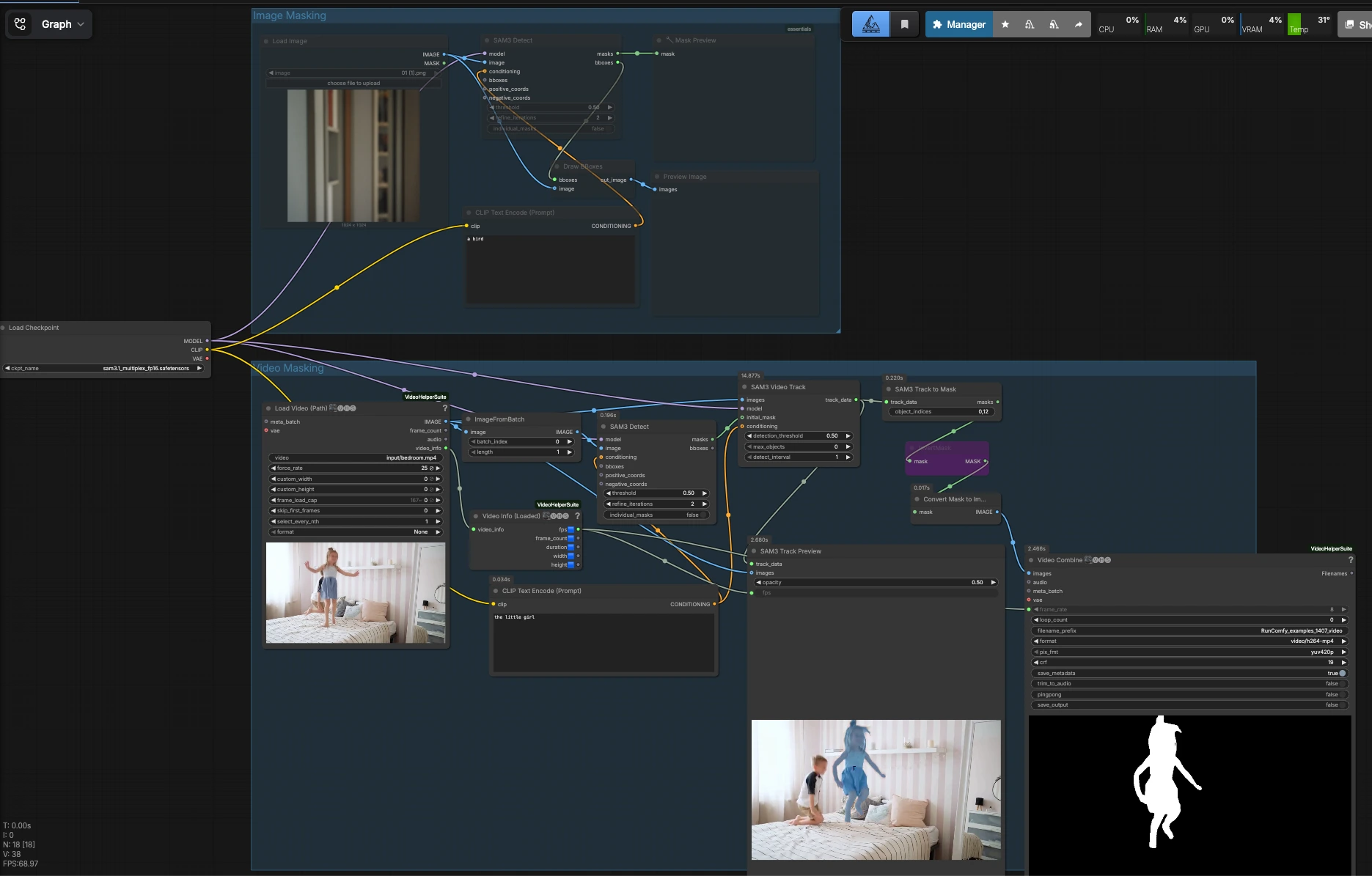
SAM 3.1 ComfyUI workflow for prompt-guided segmentation, bounding-box preview, and video tracking#
This SAM 3.1 ComfyUI workflow delivers native, promptable image segmentation with instant bounding-box visualization and frame-accurate video object tracking with mask extraction. It uses the built-in comfy-core SAM 3.1 nodes, so you get first-class performance and stability without third‑party custom nodes. The result is fast, reusable mattes for compositing, isolation, or downstream editing across still images and full videos.
Designed for artists, editors, and pipeline engineers, SAM 3.1 ComfyUI makes it easy to start with a text cue or a bounding box, validate the selection in-place, then propagate a clean mask through an entire clip. Under the hood it loads the sam3.1_multiplex_fp16 checkpoint and runs the official SAM3_Detect, SAM3_VideoTrack, SAM3_TrackToMask, and SAM3_TrackPreview nodes that were added as native support to ComfyUI. See the model files on Hugging Face and the ComfyUI pull request for background: Comfy-Org/sam3.1, ComfyUI PR #13408.
Key models in Comfyui SAM 3.1 ComfyUI workflow#
- Comfy-Org SAM 3.1 Multiplex FP16 checkpoint. The sam3.1_multiplex_fp16 weights power promptable image segmentation and the tracker used by the SAM 3.1 nodes. Load it with
CheckpointLoaderSimpleand it supplies the model and text-conditioning used throughout the workflow. Source: Comfy-Org/sam3.1.
How to use Comfyui SAM 3.1 ComfyUI workflow#
The graph has two independent lanes. Image Masking lets you segment a still image and preview bounding boxes for quick QA. Video Masking initializes a mask on a reference frame, tracks the object across the clip, previews the track, and exports masks for editing or compositing.
Image Masking#
This lane is ideal for single frames or for prototyping your prompt before you run tracking. Start by loading an image with LoadImage (#4) and writing a short text cue in CLIPTextEncode (#3), for example “a bird” or “red car”. The text conditioning and image are fed to SAM3_Detect (#1), which returns both a mask and automatic bounding boxes around the detected subject. Use MaskPreview+ (#5) to visually inspect the matte and DrawBBoxes (#6) plus PreviewImage (#7) to confirm the box placement. If the selection is ambiguous, refine the text, add positive or negative points, or provide a tighter box to steer SAM 3.1 ComfyUI toward the intended object.
Video Masking#
This lane scales the same promptable segmentation to full clips. Load a video in VHS_LoadVideoPath (#12); it provides frames and metadata to the rest of the graph. A reference frame is chosen with ImageFromBatch (#15) and described in text via CLIPTextEncode (#14). SAM3_Detect (#13) generates the initial mask on that frame, which serves as the seed for SAM3_VideoTrack (#8) to follow the object across remaining frames using the same model and text conditioning. Convert the resulting track into per-frame mattes with SAM3_TrackToMask (#9). For a quick binary preview or to invert foreground/background, the masks pass through InvertMask (#19) and MaskToImage (#16), then VHS_VideoCombine (#17) can render a simple mask video. For an interactive look at the result over the original frames, SAM3_TrackPreview (#10) plays the overlay at the source frame rate provided by VHS_VideoInfoLoaded (#18). Adjust the starting frame or prompt if you see drift, then re-run to lock the track before exporting.
Key nodes in Comfyui SAM 3.1 ComfyUI workflow#
SAM3_Detect (#1)#
Generates an object mask and bounding boxes for a still image based on your prompt and optional points or boxes. Use it to validate your subject choice quickly in SAM 3.1 ComfyUI. If the mask feels too broad or includes lookalikes, tighten the textual description or draw a more constrained box to improve separation.
SAM3_Detect (#13)#
Seeds the video tracker by producing a clean mask on a chosen reference frame. Tracking quality in SAM 3.1 ComfyUI strongly depends on this seed, so pick a frame where the target is visible and minimally occluded. If the subject changes appearance later, reinitialize from another frame and concatenate results in your editor.
SAM3_VideoTrack (#8)#
Propagates the initial mask through the clip using the same model and text cue. Keep the conditioning consistent with the seed to avoid latching onto similar objects. When tracking a small or fast-moving subject, start from a frame with a confident seed and consider shortening the segment if lighting or scale shifts dramatically.
SAM3_TrackToMask (#9)#
Converts the tracker output to a mask sequence for export. You can output all frames or select a subset by entering indices or simple ranges. This is the handoff point to either write a video preview or to save a PNG sequence for compositing in your preferred tool.
SAM3_TrackPreview (#10)#
Plays back the tracked result over the original frames for instant quality control. The preview uses the source frame rate reported by VHS_VideoInfoLoaded (#18) so timing matches your clip. Use it to spot drift, occlusion failures, or identity swaps before committing to a full export.
Optional extras#
- Use bounding boxes to disambiguate when your text prompt matches multiple subjects in frame.
- If the target changes scale or lighting mid-clip, split the video into logical segments and re-seed
SAM3_Detect(#13) per segment for steadier tracking. - For matte exports as an image sequence, route
SAM3_TrackToMask(#9) to aSaveImagenode instead ofVHS_VideoCombine(#17). - Keep prompts short and specific. In SAM 3.1 ComfyUI, concise nouns with a key attribute often outperform long prose.
- When you only need a still mask from a specific frame, run Image Masking on that frame directly to bypass tracking and save time.
Acknowledgements#
This workflow implements and builds upon the following works and resources. We gratefully acknowledge Innovate Futures @ Benji for the ComfyUI with SAM 3.1 segmentation workflow, Comfy-Org for the SAM 3.1 model files, and Comfy-Org for the Native ComfyUI SAM 3.1 support PR for their contributions and maintenance. For authoritative details, please refer to the original documentation and repositories linked below.
Resources#
- Innovate Futures @ Benji/Workflow source
- Comfy-Org/SAM 3.1 model files
- GitHub: facebookresearch/sam3
- Hugging Face: Comfy-Org/sam3.1
- arXiv: SAM 3: Segment Anything with Concepts (2511.16719)
- Docs / Release Notes: RELEASE_SAM3p1.md
- Comfy-Org/Native ComfyUI SAM 3.1 support PR
- GitHub: Comfy-Org/ComfyUI#13408
Note: Use of the referenced models, datasets, and code is subject to the respective licenses and terms provided by their authors and maintainers.